 CloudConsole
IAM policy: deny requests from outside approved IP addresses
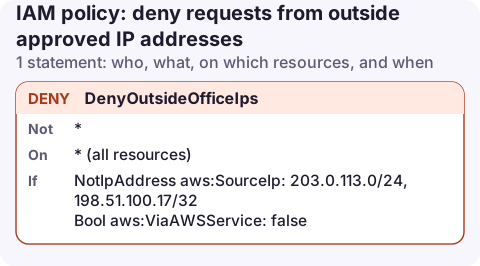
Attach a Deny on "*" with a NotIpAddress condition on aws:SourceIp listing your public ranges, plus aws:ViaAWSService false so calls AWS services make for you (CloudFormation, Athena reading S3) are not blocked. It applies to console and API calls made by that user or role.
The policy
{
  "Version": "2012-10-17",
  "Statement": [
    {
      "Sid": "DenyOutsideOfficeIps",
      "Effect": "Deny",
      "Action": "*",
      "Resource": "*",
      "Condition": {
        "NotIpAddress": {
          "aws:SourceIp": [
            "203.0.113.0/24",
            "198.51.100.17/32"
          ]
        },
        "Bool": {
          "aws:ViaAWSService": "false"
        }
      }
    }
  ]
}
This only removes access. Attach it alongside the policies that grant permissions, for example to a group or a permission set used by people.
Line by line
- Deny, Action *, Resource *: when the conditions match, nothing is allowed, whatever other policies say.
NotIpAddressonaws:SourceIp: matches when the caller's public IP is outside the listed CIDR ranges. Use your office egress and VPN ranges.aws:ViaAWSServicefalse: when a service such as CloudFormation calls another service using your credentials, the source IP is the service's, not yours. This condition stops the deny from breaking those calls; without it, stack deployments fail partway through.
Attach it
aws iam create-policy --policy-name deny-outside-office \
  --policy-document file://deny-outside-office.json

aws iam attach-group-policy --group-name engineers \
  --policy-arn arn:aws:iam::123456789012:policy/deny-outside-office
For IAM Identity Center, add the JSON as the inline policy of a permission set. To cover a whole account or organisation, the same statement can go into an SCP, though there it also affects automation, so test carefully.
What it breaks
- Workloads inside AWS. Don't attach this to roles used by Lambda, EC2 or ECS. Their requests come from AWS addresses, or through VPC endpoints where
aws:SourceIpis not present at all, so the deny matches. - Calls through VPC endpoints. If staff connect through a VPN into a VPC and use interface endpoints, write a separate condition with
aws:SourceVpceoraws:VpcSourceIp; see VPC endpoint only. - Working away from the office. Mobile data, hotel Wi-Fi and home broadband all fall outside the list. Make sure the VPN is the only way in, or have a break-glass role without the restriction.
- Signing in still works. The console sign-in page itself is not blocked; users see access denied errors on every page after sign-in.
Find your egress IPs first
Before attaching the deny, check which public addresses your team's requests really come from. CloudTrail records sourceIPAddress on every event; look at a week of console and CLI activity for the users you're about to restrict.
aws cloudtrail lookup-events \
  --lookup-attributes AttributeKey=Username,AttributeValue=alex \
  --max-results 50 --query 'Events[].CloudTrailEvent' --output text | grep -o '"sourceIPAddress":"[^"]*"' | sort | uniq -c
Variations and mistakes
- Restrict only one bucket: put the same deny in the bucket policy with
"Principal": "*"and Actions3:*. - IPv6: if clients reach AWS dual-stack endpoints, add their IPv6 ranges too, or the deny matches.
- Using
IpAddresswith an Allow instead of this Deny pattern. Any other allow (for example a managed policy) still works from anywhere. - Private ranges such as
10.0.0.0/8never appear inaws:SourceIpfor public endpoint calls.
Questions
Can I restrict AWS console access by IP address?
Yes. Attach this deny policy to the users, groups or permission sets people use; the console then refuses actions from other IPs.
Why do CloudFormation deployments fail after adding an IP restriction?
CloudFormation makes some calls from AWS addresses on your behalf. Add the aws:ViaAWSService false condition so those calls are not denied.
An IP allow-list is exactly what stops you acting from your phone during an incident. Decide in advance whether on-call staff connect through a VPN on mobile or use a separate, tightly scoped read-only role.
About the app → · Download on the App Store