 CloudConsole
IAM policy: read Parameter Store parameters under a path
Allow ssm:GetParameter, ssm:GetParameters and ssm:GetParametersByPath on arn:aws:ssm:eu-west-2:123456789012:parameter/my-app/prod and parameter/my-app/prod/*. For SecureString parameters encrypted with a customer managed key, also allow kms:Decrypt on that key.
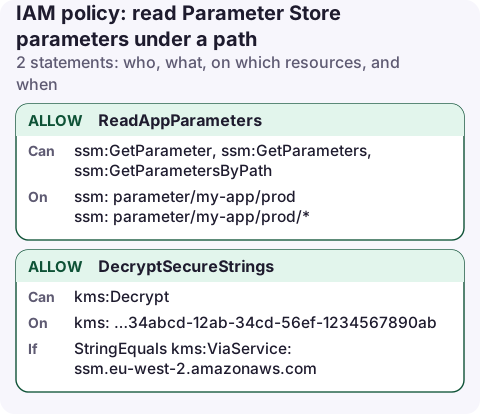
The policy
{
  "Version": "2012-10-17",
  "Statement": [
    {
      "Sid": "ReadAppParameters",
      "Effect": "Allow",
      "Action": [
        "ssm:GetParameter",
        "ssm:GetParameters",
        "ssm:GetParametersByPath"
      ],
      "Resource": [
        "arn:aws:ssm:eu-west-2:123456789012:parameter/my-app/prod",
        "arn:aws:ssm:eu-west-2:123456789012:parameter/my-app/prod/*"
      ]
    },
    {
      "Sid": "DecryptSecureStrings",
      "Effect": "Allow",
      "Action": "kms:Decrypt",
      "Resource": "arn:aws:kms:eu-west-2:123456789012:key/1234abcd-12ab-34cd-56ef-1234567890ab",
      "Condition": {
        "StringEquals": {
          "kms:ViaService": "ssm.eu-west-2.amazonaws.com"
        }
      }
    }
  ]
}
Line by line
- The ARN drops the leading slash. A parameter called
/my-app/prod/db-urlhas the ARN…:parameter/my-app/prod/db-url, notparameter//my-app/…. - Two resources:
…/my-app/prod/*covers individual parameters; the bare path covers aGetParametersByPathcall that names the path itself. GetParameters(plural) is what many config libraries and ECS secret injection use to fetch several names in one call.- DecryptSecureStrings is needed for SecureString parameters encrypted with your own key, when the caller passes
--with-decryption. Parameters using the defaultaws/ssmkey need no KMS statement.
Attach and test
aws iam put-role-policy --role-name my-app-lambda \
  --policy-name read-prod-params --policy-document file://params.json

aws ssm get-parameters-by-path --path /my-app/prod --recursive \
  --with-decryption --query 'Parameters[].Name' --profile my-app-lambda
Things to know about paths
- Access to a path is access to everything below it. The Parameter Store docs warn that with
GetParametersByPathand--recursive, a policy on/my-app/prod/*returns parameters at every depth beneath it. Put anything more sensitive under a different top-level path. - Don't share prefixes between environments:
parameter/my-app/prod*would also match/my-app/production-old. ssm:DescribeParameterslists metadata and needs"*". Only grant it to people who browse the console.
List what the role will see
Before attaching the policy, list everything under the path with an admin role, so you know exactly which values the app will be able to read, including nested levels:
aws ssm get-parameters-by-path --path /my-app/prod --recursive \
  --query 'Parameters[].[Name,Type]' --output table
Anything in that list that the app shouldn't read belongs under a different path.
Parameters are cheap to read, but the standard tier has a default throughput limit. Apps that fetch parameters on every request can hit throttling; cache the values in memory for a few minutes, or use the Parameters and Secrets Lambda extension, which caches for you.
Variations and mistakes
- Write access for a deploy pipeline: add
ssm:PutParameteron the same ARNs, pluskms:Encrypton the key for SecureStrings. - Mistake:
ssm:*. Systems Manager covers much more than parameters, including running commands on instances. - Mistake: wrong region in the ARN. Parameters are regional; a Lambda function in
eu-west-1readingeu-west-2parameters must name that region in its SDK client too. - Secrets Manager or Parameter Store? Use Secrets Manager for credentials that need rotation; see read one secret.
Questions
What permissions are needed for GetParametersByPath?
ssm:GetParametersByPath on the path's ARN (without the leading slash), and kms:Decrypt on the key if you request decryption of SecureStrings encrypted with your own key.
Do I need KMS permissions for SecureString parameters?
Only for parameters encrypted with a customer managed key. The default aws/ssm key needs no extra IAM statement.
A bad parameter value can take a service down as surely as a bad deploy. Being able to see recent SSM changes in CloudTrail from a phone helps you spot that quickly.
About the app → · Download on the App Store