 CloudConsole
DynamoDB limits: item size, partitions and transactions
A DynamoDB item, attribute names included, can be at most 400 KB. Each partition delivers up to 3,000 read units and 1,000 write units per second, so a single hot partition key is capped there no matter how much table capacity you have. Transactions hold up to 100 items and 4 MB, BatchWriteItem 25 requests, BatchGetItem 100 items, and Query or Scan return at most 1 MB per page. Table-level throughput quotas (40,000 units by default) and the 2,500-table quota can be raised; item, partition and request limits cannot.
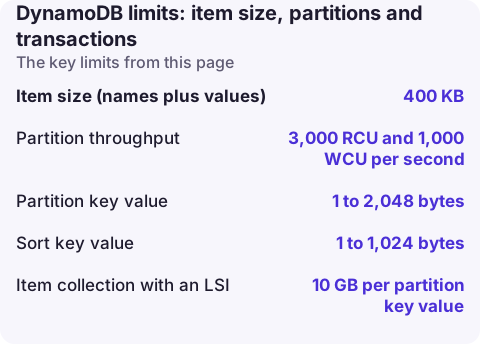
Fixed limits (cannot be raised)
| Limit | Value |
|---|---|
| Item size (names plus values) | 400 KB |
| Partition throughput | 3,000 RCU and 1,000 WCU per second |
| Partition key value | 1 to 2,048 bytes |
| Sort key value | 1 to 1,024 bytes |
| Item collection with an LSI | 10 GB per partition key value |
| Transaction (TransactWriteItems / TransactGetItems) | 100 unique items, 4 MB total |
| BatchWriteItem | 25 put or delete requests, 16 MB |
| BatchGetItem | 100 items, 16 MB |
| Query or Scan result page | 1 MB before filtering |
| Local secondary indexes per table | 5 |
| Projected attributes across all indexes | 100 |
All sizes use binary units (1 KB = 1,024 bytes). Note that the 1 MB page limit applies before a FilterExpression, so a filtered query can return few or no items and still a LastEvaluatedKey; keep paginating.
Adjustable quotas
| Quota | Default | How to raise |
|---|---|---|
| Throughput per table (on-demand or provisioned) | 40,000 read and 40,000 write units | Service Quotas |
| Provisioned throughput per account | 80,000 RCU and 80,000 WCU | Service Quotas |
| Tables per Region | 2,500 | Account team, up to 10,000 |
| Global secondary indexes per table | 20 | AWS Support |
| Provisioned capacity decreases per table per day | 4 at a time, plus 1 per hour (27 a day) | Not adjustable |
On-demand tables have no account-level throughput quota, only the per-table one.
The partition limit is the one that bites
DynamoDB spreads data across partitions by partition key. However high the table's capacity, all requests for a single key land on one partition, which can serve at most 3,000 reads or 1,000 writes of 1 KB per second. Adaptive capacity and burst capacity (up to five minutes of unused throughput) help with uneven traffic, but they cannot push one key past the partition maximum. Symptoms: ProvisionedThroughputExceededException or ThrottlingException on some keys while ConsumedWriteCapacityUnits for the table is far below what you provisioned. CloudWatch Contributor Insights for DynamoDB shows the most-throttled keys.
Fixes: add a random or calculated suffix to hot keys (write sharding) and read across the shards, cache hot reads with DAX or in the application, and batch small writes into fewer larger items where it fits the access pattern. The throughput exceeded page has the full diagnostic sequence.
Item size: designing below 400 KB
- Store large blobs (documents, images, long JSON) in S3 and keep the key in the item.
- Split items that grow over time, such as order histories or chat threads, into one item per entry under the same partition key and use a sort key.
- Shorten attribute names on very large or numerous items; names count towards both the 400 KB and every capacity unit.
- Compress large text attributes and store them as binary.
- An LSI adds the projected attributes to the 400 KB budget for that item.
When you exceed the limit you get ValidationException: Item size has exceeded the maximum allowed size; see the item size fix. In a transaction the same problem surfaces as a cancellation reason; see TransactionCanceledException.
Check your quotas
aws dynamodb describe-limits
aws service-quotas list-service-quotas --service-code dynamodb \
  --query "Quotas[].[QuotaName,QuotaCode,Value]" --output table
describe-limits returns the account and table maximums for provisioned capacity in the current Region.
Questions
What is the maximum item size in DynamoDB?
400 KB per item, including attribute names and values. It cannot be increased.
How many items can a DynamoDB transaction contain?
Up to 100 unique items in one TransactWriteItems or TransactGetItems call, with a 4 MB total size.
Is there a limit on DynamoDB table size?
No. Tables have no practical size limit, but tables with a local secondary index limit each partition key's item collection to 10 GB.
Hot partitions usually announce themselves as throttling on one table during a traffic spike. CloudConsole, a phone app for AWS, is being built to show DynamoDB throttle alarms on your phone with the context to tell a hot key from a capacity problem.
About the app → · Download on the App Store