 CloudConsole
aws dynamodb query
aws dynamodb query reads the items that share one partition key value, optionally narrowed by a sort key condition, using --key-condition-expression with placeholder values in --expression-attribute-values. It is fast and cheap because it only reads the matching key range; a --filter-expression trims results afterwards but does not reduce what you pay for.
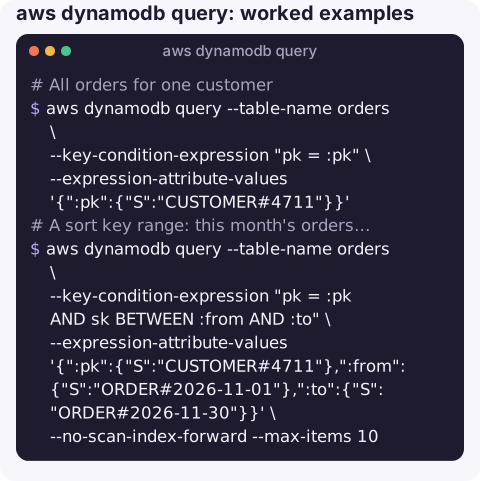
What the command does
Query goes straight to one partition (one value of the partition key) on the table or on a secondary index and walks the sort key in order. That is the difference from scan, which reads every item. If you do not know the partition key value, query cannot help you; you need a different index or a scan.
Results come back in DynamoDB's typed JSON, where every value is wrapped in its type, such as {"S": "text"} or {"N": "42"}. Each response page reads at most 1 MB of data; the CLI keeps requesting pages for you unless you limit it.
Syntax
aws dynamodb query \
  --table-name <table> [--index-name <index>] \
  --key-condition-expression "<pk> = :pk [AND <sk condition>]" \
  --expression-attribute-values '{":pk":{"S":"value"}}' \
  [--filter-expression "..."] [--projection-expression "..."] \
  [--expression-attribute-names '{"#n":"name"}'] \
  [--no-scan-index-forward] [--consistent-read] [--select COUNT]
Worked examples
All orders for one customer (partition key pk):
aws dynamodb query --table-name orders \
  --key-condition-expression "pk = :pk" \
  --expression-attribute-values '{":pk":{"S":"CUSTOMER#4711"}}'
A sort key range: this month's orders, newest first, latest 10:
aws dynamodb query --table-name orders \
  --key-condition-expression "pk = :pk AND sk BETWEEN :from AND :to" \
  --expression-attribute-values '{":pk":{"S":"CUSTOMER#4711"},":from":{"S":"ORDER#2026-11-01"},":to":{"S":"ORDER#2026-11-30"}}' \
  --no-scan-index-forward --max-items 10
Query a global secondary index and print plain values instead of typed JSON:
aws dynamodb query --table-name orders --index-name status-index \
  --key-condition-expression "#s = :s" \
  --expression-attribute-names '{"#s":"status"}' \
  --expression-attribute-values '{":s":{"S":"FAILED"}}' \
  --query "Items[].[pk.S,sk.S,total.N]" --output text
status is a DynamoDB reserved word, which is why it goes through the #s placeholder.
Filter after the key condition, here orders over 100 that have not shipped:
aws dynamodb query --table-name orders \
  --key-condition-expression "pk = :pk AND begins_with(sk, :o)" \
  --filter-expression "total > :min AND attribute_not_exists(shippedAt)" \
  --expression-attribute-values '{":pk":{"S":"CUSTOMER#4711"},":o":{"S":"ORDER#"},":min":{"N":"100"}}'
Count without returning items:
aws dynamodb query --table-name orders \
  --key-condition-expression "pk = :pk" \
  --expression-attribute-values '{":pk":{"S":"CUSTOMER#4711"}}' \
  --select COUNT --query Count
Key condition rules
| Part | Allowed |
|---|---|
| Partition key | Equality only: pk = :v. Required. |
| Sort key | =, <, <=, >, >=, BETWEEN :a AND :b, begins_with(sk, :p). Optional. |
| Anything else | Not in the key condition. Use --filter-expression, which runs after the read. |
Gotchas
- Filters do not save capacity. DynamoDB reads the whole key range, charges for it, then drops non-matching items. Compare
CountwithScannedCount: a big gap means you need a better key design or an index. --limitis applied before the filter.--limit 10with a filter can return zero items and aLastEvaluatedKey. Use--max-itemsto cap what the CLI prints.- Shell quoting. Wrap JSON in single quotes on Linux and macOS. On Windows PowerShell or cmd, put the JSON in a file and use
file://values.json. - Index reads are eventually consistent.
--consistent-readis not supported on global secondary indexes, so a just-written item may be missing for a moment. - The wrong key name gives a validation error, not empty results; see Query condition missed key schema element.
Questions
How do I query DynamoDB by partition key from the CLI?
Use --key-condition-expression "pk = :pk" and supply the value with --expression-attribute-values '{":pk":{"S":"value"}}', replacing pk with your partition key attribute name and S with N for numeric keys.
How do I get all items from a DynamoDB table with query?
You cannot without a partition key value. Query always targets one partition. To read the whole table, use aws dynamodb scan, ideally with a projection to keep the output small.
What is the difference between --limit and --max-items?
--limit is the API Limit: how many items DynamoDB evaluates per request, before filtering. --max-items is a CLI option that stops after printing that many items and gives you a NextToken to continue.
Looking up a customer's records during an incident is a common reason to reach for the CLI. CloudConsole, a phone app for AWS, is built to show DynamoDB tables and their throttling alarms on a phone.
About the app → · Download on the App Store