 CloudConsole
DynamoDB Time to Live (TTL)
DynamoDB TTL deletes items automatically once the time in a chosen attribute has passed, without consuming write capacity. The attribute must be a Number holding a Unix epoch time in seconds (not milliseconds, not a string), and values more than five years in the past are ignored. Deletion is not instant: expired items are typically removed within a few days, so filter them out of reads. Enabling TTL takes about an hour to reach all partitions, and only one attribute per table can be the TTL attribute.
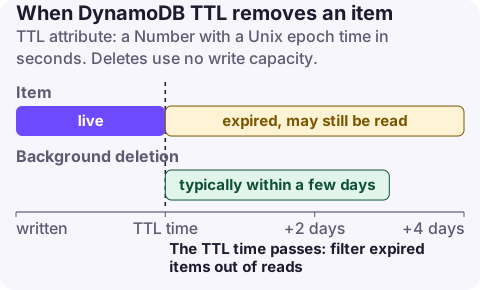
The rules
| Rule | Detail |
|---|---|
| Attribute type | Number, epoch seconds (e.g. 1795000000) |
| Wrong type or missing attribute | Item never expires (ignored by TTL) |
| Values more than 5 years in the past | Not considered for deletion |
| Deletion timing | Typically within a few days of expiry; not guaranteed to be immediate |
| Cost | TTL deletes consume no write capacity in the item's Region |
| Global tables | Deletes replicate; replica deletes are charged as replicated writes |
| Indexes | Deleted items are also removed from LSIs and GSIs |
| Streams | Delete records carry userIdentity.type = Service and principalId = dynamodb.amazonaws.com |
| Enabling | About one hour to apply across partitions |
| Disabling | Deletions continue for about 30 minutes |
| Restored tables | TTL must be configured again |
The attribute name is case-sensitive and must match exactly what your code writes. Changing to a different attribute means disabling TTL and enabling it again with the new name.
Recommended setup
- Name the attribute clearly, such as
expireAtorttl, and write it on every item that should expire. - Compute it at write time:
now_epoch_seconds + retention_seconds. A common bug is writing milliseconds from JavaScript'sDate.now(), which puts expiry tens of thousands of years in the future. - Filter expired items in queries until they are physically deleted:
FilterExpression: #exp > :now. - If you need an action on expiry (archiving, notifications), consume the table's stream and act on Service-initiated deletes.
- Don't rely on TTL for exact timing (session cut-off, token expiry checks); check the timestamp in the application too.
Enable and check it
aws dynamodb update-time-to-live --table-name sessions \
  --time-to-live-specification Enabled=true,AttributeName=expireAt

aws dynamodb describe-time-to-live --table-name sessions

# Read only items that have not expired yet
aws dynamodb query --table-name sessions \
  --key-condition-expression "userId = :u" \
  --filter-expression "expireAt > :now" \
  --expression-attribute-values '{":u":{"S":"user-123"},":now":{"N":"1795000000"}}'
CloudFormation: TimeToLiveSpecification on AWS::DynamoDB::Table with AttributeName and Enabled. Terraform: a ttl block on aws_dynamodb_table with attribute_name and enabled. Don't declare the TTL attribute in AttributeDefinitions unless it is also a key; it is just a normal attribute.
Two settings changes in quick succession can be rejected while the previous change is still being applied; wait for describe-time-to-live to show the new status.
Symptoms of getting it wrong
| Symptom | Cause |
|---|---|
| Items never deleted | Attribute stored as String, or in milliseconds, or name mismatch |
| Items deleted immediately on write | Value is in the past, often seconds-vs-milliseconds the other way or a timezone bug |
| Expired items still returned | Normal: deletion lags; add a filter expression |
| Unexpected deletes in streams consumers | Consumers not distinguishing Service deletes from user deletes |
| Table size not shrinking | Deletes take days; check TimeToLiveDeletedItemCount |
Questions
What format does DynamoDB TTL use?
A Number attribute containing a Unix epoch timestamp in seconds. Strings and millisecond values don't work as intended.
How long does DynamoDB take to delete expired items?
Usually within a few days of the expiry time. Until then expired items can still appear in reads, so filter them out.
Does DynamoDB TTL cost anything?
TTL deletes don't consume write capacity in the table's Region. In global tables, the replicated deletes in other Regions are charged as replicated writes.
TTL mistakes are silent: items either never expire or vanish early. CloudConsole, a phone app for AWS, is being built to show DynamoDB metrics and alarms on your phone so a change in table size is easy to notice.
About the app → · Download on the App Store