 CloudConsole
AWS Fargate task size limits
A Fargate task must use one of the documented CPU and memory pairs, from 256 CPU units (0.25 vCPU) with 512 MiB up to 16 vCPU with 120 GB, and 32 vCPU with 60, 120 or 244 GB; the 8, 16 and 32 vCPU sizes are Linux-only and need platform version 1.4.0 or later. Tasks get 20 GiB of ephemeral storage by default and can be configured up to 200 GiB. Separately, your account has a Fargate vCPU quota per Region (6 vCPUs for On-Demand and 6 for Spot by default on new accounts) that caps how many tasks can run at once.
Valid CPU and memory combinations
| CPU (units) | vCPU | Memory | OS |
|---|---|---|---|
| 256 | 0.25 | 512 MiB, 1 GB, 2 GB | Linux |
| 512 | 0.5 | 1 GB to 4 GB in 1 GB steps | Linux |
| 1024 | 1 | 2 GB to 8 GB in 1 GB steps | Linux, Windows |
| 2048 | 2 | 4 GB to 16 GB in 1 GB steps | Linux, Windows |
| 4096 | 4 | 8 GB to 30 GB in 1 GB steps | Linux, Windows |
| 8192 | 8 | 16 GB to 60 GB in 4 GB steps | Linux, platform 1.4.0+ |
| 16384 | 16 | 32 GB to 120 GB in 8 GB steps | Linux, platform 1.4.0+ |
| 32768 | 32 | 60 GB, 120 GB or 244 GB | Linux, platform 1.4.0+ |
Task-level cpu and memory are required on Fargate and must match one row. Registering an invalid pair fails with ClientException: No Fargate configuration exists for given values. Container-level memory and memoryReservation must fit inside the task memory; see memory vs memoryReservation.
Ephemeral storage
Tasks on Linux platform 1.4.0 or later get at least 20 GiB of ephemeral storage, shared by all containers for image layers, writable layers and bind mounts. Set ephemeralStorage.sizeInGiB in the task definition to go up to 200 GiB:
"ephemeralStorage": { "sizeInGiB": 100 }Running out shows up as "no space left on device" inside the container. The Container Insights metric for ephemeral storage use, with an ephemeral storage alarm, gives warning before that.
Account quotas that stop tasks launching
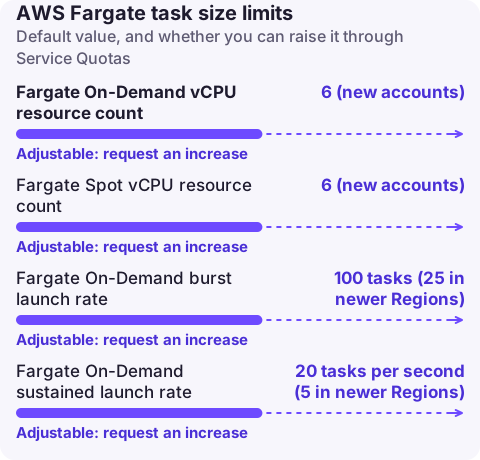
| Quota (AWS Fargate in Service Quotas) | Default | Adjustable |
|---|---|---|
| Fargate On-Demand vCPU resource count | 6 (new accounts) | Yes |
| Fargate Spot vCPU resource count | 6 (new accounts) | Yes |
| Fargate On-Demand burst launch rate | 100 tasks (25 in newer Regions) | Yes |
| Fargate On-Demand sustained launch rate | 20 tasks per second (5 in newer Regions) | Yes |
The vCPU quota counts all running Fargate tasks and EKS pods in the Region. Six vCPUs is only twelve 0.5 vCPU tasks, so new accounts hit it quickly. Fargate raises these quotas automatically as usage grows, but request an increase before a launch rather than waiting. When the quota is exhausted, RunTask and service deployments report a failure reason saying you have reached the limit on the number of vCPUs you can run concurrently.
aws service-quotas list-service-quotas --service-code fargate \
  --query "Quotas[].[QuotaName,QuotaCode,Value]" --output table
Choosing a size
- Start from measured use:
MemoryUtilizedandCpuUtilizedfrom Container Insights over a busy week, then pick the smallest row that fits peak memory with 20 to 30 percent headroom. - Memory is the hard constraint. A container that exceeds its limit is killed with exit code 137 (OutOfMemoryError); CPU is merely throttled.
- If you need more than 32 vCPU or 244 GB in one task, use EC2 capacity providers instead.
- For JVM and Node.js workloads, set heap limits relative to task memory so the runtime doesn't assume the host's memory.
Questions
What is the maximum memory for a Fargate task?
244 GB, with 32 vCPU on Linux. With 16 vCPU the maximum is 120 GB.
What is the minimum Fargate task size?
256 CPU units (0.25 vCPU) with 512 MiB of memory.
How much disk space does a Fargate task get?
20 GiB of ephemeral storage by default on platform version 1.4.0 and later, configurable up to 200 GiB.
Fargate quota problems tend to appear during a scale-out, when tasks sit in PROVISIONING or fail to start. CloudConsole, a phone app for AWS, is being built to show ECS service events and alarms on your phone.
About the app → · Download on the App Store