 CloudConsole
Lambda concurrency limit
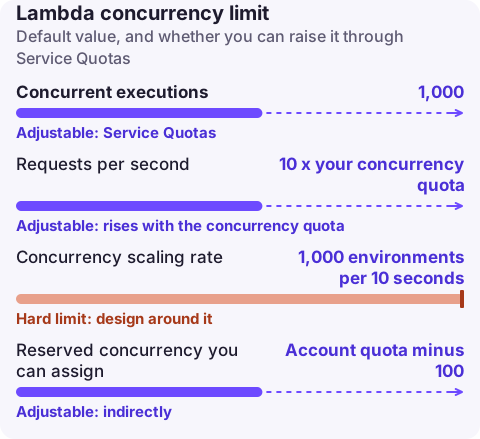
Each AWS account gets 1,000 concurrent Lambda executions per Region by default, shared by every function in that Region, and you can raise it through Service Quotas to tens of thousands. Separately, each function can add at most 1,000 execution environments every 10 seconds, and the account can serve at most 10 requests per second for each unit of concurrency. Hitting any of these produces throttling (TooManyRequestsException, HTTP 429).
Three different limits, one symptom
Engineers often say "the concurrency limit" for three separate controls. All of them end in throttles, so work out which one you hit before asking for an increase.
| Limit | Default | Scope | Adjustable |
|---|---|---|---|
| Concurrent executions | 1,000 | Account, per Region | Yes (Service Quotas) |
| Requests per second | 10 x your concurrency quota | Account, per Region | Rises with the concurrency quota |
| Concurrency scaling rate | 1,000 environments per 10 seconds | Per function | No |
| Reserved concurrency you can assign | Account quota minus 100 | Per function setting | Indirectly |
Concurrency is roughly requests per second multiplied by average duration in seconds. A function that takes 200 ms and receives 3,000 requests per second needs about 600 concurrent executions. The requests-per-second rule catches very fast functions: with the default quota the whole account tops out at 10,000 requests per second however short each invocation is.
Find which limit you hit
# Account quota and what is left after reservations
aws lambda get-account-settings --query 'AccountLimit.[ConcurrentExecutions,UnreservedConcurrentExecutions]'

# Peak concurrency across the account over the last day (1-minute maximum)
aws cloudwatch get-metric-statistics --namespace AWS/Lambda --metric-name ConcurrentExecutions \
  --start-time 2026-11-16T00:00:00Z --end-time 2026-11-17T00:00:00Z \
  --period 60 --statistics Maximum --query 'max_by(Datapoints,&Maximum).Maximum'

# Throttles for one function
aws cloudwatch get-metric-statistics --namespace AWS/Lambda --metric-name Throttles \
  --dimensions Name=FunctionName,Value=orders-api \
--start-time 2026-11-16T00:00:00Z --end-time 2026-11-17T00:00:00Z --period 300 --statistics Sum- Peak
ConcurrentExecutionsnear the quota: the account limit. - Throttles on one function while the account has headroom: that function's reserved concurrency (a reserved value of 0 throttles everything), or the per-function scaling rate during a steep ramp.
- Throttles only during sudden bursts that clear within a minute or two: almost always the scaling rate.
Raise the account limit
In the Service Quotas console choose AWS services, AWS Lambda, Concurrent executions, then Request increase at account level. From the CLI, look up the quota code first rather than hard-coding it:
aws service-quotas list-service-quotas --service-code lambda \
  --query "Quotas[?QuotaName=='Concurrent executions'].[QuotaCode,Value]" --output text

aws service-quotas request-service-quota-increase --service-code lambda \
  --quota-code QUOTA_CODE_FROM_ABOVE --desired-value 3000
Increases apply per Region, so repeat the request for each Region you run in. Include the expected peak and the reason in the case if Support asks; large jumps are reviewed manually.
Designing so the limit doesn't take you down
- Protect critical functions with reserved concurrency so a noisy batch job can't consume the whole pool; see reserved vs provisioned.
- Cap functions that hit fragile downstreams (databases, third-party APIs) with a low reserved value; throttling at Lambda is cheaper than exhausting RDS connections.
- Smooth bursts by putting SQS in front: messages wait in the queue instead of failing, and the event source mapping's maximum concurrency setting limits how many functions the queue drives.
- Pre-warm for known peaks with provisioned concurrency, which also counts against the account limit.
- Alarm before you hit it: an alarm on the account-level
ConcurrentExecutionsmaximum at around 80% of the quota, plus a Throttles alarm on key functions.
Questions
Is the Lambda concurrency limit per function or per account?
The 1,000 default is per account per Region and shared by all functions. Individual functions are only limited if you set reserved concurrency on them, plus the per-function scaling rate.
How long does a Lambda concurrency limit increase take?
Small increases are often approved automatically within minutes; larger ones go to AWS Support and can take longer. Request well before an expected launch or seasonal peak.
Can I limit Lambda concurrency to 1?
Yes. Set reserved concurrency to 1 with aws lambda put-function-concurrency and the function processes one request at a time; extra synchronous calls are throttled and asynchronous events are retried.
Concurrency throttling usually starts during a spike you didn't plan for. CloudConsole, a phone app for AWS, is being built to show throttle and error alarms with recent log lines on your phone so you can decide quickly whether to request an increase or shed load.
About the app → · Download on the App Store