 CloudConsole
AWS Lambda limits and quotas
A Lambda function can run for up to 900 seconds (15 minutes), use 128 MB to 10,240 MB of memory, accept and return 6 MB synchronously (1 MB for asynchronous events), and have 512 MB to 10,240 MB of /tmp. Zip packages are capped at 50 MB uploaded directly and 250 MB unzipped including layers; container images can be 10 GB. Only account-level quotas such as concurrent executions (1,000 by default) can be raised; the per-function limits are fixed.
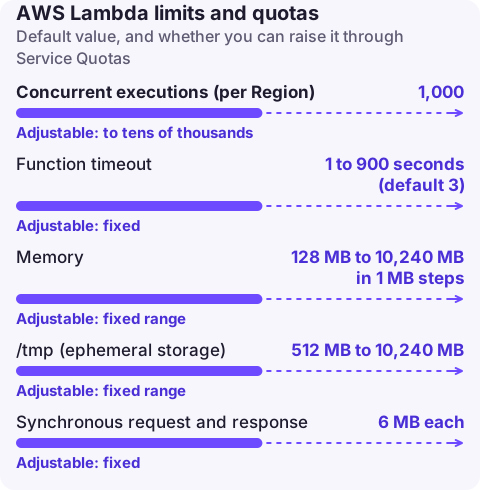
The limits at a glance
Values from the Lambda quotas page at the time of writing. "Fixed" means you cannot request a change.
| Limit | Value | Adjustable |
|---|---|---|
| Concurrent executions (per Region) | 1,000 | Yes, to tens of thousands |
| Function timeout | 1 to 900 seconds (default 3) | Fixed |
| Memory | 128 MB to 10,240 MB in 1 MB steps | Fixed range |
| /tmp (ephemeral storage) | 512 MB to 10,240 MB | Fixed range |
| Synchronous request and response | 6 MB each | Fixed |
| Streamed response | 200 MB | Fixed |
| Asynchronous event | 1 MB | Fixed |
| Environment variables | 4 KB in total | Fixed |
| Layers per function | 5 | Fixed |
| Zip upload via API or console | 50 MB zipped | Fixed (upload larger via S3) |
| Code plus layers, unzipped | 250 MB | Fixed |
| Container image | 10 GB uncompressed | Fixed |
| Code storage for zips and layers | 300 GB per Region | Not increasable |
| Scaling rate per function | 1,000 execution environments every 10 seconds | Fixed |
| File descriptors / processes and threads | 1,024 each | Fixed |
New accounts can start with lower concurrency and memory quotas than the table shows; AWS raises them automatically as usage grows.
What each limit looks like when you hit it
- Timeout: the log shows
Task timed out after 900.00 secondsand the invocation counts as an error. See Task timed out. - Payload:
RequestEntityTooLargeExceptionon Invoke, or a 413 from API Gateway. See the payload page. - Package size:
Unzipped size must be smaller than 262144000 byteson deploy, covered in this fix. - Code storage:
CodeStorageExceededExceptiononce old versions and layers fill the 300 GB; clean them up. - Concurrency:
TooManyRequestsException(429, Rate Exceeded) and a risingThrottlesmetric. See concurrency limit. - Memory:
Runtime exited with error: signal: killedorRuntime.OutOfMemory; see Lambda out of memory. - /tmp full: your runtime raises its own "No space left on device" error; Lambda does not clear /tmp between invocations in the same execution environment.
Check your account's values
Concurrency is the Lambda quota most likely to differ from the published default, so check it first:
# Account concurrency limit and how much is not reserved
aws lambda get-account-settings --query 'AccountLimit.{limit:ConcurrentExecutions,unreserved:UnreservedConcurrentExecutions,codeStorage:TotalCodeSize}'

# Same numbers from Service Quotas, with the quota code you need for an increase
aws service-quotas list-service-quotas --service-code lambda \
  --query "Quotas[].{name:QuotaName,code:QuotaCode,value:Value,adjustable:Adjustable}" --output table
Request an increase from the Service Quotas console (AWS services, AWS Lambda, Concurrent executions) or with aws service-quotas request-service-quota-increase, using the quota code from the listing above. The Service Quotas guide walks through it.
Designing around the fixed limits
- Work longer than 15 minutes: split it into steps in Step Functions, or run it on ECS or AWS Batch. Don't treat 900 seconds as a target; behind API Gateway the client usually gives up much sooner.
- Large inputs and outputs: pass an S3 key or a presigned URL instead of the data itself. Response streaming raises the response ceiling for HTTP clients but not the request.
- Big dependencies: move to a container image (10 GB) rather than juggling layers; layers count towards the same 250 MB.
- Scratch space: raise ephemeral storage up to 10,240 MB, or mount EFS for data that should outlive the execution environment.
- Environment variables over 4 KB: keep configuration in Parameter Store or Secrets Manager and read it at start-up.
- CPU: there is no separate CPU setting. CPU scales with memory, and 1,769 MB gives one full vCPU, so a CPU-bound function may need more memory than its heap requires; see memory size.
Questions
Can the Lambda 15-minute timeout be increased?
No. 900 seconds is the hard maximum for standard Lambda functions. The quotas page lists a longer 90-minute ceiling only for Lambda Managed Instances functions invoked asynchronously or through most event source mappings.
What is the Lambda /tmp storage limit?
Between 512 MB (the default) and 10,240 MB, set per function with the ephemeral storage setting.
What is the default Lambda concurrency limit per account?
1,000 concurrent executions per Region, shared by all functions in the account, and adjustable through Service Quotas. New accounts may start lower.
Lambda limits tend to surface as a sudden wave of errors after a deploy or a traffic spike. CloudConsole, a phone app for AWS being built for on-call engineers, is designed to put Lambda error and throttle alarms, with the log lines behind them, on your phone.
About the app → · Download on the App Store