 CloudConsole
CloudWatch alarm: Lambda Throttles
Alarm on AWS/Lambda Throttles per FunctionName with the Sum over 60 seconds, firing when it is greater than or equal to your threshold for 5 of 5 minutes. Throttles are invocation requests Lambda refused because no concurrency was available, either because the function hit its reserved concurrency or the account ran out.
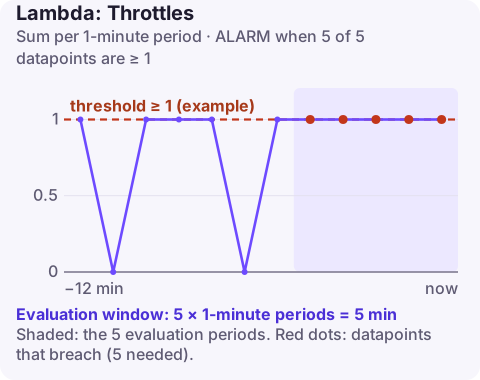
What a throttle is
When a request arrives and there is no concurrency to run it, Lambda rejects it with a 429 TooManyRequestsException and adds one to Throttles. What happens next depends on the caller:
| Invocation type | Effect of a throttle |
|---|---|
| Synchronous (API Gateway, SDK) | Caller gets the error immediately; users see failures |
| Asynchronous (S3, SNS, EventBridge) | Lambda keeps the event and retries for a while, so work is delayed |
| Event source mapping (SQS, Kinesis) | Polling slows down; backlog and age grow |
Throttling hits a function for one of three reasons: it has reserved concurrency set and reached it, the account's unreserved pool is exhausted by other functions, or scaling could not keep up with a sudden burst.
One easy-to-miss case is reserved concurrency set to 0, which some teams use as an emergency off switch. Every invocation is then throttled, and this alarm will fire until the reservation is removed.
Recommended alarm settings
| Setting | Recommended value |
|---|---|
| Namespace | AWS/Lambda |
| Metric | Throttles |
| Dimensions | FunctionName |
| Statistic | Sum |
| Threshold | Depends on your situation (a value above zero) |
| Period | 60 seconds |
| Datapoints to alarm | 5 |
| Evaluation periods | 5 |
| Comparison operator | GreaterThanOrEqualToThreshold |
Picking the threshold
For synchronous, user-facing functions, any sustained throttling is a visible failure; a threshold of 1 with five minutes is a sensible start. For async and queue-driven functions, short throttling is often harmless because work is retried; set the threshold above the Sum you see during normal bursts.
Some teams deliberately cap a function with reserved concurrency to protect a database. In that case throttles are the design working, and the better alarm is on queue age or backlog downstream.
Also consider who receives the alarm. Throttles on a queue consumer are a capacity conversation for the owning team; throttles on a public API handler are an incident.
Create the alarm
aws cloudwatch put-metric-alarm \
  --alarm-name lambda-api-handler-throttles \
  --alarm-description "api-handler throttled for 5 minutes" \
  --namespace AWS/Lambda \
  --metric-name Throttles \
  --dimensions Name=FunctionName,Value=api-handler \
  --statistic Sum \
  --period 60 \
  --evaluation-periods 5 \
  --datapoints-to-alarm 5 \
  --threshold 1 \
  --comparison-operator GreaterThanOrEqualToThreshold \
  --treat-missing-data notBreaching \
  --alarm-actions arn:aws:sns:eu-west-2:123456789012:oncall-alerts
When it fires
- Function or account? Run
aws lambda get-function-concurrency --function-name api-handler. If a reservation exists andConcurrentExecutionsfor the function is at it, the cap is the cause. If not, check the account-level ClaimedAccountConcurrency. - Raise the right limit: increase the function's reservation with put-function-concurrency, or request a higher account quota.
- Lower demand per request: faster functions need less concurrency; bigger batch sizes for SQS and Kinesis reduce concurrent invocations.
- Look for runaway callers: a retry storm or a recursive trigger can multiply invocations and throttle everything else.
Questions
What causes Lambda throttling?
No concurrency was available: the function reached its reserved concurrency, the account reached its Regional quota, or traffic grew faster than Lambda could scale.
Are throttled Lambda invocations counted as errors?
No. They appear in Throttles, not Errors. Synchronous callers still receive a 429 error.
How do I get an alarm when a Lambda function is throttled?
Create this alarm on Throttles for the function with a threshold of 1 and route it to an SNS topic with email or chat subscribers.
Throttling usually comes with a traffic spike, and the fix is often a single concurrency change. CloudConsole, a phone app for AWS, is built to show this alarm and the function's concurrency on your phone.
Did it start after a deploy? What changed? on the app’s alarm screen lists the deploys and configuration changes from the hour before the alarm fired.
About the app → · Download on the App Store