 CloudConsole
Regex parse in CloudWatch Logs Insights
Logs Insights accepts regular expressions between slashes. Use them in filter (@message like /pattern/ or =~) to match events, and in parse with named capture groups, (?<name>...), to turn parts of a text line into fields you can filter, group and sort on.
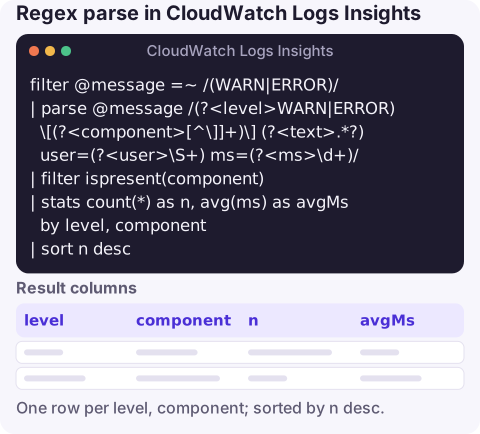
The query
Given application lines such as 2026-11-16 09:12:44 WARN [orders] payment declined user=u-123 ms=842:
filter @message =~ /(WARN|ERROR)/
| parse @message /(?<level>WARN|ERROR) \[(?<component>[^\]]+)\] (?<text>.*?) user=(?<user>\S+) ms=(?<ms>\d+)/
| filter ispresent(component)
| stats count(*) as n, avg(ms) as avgMs by level, component
| sort n desc
How it works
filter @message =~ /(WARN|ERROR)/keeps only lines matching the regex.=~andlikebehave the same with a regex;likewith a quoted string is a plain substring match.parse @message /…/applies the regex to each event. Every named group,(?<name>…), becomes a field with that name. Here that'slevel,component,text,userandms.- Brackets and other special characters must be escaped, as in
\[and\]..*?is a lazy match sotextstops atuser=. filter ispresent(component)drops events where the regex didn't match; parse leaves the fields empty rather than removing the event.statsthen uses the extracted fields like any other.avg(ms)works because a value captured as digits can be used in arithmetic.
Test a new pattern on a small sample first: run it with | display @message, level, component, user | limit 20 over a few minutes of logs and check that every column is filled before you aggregate.
Regex patterns worth keeping
| Goal | Pattern |
|---|---|
| Case-insensitive match | /(?i)timeout/ |
| Whole word only | /\berror\b/ |
| UUID (Lambda request ID) | /(?<rid>[0-9a-f]{8}-[0-9a-f]{4}-[0-9a-f]{4}-[0-9a-f]{4}-[0-9a-f]{12})/ |
| IPv4 address | /(?<ip>\d{1,3}(\.\d{1,3}){3})/ |
| HTTP status in an access line | /" (?<status>[1-5]\d\d) / |
| AWS region code | /(?<region>[a-z]{2}(-[a-z]+)+-\d)/ |
| Exception class | /(?<exc>[\w.]+(Exception|Error))/ |
Error patterns for Lambda and API Gateway
Lambda runtime errors, grouped by type:
filter @message like /Runtime\.\w+|errorType/
| parse @message /(?<errType>Runtime\.\w+)/
| stats count(*) as n by errType
| sort n desc
API Gateway execution logs, which put the request ID in brackets at the start of each line:
filter @message like /Method completed with status: 5\d\d/
| parse @message /^\((?<reqId>[^)]+)\) Method completed with status: (?<status>\d+)/
| stats count(*) as n by status
Glob or regex, and what regex can't do here
- For simple, fixed layouts a glob is easier to read:
parse @message "user=* ms=*" as user, ms. Switch to regex when the layout varies or you need validation. - There's no regex-based replace function;
replace()substitutes a literal string. Extract the part you want with a capture group instead. - Parsing costs nothing extra beyond the data scanned, but complex patterns over huge ranges are slower; filter first with a cheap substring match, then parse.
- Only named groups become fields. Plain parentheses still work for alternation and repetition, as in
(\.\d{1,3}){3}, but produce no column. - One
parsecommand takes one pattern. To extract from differently shaped lines, use severalparsecommands, each with its own field names, and combine them withcoalesce().
Questions
Does CloudWatch Logs Insights support regex?
Yes. Put the pattern between slashes in filter (like or =~) or in parse, where named capture groups become fields.
How do I make a Logs Insights regex case-insensitive?
Start the pattern with (?i), for example filter @message like /(?i)error/.
Can I replace text with a regex in Logs Insights?
Not directly; replace() works with literal strings. Use parse with a named capture group to extract the part you need.
Getting a regex right is slow on a small screen, so it pays to save working queries. CloudConsole, a phone app for AWS, is built to show alarms and the related log lines on your phone.
About the app → · Download on the App Store