 CloudConsole
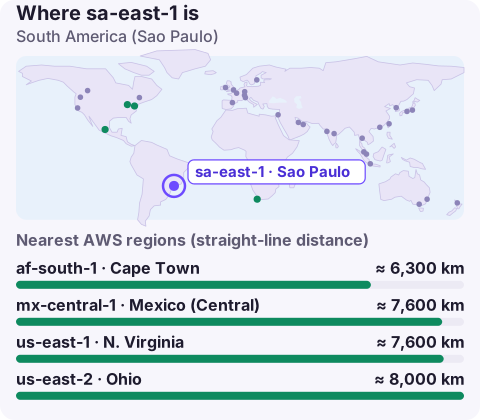
sa-east-1: South America (São Paulo)
sa-east-1 is the code for the South America (São Paulo) region in Brazil. It is enabled by default and is the region to use for low latency to Brazilian users or when data must stay in Brazil, but list prices there are noticeably higher than in the main US regions, so many teams keep only latency-sensitive or resident data in it.
Who should run in São Paulo
- Brazilian users: serving from São Paulo avoids the long hop to the US East Coast that every request otherwise makes.
- Brazilian data: financial-services and public-sector customers may require local storage, and LGPD compliance work is often simpler to explain when data stays in the country.
- Other South American traffic: for users in Argentina, Chile or Colombia, compare São Paulo with US regions; depending on routes it is not always the closer one.
Cost: the reason to be selective
sa-east-1 has historically been among the most expensive AWS regions for compute, storage and data transfer out. A common pattern is to split by need:
| Keep in sa-east-1 | Consider a US region |
|---|---|
| User-facing APIs and databases with personal data | Batch analytics on anonymised data |
| Anything a regulator requires locally | CI/CD, build runners, dev and test |
| Latency-sensitive caches | Long-term archives without residency rules |
Price the actual line items in the AWS Pricing Calculator; differences vary widely by service. Savings Plans and Reserved Instances apply here too and cut the gap.
Pointing tools at sa-east-1
aws ec2 describe-instances --region sa-east-1 \
  --filters Name=instance-state-name,Values=running \
  --query 'Reservations[].Instances[].[InstanceId,InstanceType]' --output table

export AWS_DEFAULT_REGION=sa-east-1
The code has no accent: it is sa-east-1, and the console names it "South America (São Paulo)". Endpoints follow <service>.sa-east-1.amazonaws.com. The CLI reads both AWS_REGION and AWS_DEFAULT_REGION; if they disagree, AWS_REGION wins in current versions, which confuses people who set only the older variable.
Disaster recovery and neighbours
There is no second AWS region in Brazil, so a regional recovery plan has to leave the country or accept multi-AZ only. Most teams pair São Paulo with us-east-1 or us-east-2, which have the shortest routes and the broadest services. If residency rules forbid that, keep recovery inside sa-east-1 across Availability Zones, with backups in a separate account. mx-central-1 in Mexico is another Latin American option. Whichever you choose, check data-transfer pricing for replication from São Paulo before switching it on, as outbound transfer from this region is not cheap.
Latency without moving everything
If your concern is page-load time for Brazilian users rather than where data is stored, CloudFront can serve cached content from edge locations in Brazil while the origin stays in a US region. That often gives most of the latency benefit at a fraction of the cost. Dynamic API calls and database round trips are where an origin in sa-east-1 makes the real difference, so measure those specifically before deciding.
Questions
Where is sa-east-1?
In São Paulo, Brazil. It is the only AWS region in Brazil.
Why is sa-east-1 more expensive?
AWS sets prices per region and São Paulo's are higher for many services. Check the pricing page for each service and keep non-resident, non-latency-sensitive work in a cheaper region.
What is the best DR region for sa-east-1?
Usually us-east-1 or us-east-2, for routing and service coverage, unless data residency rules require you to stay in Brazil.
Data-transfer charges out of São Paulo are a common source of bill surprises. CloudConsole, a phone app for AWS, is built to surface costs alongside alarms and resources on your phone.
About the app → · Download on the App Store