 CloudConsole
SQS standard vs FIFO queues
Use a standard queue unless you need strict ordering or built-in de-duplication: it has nearly unlimited throughput and costs less per request, and you make consumers idempotent. Use a FIFO queue when the order of messages for the same entity matters (an account's ledger entries, an order's state changes) and you can spread load across many message group IDs.
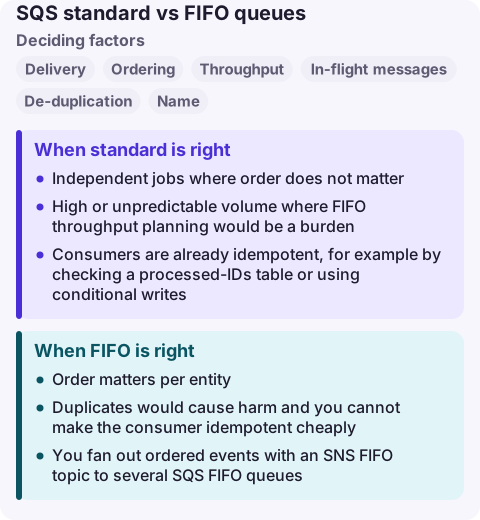
Standard vs FIFO compared
| Factor | Standard queue | FIFO queue |
|---|---|---|
| Delivery | At least once; occasional duplicates | Exactly-once processing within the de-duplication window |
| Ordering | Best effort | Strict within each message group |
| Throughput | Nearly unlimited API calls per second | 300 API calls/s per action, or 3,000 messages/s with batching; higher with high-throughput mode |
| In-flight messages | Large quota (see SQS quotas) | 120,000 by default |
| De-duplication | Your code | MessageDeduplicationId or content-based de-duplication |
| Name | Any | Must end in .fifo |
| Price | Standard request rate | Higher FIFO request rate |
| Type change | Cannot convert | Cannot convert; create a new queue |
When standard is right
- Independent jobs where order does not matter: thumbnails, emails, webhooks.
- High or unpredictable volume where FIFO throughput planning would be a burden.
- Consumers are already idempotent, for example by checking a processed-IDs table or using conditional writes.
Standard queues can now also use message group IDs for fair queuing, which reduces the effect of one noisy tenant on others; this is about fairness, not ordering, and has its own request rate.
When FIFO is right
- Order matters per entity: use the entity ID (account, order, device) as the
MessageGroupId. - Duplicates would cause harm and you cannot make the consumer idempotent cheaply.
- You fan out ordered events with an SNS FIFO topic to several SQS FIFO queues.
Throughput in a FIFO queue scales with the number of active message groups. A single group means a single ordered lane: messages in that group are delivered one batch at a time, and one failing message blocks the rest of its group until it succeeds or moves to the dead-letter queue.
Switching between them
You cannot change a queue's type. Create the new queue, point producers at it (FIFO producers must send a MessageGroupId and either a de-duplication ID or enable content-based de-duplication), drain the old queue, then delete it. A FIFO queue's dead-letter queue must also be FIFO.
For Lambda consumers, ordering is preserved per message group, and concurrency is limited by the number of active groups, so a FIFO queue with few groups processes slowly by design.
Common wrong reasons
- "FIFO guarantees my handler runs once." It prevents duplicate delivery within the de-duplication window; a handler that times out before deleting can still see the message again. Keep side effects idempotent.
- "Standard queues are unreliable." They are durable; their trade-off is duplicates and ordering, not loss.
- "One message group is fine." It serialises the whole queue. Choose a group key with many distinct values.
Questions
Is SQS FIFO slower than standard?
FIFO has per-action throughput limits (300 API calls per second, 3,000 messages per second with batching) unless you enable high-throughput mode and spread messages across many groups. Standard queues are effectively unlimited.
Does FIFO cost more than standard?
Yes. FIFO requests are billed at a higher rate than standard requests; check the SQS pricing page for current rates.
Can I convert a standard queue to FIFO?
No. Create a new FIFO queue, migrate producers and consumers, and drain the old queue.
A poisoned message in a FIFO group stalls everything behind it, which looks like a slow queue rather than an error. CloudConsole is being built to show queue-age alarms and consumer logs on a phone with production guardrails.
About the app → · Download on the App Store