 CloudConsole
CloudWatch alarm for Auto Scaling GroupInServiceCapacity
Alarm on GroupInServiceCapacity for the Auto Scaling group with the Average statistic, firing when it is below the minimum capacity your workload needs for 10 of 10 one-minute periods. Group metrics collection must be enabled first, or the metric does not exist.
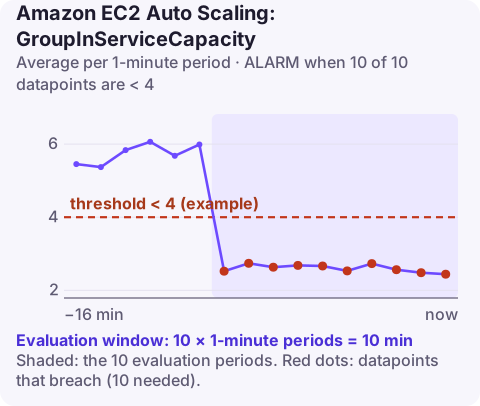
What the metric tells you
GroupInServiceCapacity is the number of capacity units in the group that are in the InService lifecycle state: launched, past any launch lifecycle hooks, and counted as able to serve. Without instance weights a unit is an instance; with weights (common in mixed-instance groups), it is the sum of the weights.
It drops below what you asked for when the group cannot launch replacements or new capacity: no capacity for the instance type in the Availability Zone, an account vCPU quota reached, a launch template pointing at a deleted AMI or security group, or the Launch process suspended by someone during maintenance. It also drops when instances keep failing health checks and get replaced in a loop.
Recommended alarm settings
| Setting | Value |
|---|---|
| Namespace | AWS/AutoScaling |
| Metric | GroupInServiceCapacity |
| Dimensions | AutoScalingGroupName |
| Statistic | Average |
| Period | 60 seconds |
| Datapoints to alarm | 10 |
| Evaluation periods | 10 |
| Comparison operator | LessThanThreshold |
| Threshold | Depends on your situation: the minimum capacity your workload needs |
Settings from the CloudWatch recommended alarms list. Ten minutes gives normal launches and health-check grace periods time to complete before you are paged.
Picking the threshold
AWS suggests the minimum capacity that keeps the workload healthy, often the same as GroupDesiredCapacity. Two ways to do that:
- Static: work out how many instances you need at peak to stay within your latency targets (from load testing or past incidents) and use that. For a group whose desired capacity rarely changes, this is simply the desired capacity.
- Follow desired capacity: for a group that scales, a fixed number is either too high at night or too low at peak. Alarm on the gap instead with metric math, as below, and fire when
GroupDesiredCapacity - GroupInServiceCapacitystays above 0.
Create it
# Group metrics are off by default
aws autoscaling enable-metrics-collection \
  --auto-scaling-group-name web-asg --granularity "1Minute"
# 4 = minimum instances this workload needs
aws cloudwatch put-metric-alarm \
--alarm-name web-asg-low-inservice \
--namespace AWS/AutoScaling \
--metric-name GroupInServiceCapacity \
--dimensions Name=AutoScalingGroupName,Value=web-asg \
--statistic Average \
--period 60 \
--evaluation-periods 10 \
--datapoints-to-alarm 10 \
--threshold 4 \
--comparison-operator LessThanThreshold \
--alarm-actions arn:aws:sns:eu-west-2:123456789012:ops-alerts \
--region eu-west-2Gap-based variant using metric math:
aws cloudwatch put-metric-alarm --alarm-name web-asg-capacity-gap \
  --evaluation-periods 10 --datapoints-to-alarm 10 \
  --threshold 0 --comparison-operator GreaterThanThreshold \
  --alarm-actions arn:aws:sns:eu-west-2:123456789012:ops-alerts \
  --metrics '[
 {"Id":"gap","Expression":"desired - insvc","ReturnData":true},
 {"Id":"desired","ReturnData":false,"MetricStat":{"Period":60,"Stat":"Average","Metric":{"Namespace":"AWS/AutoScaling","MetricName":"GroupDesiredCapacity","Dimensions":[{"Name":"AutoScalingGroupName","Value":"web-asg"}]}}},
 {"Id":"insvc","ReturnData":false,"MetricStat":{"Period":60,"Stat":"Average","Metric":{"Namespace":"AWS/AutoScaling","MetricName":"GroupInServiceCapacity","Dimensions":[{"Name":"AutoScalingGroupName","Value":"web-asg"}]}}}
]'
When it fires
- Read the scaling activities; failed launches state the reason in plain text:
aws autoscaling describe-scaling-activities \ --auto-scaling-group-name web-asg --max-items 10 \ --query "Activities[].[StartTime,StatusCode,StatusMessage]" --output table - Match the message: capacity shortages (InsufficientInstanceCapacity) are fixed by allowing more instance types or Availability Zones; quota errors (VcpuLimitExceeded) by a quota increase; InvalidAMIID.NotFound by updating the launch template.
- Check suspended processes in
aws autoscaling describe-auto-scaling-groupsoutput; resumeLaunchif a maintenance window left it suspended. - Look for a replacement loop: instances launching and terminating every few minutes usually fail load-balancer health checks. Check the target group's health reasons.
Questions
Why is GroupInServiceCapacity missing in CloudWatch?
Auto Scaling group metrics are not collected by default. Enable them with enable-metrics-collection; data appears from then on, not retroactively.
What is the difference between GroupInServiceInstances and GroupInServiceCapacity?
GroupInServiceInstances counts instances. GroupInServiceCapacity counts capacity units, which differ from instance counts when the group uses instance weights.
Will this alarm fire during normal scale-out?
Rarely. New instances take a few minutes to become InService, and the alarm needs ten consecutive breaching minutes.
Lost capacity often shows up as slowness first and as an alarm ten minutes later. CloudConsole, a phone app for AWS, is built to show this alarm together with the group's recent scaling activities on a phone.
Did it start after a deploy? What changed? on the app’s alarm screen lists the deploys and configuration changes from the hour before the alarm fired.
About the app → · Download on the App Store