 CloudConsole
CloudWatch alarm for CloudFront FunctionExecutionErrors
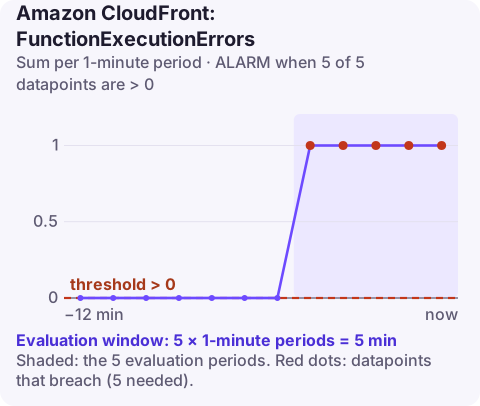
FunctionExecutionErrors counts CloudFront function invocations that threw an exception at runtime. AWS recommends alarming when its Sum is greater than 0 in 5 consecutive one-minute periods, per DistributionId and FunctionName with Region=Global, in us-east-1.
What counts as an execution error
An execution error is a runtime failure in your function's JavaScript: the code threw, or tried something the CloudFront Functions runtime does not allow. Because the function sits in front of every request on the cache behaviour it is attached to, a failing branch affects real viewers immediately: they get an error page instead of your content.
Patterns that produce execution errors in production:
- Assuming a header, cookie or query parameter exists.
request.headers['user-agent'].valuethrows for clients that send no user agent; check for the key first. - Parsing untrusted input, such as
JSON.parseon a cookie value ordecodeURIComponenton a malformed query string. - Using a language feature or module the runtime does not support; check which runtime version the function uses before reaching for newer syntax.
Recommended alarm settings
| Setting | Value |
|---|---|
| Namespace | AWS/CloudFront |
| Metric | FunctionExecutionErrors |
| Dimensions | DistributionId, FunctionName, Region=Global |
| Statistic | Sum |
| Period | 60 seconds |
| Datapoints to alarm | 5 |
| Evaluation periods | 5 |
| Comparison operator | GreaterThanThreshold |
| Threshold | 0.0 |
From the CloudWatch recommended alarms page. AWS wants a zero threshold because any runtime error is a code bug, and uses five breaching minutes so a single malformed request from a scanner does not page you.
Create it
aws cloudwatch put-metric-alarm \
  --alarm-name cdn-url-rewrite-exec-errors \
  --namespace AWS/CloudFront \
  --metric-name FunctionExecutionErrors \
  --dimensions Name=DistributionId,Value=E1A2B3C4D5E6F7 Name=FunctionName,Value=url-rewrite Name=Region,Value=Global \
  --statistic Sum \
  --period 60 \
  --evaluation-periods 5 \
  --datapoints-to-alarm 5 \
  --threshold 0 \
  --comparison-operator GreaterThanThreshold \
  --treat-missing-data notBreaching \
  --alarm-actions arn:aws:sns:us-east-1:123456789012:ops-alerts \
  --region us-east-1
Tuning
Keep the threshold at zero, but think about the window. Five breaching minutes means the errors must be continuous. If your function fails only on rare inputs (one odd bot every few minutes), it can error all day without ever breaching five minutes in a row. For a stricter signal, add a second alarm with --datapoints-to-alarm 3 --evaluation-periods 15 and route it to a ticket queue rather than a pager. For a sense of scale, compare the errors with FunctionInvocations for the same function.
When it fires
- Find the stack trace in the function's log group in
us-east-1(/aws/cloudfront/function/url-rewrite). Each error is logged with the message and line. - Check for a recent publish with
aws cloudfront describe-function --name url-rewrite --stage LIVE, which shows when the live code was last modified. If it matches the start of the errors, restore the previous code and publish it. - Capture a failing request and replay it with
aws cloudfront test-functionagainst the development stage until the fix passes. - If you cannot fix it quickly, consider removing the function association from the cache behaviour, if the site works without it. That needs a distribution update and takes a few minutes to deploy.
Questions
What happens to the viewer when a CloudFront function errors?
CloudFront cannot complete the request as designed, so the viewer receives an error response instead of the content.
How do I debug a CloudFront function?
Add console.log lines, publish, and read the log group in us-east-1, or use test-function with a sample event to see output, logs and errors without affecting live traffic.
Is FunctionExecutionErrors the same as Lambda@Edge errors?
No. It covers CloudFront Functions only. Lambda@Edge functions report through Lambda's own metrics and logs in the Regions where they run.
A broken edge function hits every visitor on that path, so the fix is often a quick rollback. CloudConsole, a phone app for AWS, is built to show this alarm and the function's error logs on a phone so you can decide whether to roll back.
Did it start after a deploy? What changed? on the app’s alarm screen lists the deploys and configuration changes from the hour before the alarm fired.
About the app → · Download on the App Store