 CloudConsole
403 ERROR: The request could not be satisfied (CloudFront)
This HTML 403 page is generated by CloudFront itself, before or instead of contacting your origin. The common causes are a domain name that is not listed as an alternate domain name (CNAME) on the distribution, an HTTP method the cache behaviour does not allow (such as POST), geographic restrictions, or an AWS WAF rule. An XML AccessDenied from S3 is a different problem: the origin refused the request.
Is it CloudFront or the origin?
403 ERROR
The request could not be satisfied.
Bad request. We can't connect to the server for this app or website at this time...
Generated by cloudfront (CloudFront)
Request ID: 2Kq8b...==
"Generated by cloudfront" means CloudFront refused the request. If instead you get an XML body with <Code>AccessDenied</Code>, the request reached S3 and S3 refused it; that is covered in CloudFront S3 AccessDenied. Check the headers too:
curl -sI https://www.example.com/ | grep -iE 'HTTP/|x-cache|x-amz-cf-id|server'X-Cache: Error from cloudfront together with the HTML page confirms CloudFront produced the error. Keep the request ID; AWS Support can trace it.
Causes by the line under "could not be satisfied"
| Text on the page | Cause | Fix |
|---|---|---|
| Bad request. | The Host header is not one of the distribution's alternate domain names (DNS points at the distribution but the name was never added), or the TLS certificate does not cover it | Add the name to Alternate domain names with a certificate (in us-east-1) that covers it |
| This distribution is not configured to allow the HTTP request method that was used for this request. | Cache behaviour allows only GET and HEAD, and you sent POST, PUT or DELETE | Allow all methods on the behaviour that serves your API paths |
| The Amazon CloudFront distribution is configured to block access from your country. | Geographic restriction | Adjust the allow or block list |
| Request blocked. | AWS WAF web ACL blocked the request | Check the WAF logs or sampled requests for the matching rule |
Inspect the distribution
aws cloudfront get-distribution-config --id E1A2B3C4D5E6F7 \
  --query 'DistributionConfig.{aliases:Aliases.Items,cert:ViewerCertificate.ACMCertificateArn,methods:DefaultCacheBehavior.AllowedMethods.Items,geo:Restrictions.GeoRestriction,waf:WebACLId,enabled:Enabled}'
Check the other cache behaviours too (CacheBehaviors.Items[].{path:PathPattern,methods:AllowedMethods.Items}); the method error often comes from a path pattern like /api/* that was left on the GET/HEAD default.
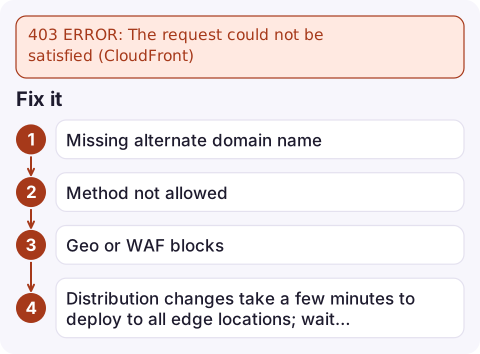
Fix it
- Missing alternate domain name: add
www.example.comto the distribution's alternate domain names and attach an ACM certificate fromus-east-1that covers it. Then point DNS at the distribution with an alias record. - Method not allowed: set the relevant behaviour to allow
GET, HEAD, OPTIONS, PUT, POST, PATCH, DELETE, and forward the headers, cookies and query strings your origin needs via an origin request policy. - Geo or WAF blocks: confirm the block is intended; for WAF, find the rule in the logs and add a scoped exception rather than disabling the web ACL.
- Distribution changes take a few minutes to deploy to all edge locations; wait for the status to become
Deployedbefore retesting.
Other "could not be satisfied" errors
The same page with 502, 503 or 504 means CloudFront could not get a good response from the origin: TLS problems between CloudFront and the origin (certificate name mismatch, unsupported protocols), an origin that is down or too slow, or a Lambda@Edge or CloudFront Functions error. Those are origin-side and usually show up in the distribution's 5xxErrorRate metric.
Questions
Why does CloudFront return 403 Bad request for my custom domain?
The domain is not listed as an alternate domain name on the distribution, or the attached certificate does not cover it. Add the name with a matching us-east-1 ACM certificate.
Why does CloudFront return 403 for POST requests?
The cache behaviour only allows GET and HEAD. Allow all HTTP methods on the behaviour that handles those paths.
Do I need to invalidate the cache after fixing a CloudFront 403?
Configuration fixes apply once the distribution finishes deploying. Invalidate only if an error response was cached for the affected paths.

A CloudFront 403 after a DNS or certificate change can take a whole site offline in minutes. CloudConsole, a phone app for AWS, is built to show CloudFront error-rate alarms on your phone so you notice before your users tell you.
Did it start after a deploy? What changed? on the app’s alarm screen lists the deploys and configuration changes from the hour before the alarm fired.
About the app → · Download on the App Store