 CloudConsole
CloudWatch alarm for CloudFront FunctionValidationErrors
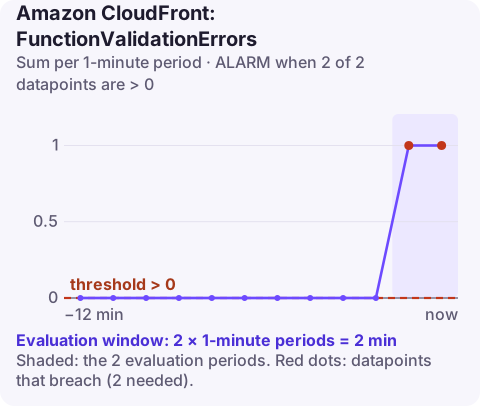
FunctionValidationErrors counts invocations where a CloudFront function ran but returned a request or response CloudFront could not accept, such as one with the Host header removed. AWS recommends alarming when the Sum is greater than 0 in 2 of 2 one-minute periods, in us-east-1, for each DistributionId and FunctionName.
Validation errors versus execution errors
CloudFront Functions have two separate failure metrics, and they need different fixes:
| Metric | The function... | Typical cause |
|---|---|---|
FunctionExecutionErrors | threw at runtime | A JavaScript bug, such as reading a property of undefined |
FunctionValidationErrors | finished, but its output broke CloudFront's rules | Removing or rewriting a header CloudFront needs, an invalid status code or response shape |
The textbook example: a viewer-request function that rebuilds the headers object and leaves out host. The JavaScript is fine, but CloudFront cannot route a request with no Host header, so the invocation is rejected and the viewer gets an error. The list of things a function may and may not change is in AWS's restrictions on edge functions.
Recommended alarm settings
| Setting | Value |
|---|---|
| Namespace | AWS/CloudFront |
| Metric | FunctionValidationErrors |
| Dimensions | DistributionId, FunctionName, Region=Global |
| Statistic | Sum |
| Period | 60 seconds |
| Datapoints to alarm | 2 |
| Evaluation periods | 2 |
| Comparison operator | GreaterThanThreshold |
| Threshold | 0.0 |
Per the CloudWatch recommended alarms list. Two minutes rather than five because validation errors come from deterministic code paths: if one request hits it, every request on that path will.
Create it
aws cloudwatch put-metric-alarm \
  --alarm-name cdn-url-rewrite-validation-errors \
  --namespace AWS/CloudFront \
  --metric-name FunctionValidationErrors \
  --dimensions Name=DistributionId,Value=E1A2B3C4D5E6F7 Name=FunctionName,Value=url-rewrite Name=Region,Value=Global \
  --statistic Sum \
  --period 60 \
  --evaluation-periods 2 \
  --datapoints-to-alarm 2 \
  --threshold 0 \
  --comparison-operator GreaterThanThreshold \
  --treat-missing-data notBreaching \
  --alarm-actions arn:aws:sns:us-east-1:123456789012:ops-alerts \
  --region us-east-1
Like every CloudFront metric, these are in us-east-1 and need Region=Global. A function attached to several distributions has one series per distribution; alarm on each one you care about.
Tuning
There is little to tune: the healthy value is zero, and any validation error means some viewers are not being served. If a known edge case produces an occasional error that you have accepted, fix the code instead of raising the threshold; a non-zero threshold here will hide the next real regression. Leave missing data as notBreaching.
When it fires
- Read the function logs. Function logs go to CloudWatch Logs in
us-east-1under/aws/cloudfront/function/url-rewrite; the validation message names what was wrong with the output. - Reproduce it with test-function against the development stage, using a saved event that matches the failing request:
aws cloudfront describe-function --name url-rewrite --query ETag aws cloudfront test-function --name url-rewrite --if-match ETVPDKIKX0DER \ --stage DEVELOPMENT --event-object fileb://viewer-request.json - Roll back if it started with a publish. Put the previous code back with
update-functionand publish it; there is no automatic version history to switch to. - Check which requests fail. Errors only on some paths usually mean a branch in the code that builds a response or rewrites headers differently.
Questions
What is a CloudFront function validation error?
The function ran without throwing, but the request or response it returned violates CloudFront's rules, for example a missing Host header or an invalid status code.
Where do I find CloudFront Functions logs?
In CloudWatch Logs in us-east-1, in the log group /aws/cloudfront/function/ followed by the function name.
Why does the alarm need only 2 datapoints?
Validation errors come from code that behaves the same way every time, so waiting longer adds no information.
Function bugs usually go out with a deploy and break a slice of traffic immediately. CloudConsole, a phone app for AWS, is built to show alarms like this with the function's recent log lines on a phone.
Did it start after a deploy? What changed? on the app’s alarm screen lists the deploys and configuration changes from the hour before the alarm fired.
About the app → · Download on the App Store