 CloudConsole
How to invalidate CloudFront cache
In the CloudFront console, open the distribution, go to the Invalidations tab, choose Create invalidation and enter paths such as /index.html or /*. From the CLI, run aws cloudfront create-invalidation with the distribution ID and the paths. Edge locations drop the cached copies, usually within minutes, and fetch fresh ones from the origin on the next request.
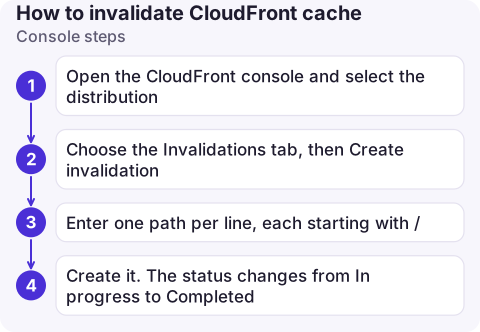
Console steps
- Open the CloudFront console and select the distribution.
- Choose the Invalidations tab, then Create invalidation.
- Enter one path per line, each starting with
/: for example/index.html,/css/*, or/*for everything. - Create it. The status changes from In progress to Completed.
CLI steps
# Find the distribution ID
aws cloudfront list-distributions \
  --query 'DistributionList.Items[].[Id,DomainName,Aliases.Items[0]]' --output table

# Invalidate two paths
aws cloudfront create-invalidation --distribution-id E2ABCDEFGHIJKL \
  --invalidation-batch '{"Paths":{"Quantity":2,"Items":["/index.html","/assets/app.js"]},"CallerReference":"deploy-2026-11-16-1015"}'

# Wait until it has finished (useful in deploy scripts)
aws cloudfront wait invalidation-completed \
  --distribution-id E2ABCDEFGHIJKL --id I2J3K4L5M6N7O8
The CLI also accepts a shorter form: --paths "/index.html" "/assets/app.js" in place of --invalidation-batch, with a caller reference generated for you. Quote paths containing * so your shell doesn't expand them. The invalidation ID for the wait command is in the create output (Invalidation.Id).
Paths, wildcards and cost
| Path | Invalidates |
|---|---|
/index.html | That one object (but not /; invalidate both if your root serves index.html) |
/images/* | Everything under /images/ |
/* | The whole distribution |
Pricing is per path requested, not per file: a monthly allowance of paths is free (1,000 at the time of writing), and each path after that is charged. A wildcard counts as one path, so /* is cheaper than listing 2,000 files individually. Paths are case-sensitive and must match how viewers request them, including query string handling.
Better than invalidating every deploy
- Versioned file names (
app.3f9c2b.js) for static assets: new deploys reference new names, so nothing needs invalidating and you can cache them for a long time. - Short TTLs on HTML, via
Cache-Controlheaders from the origin or the cache policy, so entry pages refresh quickly on their own. - Invalidate only the few un-versioned entry points (
/,/index.html) after each deploy. - When uploading with
aws s3 sync, set--cache-controlper file type: a long max-age for hashed assets and a short one for HTML, so the origin tells CloudFront how long to keep each file.
Still seeing old content?
- Browser or proxy cache. Invalidation clears CloudFront, not caches in front of it. Test with
curl -Iand look at thex-cacheandageheaders. - Wrong path.
/Index.htmlisn't/index.html; a missing leading slash is rejected. - The origin still serves the old file. Check the S3 object or origin response directly.
- Another distribution in front of the same origin, or a second CDN.
- Invalidation still running. Check it with
aws cloudfront get-invalidation --distribution-id E2ABCDEFGHIJKL --id I2J3K4L5M6N7O8before testing again.
Questions
How long does a CloudFront invalidation take?
Usually a few minutes until the status shows Completed, though it can take longer for large batches.
Does /* invalidation cost more?
No. A wildcard path counts as a single path for pricing, however many objects it matches.
Can I invalidate CloudFront from a deploy pipeline?
Yes. Run aws cloudfront create-invalidation after uploading new files, and optionally aws cloudfront wait invalidation-completed. The pipeline role needs cloudfront:CreateInvalidation on the distribution.

"The fix is deployed but users still see the old page" is a common call from someone on the move. CloudConsole, a phone app for AWS, is built to show distribution and origin health on your phone.
About the app → · Download on the App Store