 CloudConsole
CloudWatch alarm for DynamoDB AgeOfOldestUnreplicatedRecord
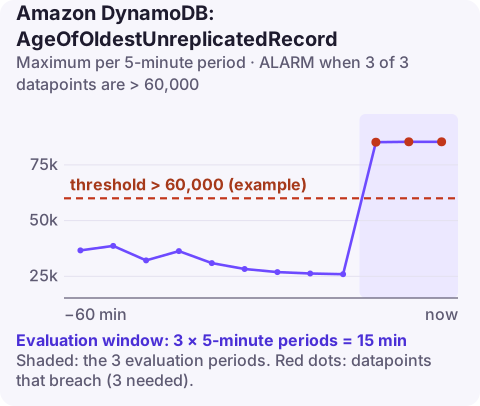
When a table streams changes into Kinesis Data Streams, AgeOfOldestUnreplicatedRecord is how long, in milliseconds, the oldest change has been waiting to be delivered. AWS recommends alarming on its Maximum per TableName and DelegatedOperation when it is above a threshold you choose for 3 of 3 five-minute periods.
What the metric measures
With Kinesis Data Streams for DynamoDB turned on, DynamoDB itself writes every item change into your Kinesis stream. In normal operation, records arrive within milliseconds and this metric stays tiny. It grows only when DynamoDB keeps failing to write to the stream, and those failures are nearly always caused by something on your side:
- Not enough shards. The stream cannot absorb the table's write rate, so Kinesis throttles DynamoDB's puts. ThrottledPutRecordCount rises at the same time.
- Permissions changed. Someone edited the stream's policy or its encryption key policy, and DynamoDB can no longer write to it.
- The stream was modified or deleted while the table was still sending to it.
Downstream consumers (analytics, search indexing, audit pipelines) see data later and later while this is happening.
Recommended alarm settings
| Setting | Value |
|---|---|
| Namespace | AWS/DynamoDB |
| Metric | AgeOfOldestUnreplicatedRecord |
| Dimensions | TableName, DelegatedOperation |
| Statistic | Maximum |
| Period | 300 seconds |
| Datapoints to alarm | 3 |
| Evaluation periods | 3 |
| Comparison operator | GreaterThanThreshold |
| Threshold | Depends on your situation: your maximum tolerable replication delay |
From the CloudWatch recommended alarms page. Confirm the DelegatedOperation value your account publishes with aws cloudwatch list-metrics --namespace AWS/DynamoDB --metric-name AgeOfOldestUnreplicatedRecord.
Choosing the threshold
Work back from the freshest data any consumer needs. If a search index must reflect changes within two minutes, alarm at around 60,000 ms so you have time to act before that promise is broken. If the stream only feeds a nightly analytics job, 15 minutes (900,000 ms) is plenty. Do not set it in the low hundreds of milliseconds: short retry delays during traffic bursts are normal and resolve themselves, and the 15-minute evaluation window already filters most of them.
Create it
# 60000 ms (1 minute) is an example; check the DelegatedOperation value with list-metrics
aws cloudwatch put-metric-alarm \
  --alarm-name orders-kinesis-replication-age \
  --namespace AWS/DynamoDB \
  --metric-name AgeOfOldestUnreplicatedRecord \
  --dimensions Name=TableName,Value=orders Name=DelegatedOperation,Value=PutRecords \
  --statistic Maximum \
  --period 300 \
  --evaluation-periods 3 \
  --datapoints-to-alarm 3 \
  --threshold 60000 \
  --comparison-operator GreaterThanThreshold \
  --treat-missing-data notBreaching \
  --alarm-actions arn:aws:sns:eu-west-2:123456789012:ops-alerts \
  --region eu-west-2
When it fires
- Check the stream destination status on the table:
A status other thanaws dynamodb describe-kinesis-streaming-destination --table-name ordersACTIVE, or an error description, explains most cases. - Look for throttling. If
ThrottledPutRecordCountis up, add shards to a provisioned stream or switch it to on-demand capacity mode. - Check permissions. Review recent changes to the stream's resource policy and its KMS key policy in CloudTrail.
- Watch it recover. Once the cause is fixed, DynamoDB works through the backlog and the age falls back to milliseconds; consumers will see a burst of delayed records.
Questions
What is a normal AgeOfOldestUnreplicatedRecord?
Milliseconds. Sustained values in seconds or minutes mean DynamoDB is repeatedly failing to write to the Kinesis stream.
Is this metric for DynamoDB Streams?
No. It applies to Kinesis Data Streams for DynamoDB, where DynamoDB writes changes into a Kinesis stream you own.
Does DynamoDB keep retrying unreplicated records?
Yes, for records that failed because of throttling or permissions. Records too large for Kinesis are skipped instead and counted in FailedToReplicateRecordCount.
Replication lag rarely needs instant action, but you do want to know before a consumer team notices stale data. CloudConsole, a phone app for AWS, is built to show the lag trend and the related throttling on a phone.
Did it start after a deploy? What changed? on the app’s alarm screen lists the deploys and configuration changes from the hour before the alarm fired.
About the app → · Download on the App Store