 CloudConsole
CloudWatch alarm for DynamoDB FailedToReplicateRecordCount
FailedToReplicateRecordCount counts item changes DynamoDB could not deliver to your Kinesis data stream and has skipped for good. AWS recommends alarming as soon as its Sum is above 0 in a single one-minute period, per TableName and DelegatedOperation, because each one is a change your consumers will never see.
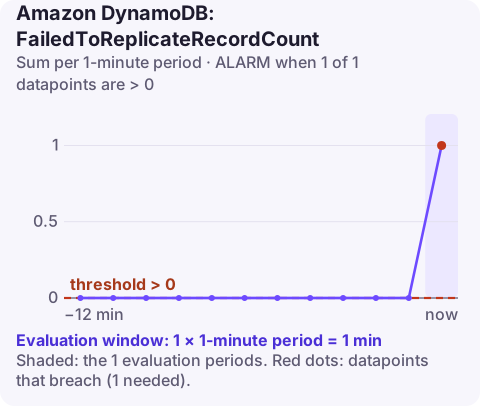
Why records fail permanently
Unlike throttling, which DynamoDB retries, this metric counts records that cannot be delivered at all and are therefore dropped from the stream. The main cause is size. A Kinesis record has a 1 MB limit, while a DynamoDB item can be up to 400 KB in its own storage format. When DynamoDB serialises a change for Kinesis, it writes the old and/or new item image as JSON, and some attribute types grow a lot in the process: Boolean and empty values take one byte in DynamoDB but several characters in JSON. An item a few tens of kilobytes in size, packed with thousands of such attributes, can therefore become a change record bigger than Kinesis allows.
After skipping a record, DynamoDB carries on with the next one, so the stream keeps flowing and the only trace is this metric.
Recommended alarm settings
| Setting | Value |
|---|---|
| Namespace | AWS/DynamoDB |
| Metric | FailedToReplicateRecordCount |
| Dimensions | TableName, DelegatedOperation |
| Statistic | Sum |
| Period | 60 seconds |
| Datapoints to alarm | 1 |
| Evaluation periods | 1 |
| Comparison operator | GreaterThanThreshold |
| Threshold | 0.0 |
As given on the CloudWatch recommended alarms page. A single datapoint is enough because there is no normal level of lost records.
Create it
# Confirm the DelegatedOperation value with:
# aws cloudwatch list-metrics --namespace AWS/DynamoDB --metric-name FailedToReplicateRecordCount
aws cloudwatch put-metric-alarm \
  --alarm-name orders-kinesis-failed-records \
  --namespace AWS/DynamoDB \
  --metric-name FailedToReplicateRecordCount \
  --dimensions Name=TableName,Value=orders Name=DelegatedOperation,Value=PutRecords \
  --statistic Sum \
  --period 60 \
  --evaluation-periods 1 \
  --datapoints-to-alarm 1 \
  --threshold 0 \
  --comparison-operator GreaterThanThreshold \
  --treat-missing-data notBreaching \
  --alarm-actions arn:aws:sns:eu-west-2:123456789012:ops-alerts \
  --region eu-west-2
Treat missing data as notBreaching: an empty minute means nothing failed.
Tuning
Keep the threshold at zero. If one table regularly produces oversized records and the consumers can tolerate it, it is still better to fix the data model than to raise the threshold: once the alarm accepts some loss, nobody will notice when it grows. Shrinking the stream record can also help; if your destination was configured to include both old and new images and consumers only need one, reducing what is sent makes each record smaller.
When it fires
- Accept that the records are gone from the stream. They will not be retried; consumers must be reconciled from the table itself.
- Identify the offending items. Look for very large items, or items with long lists or maps of Booleans, nulls or empty strings, written around the time of the alarm. Application logs that record item keys on write make this much easier.
- Change the data model so items stay well below the size that expands past 1 MB: move large blobs to S3 with a pointer in the item, or split wide items into several.
- Repair the consumer's copy by re-reading those keys from DynamoDB and pushing them through the pipeline, or by running a targeted export.
Questions
Does DynamoDB retry records that fail to replicate to Kinesis?
Not these. Records too large for Kinesis are skipped and counted here; DynamoDB continues with later records.
Why would a 40 KB DynamoDB item exceed Kinesis's 1 MB limit?
When the change is serialised as JSON for Kinesis, compact types such as Booleans and empty values expand several times over, so an item with very many of them can grow past 1 MB.
How do I recover the missing changes?
Read the affected items from the table and replay them into your downstream system; the stream itself will not contain them.
A skipped record is silent data loss in a downstream system, so it is worth knowing about the same day. CloudConsole, a phone app for AWS, is built to surface alarms like this on a phone so they do not wait in an inbox.
Did it start after a deploy? What changed? on the app’s alarm screen lists the deploys and configuration changes from the hour before the alarm fired.
About the app → · Download on the App Store