 CloudConsole
CloudWatch alarm for DynamoDB ReplicationLatency (global tables)
ReplicationLatency is how long, in milliseconds, it takes for a change written in one Region to appear in a global table replica in another. AWS recommends alarming on its Average per TableName and ReceivingRegion when it stays above a threshold you pick for 15 consecutive one-minute periods; lag over about three minutes is generally worth investigating.
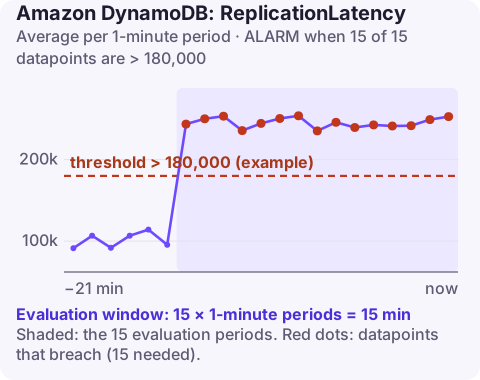
What the metric measures
In a global table, a write lands in one Region and is then copied asynchronously to every other replica. ReplicationLatency is published for each pair: the table name plus a ReceivingRegion dimension naming the destination. You find it in the Region where the writes happen, so for a table written in eu-west-2 and replicated to eu-west-1, look in eu-west-2 with ReceivingRegion=eu-west-1.
Under normal conditions the value is small and steady. Sustained growth means the replica is diverging: readers there see older data, and if you fail over to it, writes made in the lag window may not have arrived yet.
Recommended alarm settings
| Setting | Value |
|---|---|
| Namespace | AWS/DynamoDB |
| Metric | ReplicationLatency |
| Dimensions | TableName, ReceivingRegion |
| Statistic | Average |
| Period | 60 seconds |
| Datapoints to alarm | 15 |
| Evaluation periods | 15 |
| Comparison operator | GreaterThanThreshold |
| Threshold | Depends on your situation: set from your tolerance for stale replicas |
As published in the CloudWatch recommended alarms list. Fifteen breaching minutes in a row avoids alarms for short bursts that replication catches up with.
Choosing a threshold
- Start from your recovery point. If losing up to one minute of writes on a regional failover is acceptable, alarm at 60,000 ms so you know when that promise is at risk.
- Otherwise use AWS's guidance: 180,000 ms (three minutes) as a generic investigation point.
- Check your normal. Graph the Average for each receiving Region over two weeks. Replicas further away have higher normal latency; give each its own alarm and threshold.
An alarm with the Average statistic over one-minute periods can hide short spikes; that is intended here.
Create it
aws cloudwatch put-metric-alarm \
  --alarm-name orders-replication-to-eu-west-1 \
  --namespace AWS/DynamoDB \
  --metric-name ReplicationLatency \
  --dimensions Name=TableName,Value=orders Name=ReceivingRegion,Value=eu-west-1 \
  --statistic Average \
  --period 60 \
  --evaluation-periods 15 \
  --datapoints-to-alarm 15 \
  --threshold 180000 \
  --comparison-operator GreaterThanThreshold \
  --treat-missing-data notBreaching \
  --alarm-actions arn:aws:sns:eu-west-2:123456789012:ops-alerts \
  --region eu-west-2
When it fires
- Check AWS Health for either Region. A degraded receiving Region is a common cause, and AWS suggests moving read and write traffic to a healthy Region until it recovers.
- Check which global tables version you run:
On the legacy 2017.11.29 version, every replica must have the same write capacity; an under-provisioned replica cannot keep up.aws dynamodb describe-table --table-name orders --region eu-west-2 \ --query "Table.[GlobalTableVersion,Replicas[].[RegionName,ReplicaStatus]]" - Check write throttling in the receiving Region. Replicated writes consume capacity there too.
- Look at the write rate. A bulk load in the source Region increases lag everywhere until it finishes. Pace large imports.
- AWS's global tables best practices cover capacity settings.
Questions
Which Region do I find ReplicationLatency in?
The Region where writes originate, with the ReceivingRegion dimension naming the replica.
What is a normal ReplicationLatency for DynamoDB global tables?
It varies with distance and load; measure your own baseline. AWS treats sustained lag above about three minutes as a reason to investigate.
Does high replication latency lose data?
Not by itself; changes are still delivered. The risk is stale reads in the replica and missing recent writes if you fail over during the lag.
Replication lag is a regional problem that can need a failover decision. CloudConsole, a phone app for AWS, is built to show this alarm with the lag for each Region on a phone so that decision can start sooner.
Did it start after a deploy? What changed? on the app’s alarm screen lists the deploys and configuration changes from the hour before the alarm fired.
About the app → · Download on the App Store