 CloudConsole
CloudWatch alarm for Amazon ECS CPUReservation
CPUReservation is the share of CPU units registered by a cluster's EC2 container instances that running tasks have reserved. AWS recommends alarming when its Average for the ClusterName is above 80% for 5 of 5 one-minute periods, so you add instances before new tasks can no longer be placed. Skip it for Fargate-only clusters or clusters using capacity providers with managed scaling.
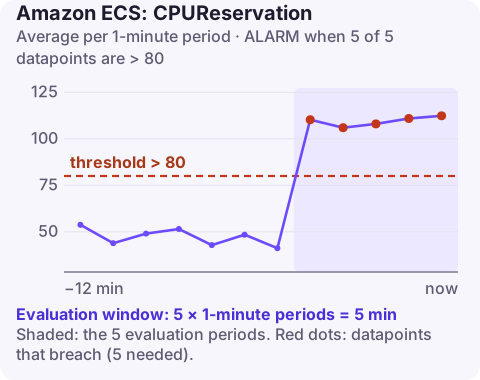
Reservation is not usage
When ECS places a task on an EC2 container instance, it subtracts the task's CPU units (1,024 per vCPU) from that instance's available pool, whether or not the task ever uses them. CPUReservation is the cluster-wide total of those reservations divided by the CPU registered by all container instances. A cluster can be at 95% reservation and 10% actual utilisation, and new tasks will still fail to place.
That is why this alarm exists: it predicts placement failures like "unable to place a task because no container instance met all of its requirements", rather than performance problems.
It does not apply to Fargate tasks, which do not run on your container instances. If the cluster uses an Auto Scaling group capacity provider with managed scaling, ECS scales instances using its own reservation target, and AWS does not recommend this alarm.
Recommended alarm settings
| Setting | Value |
|---|---|
| Namespace | AWS/ECS |
| Metric | CPUReservation |
| Dimensions | ClusterName |
| Statistic | Average |
| Period | 60 seconds |
| Datapoints to alarm | 5 |
| Evaluation periods | 5 |
| Comparison operator | GreaterThanThreshold |
| Threshold | 80.0 (percent) |
From AWS's CloudWatch recommended alarms list. AWS suggests 80% or lower, depending on the cluster.
Tuning
The right threshold depends on your largest task. If the biggest task needs 2,048 CPU units and instances register 4,096 each, a cluster can sit at 75% while every instance has less than 2,048 free, because reservations are spread out. Lower the threshold until the remaining headroom is larger than a couple of your biggest tasks. Deployments also matter: a rolling deploy with maximumPercent at 200 can briefly double a service's reservation, so leave room for your largest service to deploy.
Create it
aws cloudwatch put-metric-alarm \
  --alarm-name prod-cluster-cpu-reservation \
  --namespace AWS/ECS \
  --metric-name CPUReservation \
  --dimensions Name=ClusterName,Value=prod \
  --statistic Average \
  --period 60 \
  --evaluation-periods 5 \
  --datapoints-to-alarm 5 \
  --threshold 80 \
  --comparison-operator GreaterThanThreshold \
  --alarm-actions arn:aws:sns:eu-west-2:123456789012:ops-alerts \
  --region eu-west-2
When it fires
- Confirm free capacity per instance. Cluster totals hide fragmentation:
ARNS=$(aws ecs list-container-instances --cluster prod --query "containerInstanceArns" --output text) aws ecs describe-container-instances --cluster prod --container-instances $ARNS \ --query "containerInstances[].[ec2InstanceId,remainingResources[?name=='CPU'].integerValue|[0]]" \ --output table - Add capacity: raise the Auto Scaling group's desired count (set-desired-capacity), or move the cluster to a capacity provider with managed scaling so this is handled automatically.
- Right-size task definitions. Tasks reserving far more CPU than they use waste placement room; compare reservation with service CPUUtilization.
- Consider Fargate for services that do not need EC2-specific features.
Questions
What is the difference between CPUReservation and CPUUtilization in ECS?
CPUReservation is how much CPU running tasks have claimed on the cluster's instances. CPUUtilization is how much they actually use. Placement depends on reservation.
Does CPUReservation include Fargate tasks?
No. It covers tasks on EC2 container instances registered to the cluster.
Why do tasks fail to place below 100% reservation?
Free CPU is spread across instances. If no single instance has enough left for the task, placement fails even though the cluster total has room.
Placement failures usually appear during a deploy or a scale-out, often outside office hours. CloudConsole, a phone app for AWS, is built to show cluster reservation alarms and stuck deployments on a phone.
Did it start after a deploy? What changed? on the app’s alarm screen lists the deploys and configuration changes from the hour before the alarm fired.
About the app → · Download on the App Store