 CloudConsole
CloudWatch alarm: ECS instance_filesystem_utilization
Alarm on ECS/ContainerInsights instance_filesystem_utilization per InstanceId, ContainerInstanceId and ClusterName using the Average over 60 seconds, firing when it is above 90 for 5 of 5 minutes. It warns you that an EC2 container instance's disk is nearly full, which stops new tasks starting there and can break the ones already running.
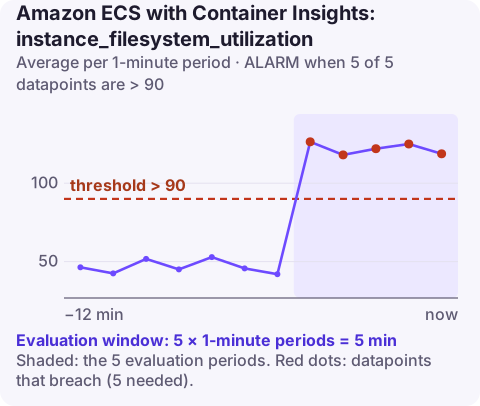
What the metric measures
instance_filesystem_utilization is the percentage of disk space in use on an EC2 container instance in an ECS cluster. It is an instance-level Container Insights metric, so it only applies to the EC2 launch type, and it needs the CloudWatch agent running on each instance (usually as a daemon service) in addition to Container Insights on the cluster. Fargate tasks have their own storage metrics instead.
On a long-lived container host, disk fills up from a few predictable places:
| Source | How it grows |
|---|---|
| Container images | Every deploy pulls a new image; old ones linger until the ECS agent's image cleanup removes them |
| Stopped containers | Their writable layers stay on disk for a while after the task stops |
| Container logs | With a local log driver such as json-file, logs accumulate on the host instead of going to CloudWatch Logs |
| Volumes and scratch data | Bind mounts and Docker volumes that applications write to and never clean |
Recommended alarm settings
| Setting | Recommended value |
|---|---|
| Namespace | ECS/ContainerInsights |
| Metric | instance_filesystem_utilization |
| Dimensions | InstanceId, ContainerInstanceId, ClusterName |
| Statistic | Average |
| Threshold | 90 |
| Period | 60 seconds |
| Datapoints to alarm | 5 |
| Evaluation periods | 5 |
| Comparison operator | GreaterThanThreshold |
Tuning the threshold
90 is a reasonable default, and anything between 90 and 95 is defensible. Where you land depends on two things you can measure:
- Size of the next pull. If your largest image is 3 GB on a 30 GB volume, a host at 92% cannot pull it. Keep the threshold low enough that one more image still fits.
- How fast it fills. Chart the metric for two weeks. A host that grows 1% a day gives you days at 90; a host that jumps 5% per deploy needs a lower threshold.
Some hosts run near full by design, for example with a large pre-populated cache. Give those their own, higher threshold rather than raising it for the whole fleet.
The dimensions identify a single instance. In a cluster backed by an Auto Scaling group, instances come and go, so per-instance alarms need to be created when an instance joins (for example from an EventBridge rule or your provisioning code) and removed when it leaves.
Create the alarm
aws cloudwatch put-metric-alarm \
  --alarm-name ecs-prod-i-0123456789abcdef0-disk \
  --alarm-description "Container instance disk above 90% for 5 minutes" \
  --namespace ECS/ContainerInsights \
  --metric-name instance_filesystem_utilization \
  --dimensions Name=InstanceId,Value=i-0123456789abcdef0 \
      Name=ContainerInstanceId,Value=0f1e2d3c4b5a69788796a5b4c3d2e1f0 \
      Name=ClusterName,Value=prod \
  --statistic Average \
  --period 60 \
  --evaluation-periods 5 \
  --datapoints-to-alarm 5 \
  --threshold 90 \
  --comparison-operator GreaterThanThreshold \
  --alarm-actions arn:aws:sns:eu-west-2:123456789012:oncall-alerts
All three dimensions must match exactly what Container Insights publishes. Copy the values from aws cloudwatch list-metrics --namespace ECS/ContainerInsights --metric-name instance_filesystem_utilization rather than typing them.
When it fires
- Get a shell on the instance with Session Manager and see what is using the space:
df -h, thendocker system dfto split images, containers and volumes. - Reclaim unused images and stopped containers.
docker image prune -aremoves every image not used by a running container. It is safe for running tasks but means the next task start has to pull again. - Find large logs under the Docker data directory if containers use a local log driver, and switch those task definitions to
awslogs. - Fix it for good: increase the volume size in the launch template, tune the ECS agent's cleanup settings (such as
ECS_IMAGE_CLEANUP_INTERVAL) in/etc/ecs/ecs.config, or simply replace the instance with a fresh one by draining it first.
If you skip this alarm, the first sign of a full disk is usually tasks failing to start on one host with errors about pulling or creating containers, which looks like an image problem but is not.
Questions
Why don't I see instance_filesystem_utilization for my cluster?
Instance-level metrics need Container Insights enabled and the CloudWatch agent deployed on the container instances. They are not produced for Fargate.
Is it safe to run docker system prune on an ECS container instance?
Pruning images and stopped containers does not affect running tasks, but pruning volumes can delete data that a stopped task expected to reuse. Check docker system df first and prune selectively.
A full disk on one container host fails quietly until a deploy tries to place tasks there. CloudConsole, a phone app for AWS, is built to surface alarms like this one, with the affected instance, on your phone.
Did it start after a deploy? What changed? on the app’s alarm screen lists the deploys and configuration changes from the hour before the alarm fired.
About the app → · Download on the App Store