 CloudConsole
CloudWatch alarm: ECS Container Insights RunningTaskCount
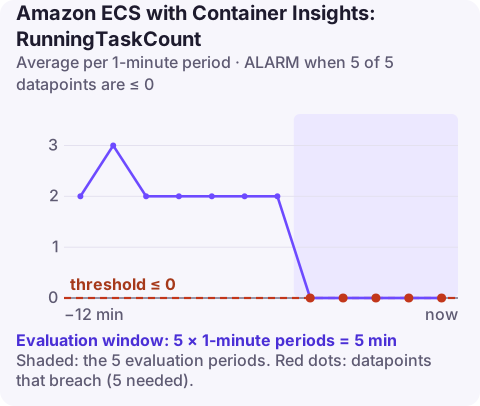
Alarm on ECS/ContainerInsights RunningTaskCount per ClusterName and ServiceName using the Average over 60 seconds, firing when it is less than or equal to 0 for 5 of 5 minutes. At that threshold it means the service has had no running tasks for five minutes, so it is effectively down; raise the threshold to catch a service running below the capacity it needs.
What the metric measures
RunningTaskCount is the number of a service's tasks in the RUNNING state. It comes from CloudWatch Container Insights, so it lives in the ECS/ContainerInsights namespace and only exists for clusters with Container Insights turned on:
aws ecs update-cluster-settings \
  --cluster prod \
  --settings name=containerInsights,value=enabled
This is the most direct availability signal ECS gives you. CPU and memory alarms go quiet when there are no tasks, because there is nothing left to measure; a task-count alarm is the one that notices. A service usually ends up with zero tasks because new ones keep failing to start: the image cannot be pulled, a secret cannot be read, the container exits on boot, or load balancer health checks fail and ECS replaces tasks in a loop.
Recommended alarm settings
| Setting | Recommended value |
|---|---|
| Namespace | ECS/ContainerInsights |
| Metric | RunningTaskCount |
| Dimensions | ClusterName, ServiceName |
| Statistic | Average |
| Threshold | 0 |
| Period | 60 seconds |
| Datapoints to alarm | 5 |
| Evaluation periods | 5 |
| Comparison operator | LessThanOrEqualToThreshold |
Choosing the threshold for your service
The default of 0 only catches a total outage. Most services need a minimum number of tasks to carry their traffic, and running at half capacity is an incident too. To pick a better value:
- Find the floor you need. If peak traffic needs at least 3 tasks, that is your floor.
- Set the threshold to one below it. With
LessThanOrEqualToThreshold, a threshold of 2 fires when 2 or fewer tasks are running. - Check it against deployments. With
minimumHealthyPercentbelow 100, ECS may stop old tasks before new ones start. With 4 desired and 50%, the count can legitimately dip to 2 during a rollout, so a threshold of 2 would fire on every deploy. Either keep the threshold below that dip or raiseminimumHealthyPercent. - Check it against scaling. The threshold must sit below the service's auto scaling minimum, or quiet periods will page you.
Five minutes at or below the threshold gives ECS time to replace a task that crashed once, so you are alerted to failures that keep happening, not to a single restart.
Create the alarm
aws cloudwatch put-metric-alarm \
  --alarm-name ecs-prod-api-no-running-tasks \
  --alarm-description "api service has had 0 running tasks for 5 minutes" \
  --namespace ECS/ContainerInsights \
  --metric-name RunningTaskCount \
  --dimensions Name=ClusterName,Value=prod Name=ServiceName,Value=api \
  --statistic Average \
  --period 60 \
  --evaluation-periods 5 \
  --datapoints-to-alarm 5 \
  --threshold 0 \
  --comparison-operator LessThanOrEqualToThreshold \
  --treat-missing-data breaching \
  --alarm-actions arn:aws:sns:eu-west-2:123456789012:oncall-alerts
--treat-missing-data breaching is an addition to AWS's settings. For an alarm that exists to detect absence, a gap in the data should count as bad news rather than leave the alarm sitting in INSUFFICIENT_DATA. For services you deliberately scale to zero, this alarm is the wrong tool altogether.
When it fires
- Compare desired and running counts, and read the events.
A desired count of 0 means someone, or a scaling policy, asked for this. Events such as unable to place a task point at capacity.aws ecs describe-services --cluster prod --services api \ --query 'services[0].{desired:desiredCount,running:runningCount,pending:pendingCount,events:events[:5].message}' - Read why tasks stopped. Use list-tasks with
--desired-status STOPPED, then describe-tasks and checkstoppedReasonand each container's exit code. - Match the reason to a fix: CannotPullContainerError, ResourceInitializationError, essential container exited or failed ELB health checks are the usual suspects.
- If the last deploy caused it, update the service back to the previous task definition revision rather than debugging under pressure.
Questions
How do I get a CloudWatch alarm for ECS task failure?
Alarm on RunningTaskCount falling to or below a minimum, as here. Failing tasks show up as a count that never reaches the desired number. For an alert on every individual stop, use an EventBridge rule on ECS task state change events instead.
Why can't I find RunningTaskCount in CloudWatch?
It is published only when Container Insights is enabled on the cluster, and it is in the ECS/ContainerInsights namespace rather than AWS/ECS.
Which other CloudWatch alarms are useful for ECS?
Service CPUUtilization and MemoryUtilization in AWS/ECS, plus error and latency alarms on the load balancer or Service Connect metrics for services that serve requests.
When a service drops to zero tasks, the stopped-task reason usually tells you the fix in one line. CloudConsole, a phone app for AWS, is built to show this alarm next to the service's events and stopped tasks on your phone.
Did it start after a deploy? What changed? on the app’s alarm screen lists the deploys and configuration changes from the hour before the alarm fired.
About the app → · Download on the App Store