 CloudConsole
CloudWatch alarm for ElastiCache ReplicationLag
ReplicationLag is how many seconds a read replica is behind its primary, reported by each replica node (CacheClusterId). AWS recommends alarming when its Average is above a threshold you set from your tolerance for stale reads, for 15 of 15 one-minute periods.
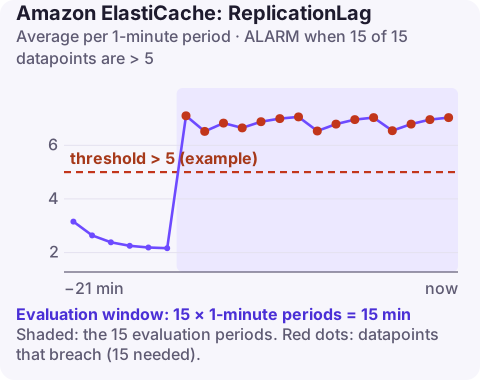
What replica lag means for your application
Replication from the primary to replicas is asynchronous. A replica normally applies changes within a fraction of a second, so the metric sits near zero. When it grows, two things go wrong:
- Stale reads. Clients reading through the reader endpoint see old values, for example a user changing a setting and seeing the old one on the next page.
- Data loss on failover. If the primary fails while a replica is behind, the writes in that gap are lost when the replica is promoted.
The metric is only published by replica nodes, so alarm on each replica's CacheClusterId, such as sessions-002. Cross-Region replication in a Global Datastore is reported by a separate metric, GlobalDatastoreReplicationLag, which needs its own alarm.
Recommended alarm settings
| Setting | Value |
|---|---|
| Namespace | AWS/ElastiCache |
| Metric | ReplicationLag |
| Dimensions | CacheClusterId |
| Statistic | Average |
| Period | 60 seconds |
| Datapoints to alarm | 15 |
| Evaluation periods | 15 |
| Comparison operator | GreaterThanThreshold |
| Threshold | Depends on your situation: what your reads can tolerate |
Per the CloudWatch recommended alarms page. Fifteen consecutive minutes keeps the alarm quiet during short write bursts that replicas catch up on.
Choosing a threshold
Start from how stale a read can be before users notice or correctness suffers. If the application reads its own writes from replicas, even one second can be visible; if replicas serve a leaderboard refreshed every minute, 30 seconds is tolerable. Then check history: graph the Average for each replica over two weeks, including your busiest write periods. Set the threshold above normal peaks but below the tolerance you identified. A typical result is between 1 and 10 seconds.
Create it
# 5 seconds is an example; this must be a replica node
aws cloudwatch put-metric-alarm \
  --alarm-name sessions-002-replication-lag \
  --namespace AWS/ElastiCache \
  --metric-name ReplicationLag \
  --dimensions Name=CacheClusterId,Value=sessions-002 \
  --statistic Average \
  --period 60 \
  --evaluation-periods 15 \
  --datapoints-to-alarm 15 \
  --threshold 5 \
  --comparison-operator GreaterThanThreshold \
  --alarm-actions arn:aws:sns:eu-west-2:123456789012:ops-alerts \
  --region eu-west-2
When it fires
- Is the primary writing unusually fast? Compare
SetTypeCmdson the primary with normal. A bulk load or a runaway writer is the usual reason. - Is the replica overloaded? High engine CPU on the replica from heavy reads leaves less time for applying changes; add replicas to spread reads.
- Was there a full resync? After a failover or network interruption, a replica may need to copy the whole dataset; lag is high until it finishes. Check recent events with
aws elasticache describe-events --source-type cache-cluster --duration 120. - Scale for writes: with cluster mode enabled, add shards so each primary handles fewer writes; otherwise move to a larger node type. AWS's scaling guide walks through it.
Questions
Where is ReplicationLag reported?
On replica nodes only. Use the replica's CacheClusterId as the dimension.
What is normal ElastiCache replication lag?
Usually well under a second. Sustained multi-second lag means the primary is writing faster than the replica can apply, or the replica is overloaded.
Can replication lag cause data loss?
Yes, if the primary fails while a replica is behind; writes not yet replicated are lost when that replica is promoted.
Replica lag is mostly a planning issue unless a failover is close. CloudConsole, a phone app for AWS, is built to show lag for each replica on a phone so you can judge the risk at a glance.
Did it start after a deploy? What changed? on the app’s alarm screen lists the deploys and configuration changes from the hour before the alarm fired.
About the app → · Download on the App Store