 CloudConsole
CloudWatch alarm: Lambda ClaimedAccountConcurrency
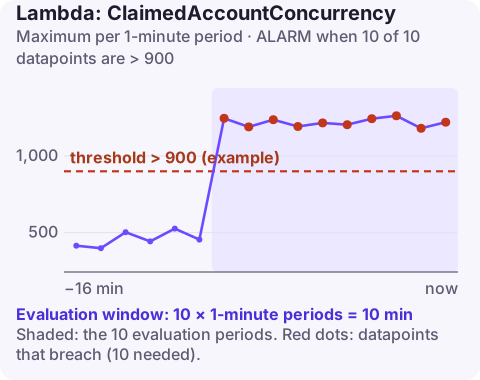
Alarm on AWS/Lambda ClaimedAccountConcurrency with no dimensions, using the Maximum over 60 seconds, firing when it is above about 90% of your Regional concurrency quota for 10 of 10 minutes. It counts concurrency that is in use or set aside by reserved and provisioned concurrency, so it shows how close the whole account is to throttling new invocations.
What "claimed" concurrency means
Lambda gives each account a concurrency quota per Region (1,000 by default, often raised). Two things eat into it: functions actually running, and capacity you have set aside. Reserved concurrency on a function and provisioned concurrency are removed from the shared pool whether or not they are busy.
ClaimedAccountConcurrency adds those together: unreserved concurrency in use plus all allocated reserved and provisioned concurrency. When it reaches the quota, any function without its own reservation is throttled. The older ConcurrentExecutions metric only counts running executions, so an account with 600 reserved but idle units can look half-empty there while being close to the limit here.
Recommended alarm settings
| Setting | Recommended value |
|---|---|
| Namespace | AWS/Lambda |
| Metric | ClaimedAccountConcurrency |
| Dimensions | None (account level) |
| Statistic | Maximum |
| Threshold | Depends on your situation (about 90% of your account quota) |
| Period | 60 seconds |
| Datapoints to alarm | 10 |
| Evaluation periods | 10 |
| Comparison operator | GreaterThanThreshold |
Working out the threshold
Check the real quota for the account and Region rather than assuming 1,000:
aws lambda get-account-settings \
  --region eu-west-2 \
  --query "AccountLimit.[ConcurrentExecutions,UnreservedConcurrentExecutions]"
Multiply ConcurrentExecutions by 0.9. For a quota of 1,000 that is 900; for 5,000 it is 4,500. Recalculate whenever the quota changes, or the alarm will be either silent or permanently firing.
Ten minutes of Maximum above the line filters out a single-minute burst while still giving warning, because the shared pool rarely drains in one step. If you also see throttles already, a second alarm at 80% gives more lead time.
Create the alarm
aws cloudwatch put-metric-alarm \
  --alarm-name lambda-account-claimed-concurrency-90pct \
  --alarm-description "Claimed Lambda concurrency above 90% of the 1000 quota in eu-west-2" \
  --namespace AWS/Lambda \
  --metric-name ClaimedAccountConcurrency \
  --statistic Maximum \
  --period 60 \
  --evaluation-periods 10 \
  --datapoints-to-alarm 10 \
  --threshold 900 \
  --comparison-operator GreaterThanThreshold \
  --alarm-actions arn:aws:sns:eu-west-2:123456789012:oncall-alerts \
  --region eu-west-2
When it fires
- Find the biggest claims. List reservations:
aws lambda list-functionsthenaws lambda get-function-concurrencyfor key functions, and check provisioned concurrency configurations. Idle reservations are the cheapest capacity to win back. - Find the busiest functions with a CloudWatch graph of
ConcurrentExecutionsper function, sorted by Maximum. - Reduce demand: concurrency equals request rate times duration, so speeding up a slow function frees concurrency directly. For stream and queue consumers, bigger batches mean fewer concurrent invocations.
- Request a quota increase through Service Quotas if the growth is genuine.
A common surprise: a single team setting a large reserved concurrency "just in case" can push claimed concurrency close to the quota on its own, throttling unrelated functions in the same account. Treat reservations as a shared budget and review them regularly.
Questions
How do I create a CloudWatch alarm for Lambda errors?
Alarm on the Errors metric per function with the Sum statistic over one-minute periods. ClaimedAccountConcurrency is a capacity alarm that helps you prevent the throttling errors that follow.
Can a CloudWatch alarm invoke a Lambda function?
Yes. Alarm actions can target a Lambda function directly, or you can send the alarm to an SNS topic that the function subscribes to.
Should I alarm on ClaimedAccountConcurrency or ConcurrentExecutions?
Use ClaimedAccountConcurrency for account-level capacity, especially if you use reserved or provisioned concurrency. ConcurrentExecutions per function is still useful for watching individual functions.
Account-wide concurrency limits tend to bite during traffic peaks, exactly when you are least likely to be at a desk. CloudConsole, a phone app for AWS, is built to show this alarm and the busiest functions from your phone.
Did it start after a deploy? What changed? on the app’s alarm screen lists the deploys and configuration changes from the hour before the alarm fired.
About the app → · Download on the App Store