 CloudConsole
CloudWatch alarm: Lambda ConcurrentExecutions
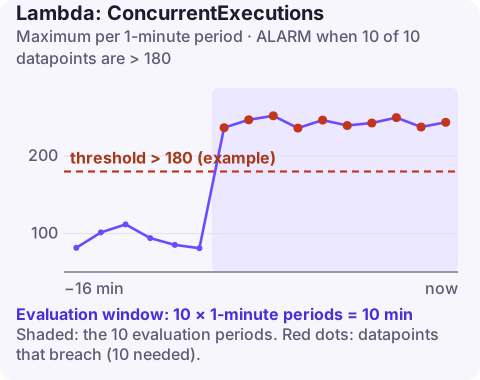
Alarm on AWS/Lambda ConcurrentExecutions with the FunctionName dimension, Maximum over 60 seconds, above about 90% of the relevant concurrency limit for 10 of 10 minutes. Use the function's reserved concurrency as the limit if it has one, otherwise the account quota; for account-wide headroom, ClaimedAccountConcurrency is now the better metric.
What the metric shows
ConcurrentExecutions is the number of instances of a function processing events at the same moment. Roughly, it equals requests per second multiplied by average duration in seconds: 200 requests a second at 0.5 seconds each needs about 100 concurrent executions. With the FunctionName dimension, the alarm watches one function.
A function is throttled when it reaches whichever limit applies to it: its own reserved concurrency, or, if it has none, whatever remains of the account's shared pool. AWS frames this alarm around the Regional quota, but per function it is most useful in two situations: functions with reserved concurrency, and functions large enough to consume most of the account on their own.
Concurrency also behaves differently per event source. SQS event source mappings scale pollers gradually and can be capped with a maximum concurrency setting on the mapping; Kinesis and DynamoDB streams use one concurrent invocation per shard by default, multiplied by the parallelisation factor. Knowing which applies tells you what normal peak concurrency should look like.
Recommended alarm settings
| Setting | Recommended value |
|---|---|
| Namespace | AWS/Lambda |
| Metric | ConcurrentExecutions |
| Dimensions | FunctionName |
| Statistic | Maximum |
| Threshold | Depends on your situation (about 90% of the applicable limit) |
| Period | 60 seconds |
| Datapoints to alarm | 10 |
| Evaluation periods | 10 |
| Comparison operator | GreaterThanThreshold |
Choosing the threshold
Pick the limit that will actually throttle this function, then take 90%:
# reserved concurrency for the function (empty output means none)
aws lambda get-function-concurrency --function-name image-resizer

# account quota and unreserved pool
aws lambda get-account-settings --query "AccountLimit"- Reserved concurrency of 200: threshold 180.
- No reservation, account quota 1,000: threshold 900 (and the function will be throttled earlier if others share the pool, so also watch account-level usage).
Maximum over ten minutes catches sustained pressure without reacting to a single burst.
Create the alarm
aws cloudwatch put-metric-alarm \
  --alarm-name lambda-image-resizer-concurrency-90pct \
  --alarm-description "image-resizer above 90% of its 200 reserved concurrency" \
  --namespace AWS/Lambda \
  --metric-name ConcurrentExecutions \
  --dimensions Name=FunctionName,Value=image-resizer \
  --statistic Maximum \
  --period 60 \
  --evaluation-periods 10 \
  --datapoints-to-alarm 10 \
  --threshold 180 \
  --comparison-operator GreaterThanThreshold \
  --treat-missing-data notBreaching \
  --alarm-actions arn:aws:sns:eu-west-2:123456789012:oncall-alerts
When it fires
- Is traffic up or duration up? Compare
InvocationsandDuration. Rising duration is often the cause, and fixing a slow dependency frees concurrency. - Check for throttles on the function (Throttles) to see whether you are already over.
- Adjust the limit: raise the reservation with put-function-concurrency, or request a higher account quota. Do not raise a reservation that exists to protect a downstream database without checking it can take the load.
- Batch more: for SQS or stream sources, larger batches reduce concurrent invocations.
Questions
What is the difference between ConcurrentExecutions and ClaimedAccountConcurrency?
ConcurrentExecutions counts running executions. ClaimedAccountConcurrency also includes reserved and provisioned concurrency that is set aside, so it shows how close the account really is to its limit.
What is the default Lambda concurrency limit?
By default an account has 1,000 concurrent executions per Region, shared across functions. Many accounts have a different value, so check with get-account-settings.
Concurrency alarms often fire during the very spike you were hoping to handle, so speed matters. CloudConsole, a phone app for AWS, is built to show the alarm and the function's concurrency trend on your phone.
Did it start after a deploy? What changed? on the app’s alarm screen lists the deploys and configuration changes from the hour before the alarm fired.
About the app → · Download on the App Store