 CloudConsole
CloudWatch alarm: Aurora AuroraVolumeBytesLeftTotal
Alarm on AWS/RDS AuroraVolumeBytesLeftTotal per DBClusterIdentifier with the Average over 60 seconds, firing when it is below your threshold for 5 of 5 minutes. Set the threshold to about 10–20% of the cluster volume's maximum size, in bytes, so you have time to act before the cluster hits its size limit and reports out-of-space errors.
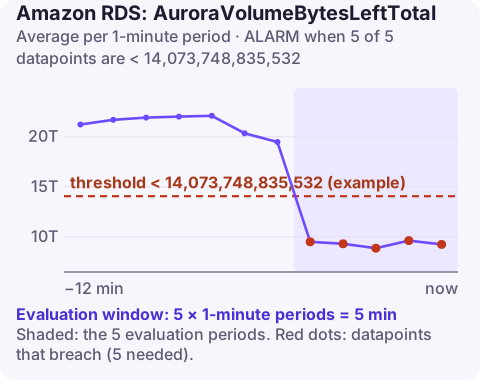
What the metric measures
Aurora's cluster volume grows automatically as you add data, so most teams never think about storage. But the volume has a maximum size, which depends on the engine version: 128 TiB on current versions and 64 TiB on some older ones. AuroraVolumeBytesLeftTotal is the room left before that limit. AWS recommends this alarm for Aurora MySQL.
Very few clusters approach the limit, but the ones that do are usually multi-tenant systems or event stores that never delete data, and by then the fix (archiving or splitting data) takes weeks. That is why the alarm uses a generous margin.
Watch this one on Aurora MySQL clusters in particular, which is where AWS recommends it.
Recommended alarm settings
| Setting | Recommended value |
|---|---|
| Namespace | AWS/RDS |
| Metric | AuroraVolumeBytesLeftTotal |
| Dimensions | DBClusterIdentifier |
| Statistic | Average |
| Threshold | Depends on your situation (10–20% of the volume limit, in bytes) |
| Period | 60 seconds |
| Datapoints to alarm | 5 |
| Evaluation periods | 5 |
| Comparison operator | LessThanThreshold |
Computing the threshold
- Confirm the limit for your engine version in the Aurora documentation (128 TiB or 64 TiB).
- Measure growth: chart
VolumeBytesUsedover several months and estimate bytes per week. - Pick 10–20%: for a 128 TiB limit, 10% is 12.8 TiB = 14,073,748,835,532 bytes; 20% is about 28 trillion bytes. Choose the larger value if growth is fast or unpredictable, so that the warning arrives months ahead.
Graph VolumeBytesUsed on a monthly view alongside this metric. If usage drops after a cleanup but this metric does not recover, the space has not been released back to the volume, which tells you the cleanup method (row deletes rather than drops) needs to change.
Create the alarm
aws cloudwatch put-metric-alarm \
  --alarm-name aurora-events-volume-space-left \
  --alarm-description "events-cluster has less than 10% of its 128 TiB volume left" \
  --namespace AWS/RDS \
  --metric-name AuroraVolumeBytesLeftTotal \
  --dimensions Name=DBClusterIdentifier,Value=events-cluster \
  --statistic Average \
  --period 60 \
  --evaluation-periods 5 \
  --datapoints-to-alarm 5 \
  --threshold 14073748835532 \
  --comparison-operator LessThanThreshold \
  --alarm-actions arn:aws:sns:eu-west-2:123456789012:oncall-alerts
When it fires
- Find the biggest tables: query
information_schema.tablesfor data and index length per schema. - Reclaim space: drop tables and schemas you no longer need. Aurora releases space from dropped tables and partitions back to the volume; deleting rows does not shrink the volume by itself.
- Archive: move old data to S3 (for example via snapshot export or your own pipeline) and drop the corresponding partitions.
- Split the workload across clusters if the dataset is genuinely heading for the limit.
- Check upgrade options if your cluster is on a version with the lower limit.
Questions
Which CloudWatch alarms should I set for RDS?
Start with CPUUtilization, FreeStorageSpace, FreeableMemory, DatabaseConnections and read and write latency per instance, then add engine-specific ones such as ReplicaLag, DBLoad or the Aurora metrics on this site.
Does deleting rows free Aurora storage?
Deleting rows makes space reusable within the table but does not shrink the volume. Dropping tables or partitions, or rebuilding a table, can release space back.
A volume-limit alarm is a planning problem rather than a midnight one, but it should not sit unread. CloudConsole, a phone app for AWS, is built to keep alarms like this visible on your phone.
Did it start after a deploy? What changed? on the app’s alarm screen lists the deploys and configuration changes from the hour before the alarm fired.
About the app → · Download on the App Store