 CloudConsole
CloudWatch alarm: RDS DatabaseConnections
AWS's published recommendation alarms on AWS/RDS DatabaseConnections per DBInstanceIdentifier with the Average over 60 seconds, firing when it is below 10 for 3 of 3 minutes. Read literally, that catches a database whose clients have stopped connecting; most teams also want a second alarm for the opposite problem, connections approaching max_connections.
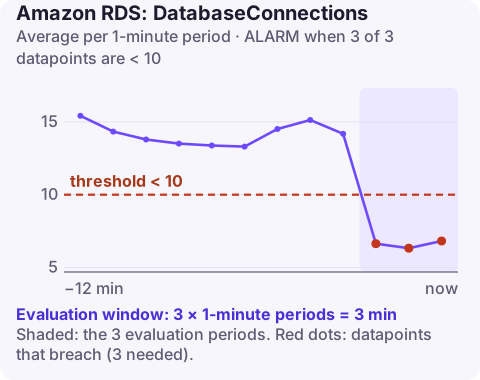
What the metric measures
DatabaseConnections is the number of client sessions connected to the DB instance. It includes your application pools, admin tools, monitoring agents and replication sessions. It does not show whether those connections are busy.
Two failure modes show up here. A sudden fall means applications can no longer reach the database, for example after a security group change, a DNS change, a credentials rotation that broke logins, or an application outage. A steady climb towards the engine's max_connections leads to "too many connections" errors for new clients.
Recommended alarm settings
| Setting | Recommended value |
|---|---|
| Namespace | AWS/RDS |
| Metric | DatabaseConnections |
| Dimensions | DBInstanceIdentifier |
| Statistic | Average |
| Threshold | 10.0 |
| Period | 60 seconds |
| Datapoints to alarm | 3 |
| Evaluation periods | 3 |
| Comparison operator | LessThanThreshold |
Note on the published text. In AWS's recommended-alarms list, the description and threshold explanation attached to this entry talk about IOPS burst credits (a burst balance below 10%), which belongs to a different metric. The settings above are reproduced as published; the explanation on this page is for DatabaseConnections itself.
Making the low-connections alarm useful
A threshold of 10 assumes your application normally keeps more than 10 connections open. Check that first: chart the Minimum of DatabaseConnections over two weeks. If quiet hours drop to 4 connections, this alarm will fire every night; set the threshold to around half of your normal quiet-time minimum instead. Use breaching for missing data so that an instance that stops reporting is treated like one with no connections.
Add a high-connections alarm. Find the limit with SHOW max_connections; on PostgreSQL or SELECT @@max_connections; on MySQL; on RDS it defaults to a formula based on instance memory. Alarm with the Maximum statistic at about 80% of it, using GreaterThanThreshold.
Create the alarm
aws cloudwatch put-metric-alarm \
  --alarm-name rds-orders-db-connections-low \
  --alarm-description "orders-db has fewer than 10 connections for 3 minutes" \
  --namespace AWS/RDS \
  --metric-name DatabaseConnections \
  --dimensions Name=DBInstanceIdentifier,Value=orders-db \
  --statistic Average \
  --period 60 \
  --evaluation-periods 3 \
  --datapoints-to-alarm 3 \
  --threshold 10 \
  --comparison-operator LessThanThreshold \
  --treat-missing-data breaching \
  --alarm-actions arn:aws:sns:eu-west-2:123456789012:oncall-alerts
When it fires
- Low connections: check the application's own errors first; then security groups, network ACLs, the endpoint DNS name the app uses, and recent secret rotations. Connection timed out and authentication errors in app logs point you to the right one.
- High connections: look for connection leaks (connections that never close), pools sized too large across many app instances, and Lambda functions each opening their own connection. RDS Proxy pools and shares connections across clients.
- Check the instance is available with describe-db-instances; a reboot or failover also drops all sessions briefly.
Questions
Which CloudWatch alarms should I set for RDS?
A practical baseline is CPUUtilization, FreeStorageSpace, FreeableMemory, DatabaseConnections, ReadLatency and WriteLatency, plus ReplicaLag on replicas. Aurora clusters add metrics such as DBLoad and BufferCacheHitRatio.
What is the maximum number of connections for RDS?
It is set by the max_connections parameter. By default RDS derives it from the instance class memory, so larger instances allow more connections; you can override it in a parameter group.
A sudden drop in database connections usually means the application side has broken, and the quickest check is whether the alarm lines up with a deploy or change. CloudConsole, a phone app for AWS, is built to show that kind of context on your phone.
Did it start after a deploy? What changed? on the app’s alarm screen lists the deploys and configuration changes from the hour before the alarm fired.
About the app → · Download on the App Store