 CloudConsole
CloudWatch alarm: Aurora EngineUptime (writer)
Alarm on AWS/RDS EngineUptime for DBClusterIdentifier with Role=WRITER, Average over 60 seconds, firing when it is less than or equal to 0 for 2 of 2 minutes. It is meant to catch the writer being down for longer than a normal failover, which usually completes in under a minute.
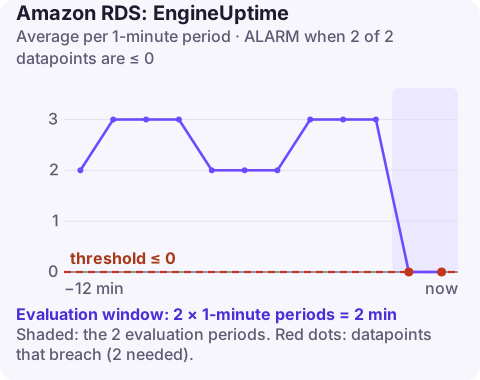
What the metric measures
EngineUptime is how long, in seconds, the database engine on an instance has been running. With DBClusterIdentifier and Role=WRITER, the series follows whichever instance is currently the cluster's writer. When the writer reboots, crashes, is upgraded, or the cluster fails over, the count resets.
A writer outage stops every write. With one or more Aurora Replicas in other Availability Zones, Aurora promotes a replica, and service is typically back within about 30 to 60 seconds. Without a replica, Aurora has to recover the writer itself, which takes longer. The two-minute window in this alarm is chosen to ignore a normal failover and catch one that drags on.
Because the role dimension follows the current writer, the series continues across failovers: after a failover you see the uptime of the newly promoted instance, which is usually well above zero because it was already running as a reader.
Recommended alarm settings
| Setting | Recommended value |
|---|---|
| Namespace | AWS/RDS |
| Metric | EngineUptime |
| Dimensions | DBClusterIdentifier, Role=WRITER |
| Statistic | Average |
| Threshold | 0.0 |
| Period | 60 seconds |
| Datapoints to alarm | 2 |
| Evaluation periods | 2 |
| Comparison operator | LessThanOrEqualToThreshold |
Getting the alarm to behave as intended
While the writer is down, it may publish no datapoints at all, and once it is back the uptime counter starts climbing from zero straight away. That means the published comparison only fires if a zero value is actually reported. Two adjustments make the alarm more dependable:
- Treat missing data as breaching, so two minutes with no writer data counts as downtime.
- Complement it with RDS event notifications for failover, reboot and failure categories, which tell you about every restart, including fast ones.
If you want to know about every writer restart rather than prolonged downtime, a separate alarm on a sudden drop in uptime (for example less than 300 seconds) does that.
Create the alarm
aws cloudwatch put-metric-alarm \
  --alarm-name aurora-orders-writer-down \
  --alarm-description "orders-cluster writer down for 2 minutes" \
  --namespace AWS/RDS \
  --metric-name EngineUptime \
  --dimensions Name=DBClusterIdentifier,Value=orders-cluster Name=Role,Value=WRITER \
  --statistic Average \
  --period 60 \
  --evaluation-periods 2 \
  --datapoints-to-alarm 2 \
  --threshold 0 \
  --comparison-operator LessThanOrEqualToThreshold \
  --treat-missing-data breaching \
  --alarm-actions arn:aws:sns:eu-west-2:123456789012:oncall-alerts
When it fires
- Check cluster status and events:
aws rds describe-events \ --source-type db-cluster \ --source-identifier orders-cluster \ --duration 60 - Confirm which instance is now writer and that applications use the cluster endpoint, not an instance endpoint, so they follow the failover.
- Look for the cause: maintenance, an out-of-memory restart, storage issues, or a manually triggered failover.
- Improve resilience if the cluster has no replica: add one in another AZ so future failures promote quickly. You can test with failover-db-cluster.
Questions
Which CloudWatch alarms should I set for RDS?
Start with CPUUtilization, FreeStorageSpace, FreeableMemory, DatabaseConnections and read and write latency per instance, then add engine-specific ones such as ReplicaLag, DBLoad or the Aurora metrics on this site.
How long does an Aurora failover take?
With an Aurora Replica available, service is typically restored in under 60 seconds and often under 30. Clusters without a replica take longer because the writer must be recovered or recreated.
A writer that does not come back after a failover is about as urgent as database alarms get. CloudConsole, a phone app for AWS, is built to show this alarm and the cluster's recent events on your phone.
Did it start after a deploy? What changed? on the app’s alarm screen lists the deploys and configuration changes from the hour before the alarm fired.
About the app → · Download on the App Store