 CloudConsole
CloudWatch alarm: RDS MaximumUsedTransactionIDs (PostgreSQL)
Alarm on AWS/RDS MaximumUsedTransactionIDs per DBInstanceIdentifier with the Average over 60 seconds, firing when it exceeds 1,000,000,000 in a single datapoint. It warns that PostgreSQL's oldest unfrozen transaction ID is far older than autovacuum normally allows, which, left alone, leads to transaction ID wraparound protection stopping writes.
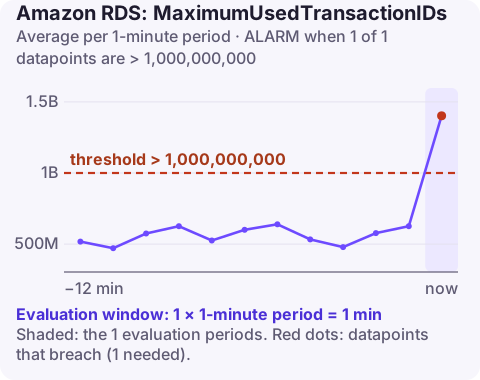
What the metric means
PostgreSQL labels rows with 32-bit transaction IDs. To reuse IDs safely, old rows must be "frozen" by vacuum. MaximumUsedTransactionIDs reports the age of the oldest unfrozen transaction ID on the instance, essentially age(datfrozenxid) for the worst database.
With default settings, autovacuum starts aggressive freezing once a table reaches 200 million (autovacuum_freeze_max_age), so a healthy database stays roughly under that. At 1 billion, something has been stopping vacuum from doing its job for a long time. The hard limit is a little over 2 billion; as it approaches, PostgreSQL first warns and then refuses new transactions to protect data. Recovering from that point is slow and painful.
Read replicas do not escape the problem: a long-running query on a PostgreSQL replica with hot_standby_feedback enabled can hold back cleanup on the primary, so include replicas in your search for old transactions.
Recommended alarm settings
| Setting | Recommended value |
|---|---|
| Namespace | AWS/RDS |
| Metric | MaximumUsedTransactionIDs |
| Dimensions | DBInstanceIdentifier |
| Statistic | Average |
| Threshold | 1.0E9 |
| Period | 60 seconds |
| Datapoints to alarm | 1 |
| Evaluation periods | 1 |
| Comparison operator | GreaterThanThreshold |
One datapoint is enough because the metric moves slowly and never "recovers" on its own; there is no noise to filter.
Create the alarm
aws cloudwatch put-metric-alarm \
  --alarm-name rds-orders-pg-xid-age-1b \
  --alarm-description "orders-pg transaction ID age above 1 billion" \
  --namespace AWS/RDS \
  --metric-name MaximumUsedTransactionIDs \
  --dimensions Name=DBInstanceIdentifier,Value=orders-pg \
  --statistic Average \
  --period 60 \
  --evaluation-periods 1 \
  --datapoints-to-alarm 1 \
  --threshold 1000000000 \
  --comparison-operator GreaterThanThreshold \
  --alarm-actions arn:aws:sns:eu-west-2:123456789012:oncall-alerts
Some teams add an earlier, low-urgency alarm around 500 million to catch problems weeks earlier.
What usually blocks freezing
| Blocker | How to see it |
|---|---|
| Long-running or idle-in-transaction sessions | pg_stat_activity ordered by xact_start |
| Inactive logical replication slots | pg_replication_slots where active is false |
| Orphaned prepared transactions | pg_prepared_xacts |
| Autovacuum too slow for very large tables | pg_stat_user_tables last autovacuum times; vacuum cost limits |
| Autovacuum disabled on a table | Table storage parameters |
When it fires
- Find the oldest database and tables:
SELECT datname, age(datfrozenxid) FROM pg_database ORDER BY 2 DESC; SELECT c.oid::regclass, age(c.relfrozenxid) FROM pg_class c WHERE c.relkind = 'r' ORDER BY 2 DESC LIMIT 10; - Remove the blocker from the table above: end old sessions, drop unused slots, commit or roll back prepared transactions.
- Freeze the worst tables with a manual
VACUUM (FREEZE, VERBOSE)during a quieter period; it is I/O heavy on large tables. - Prevent recurrence: set
idle_in_transaction_session_timeout, tune autovacuum for large tables, and monitor slots.
Questions
Which CloudWatch alarms should I set for RDS?
A practical baseline is CPUUtilization, FreeStorageSpace, FreeableMemory, DatabaseConnections, ReadLatency and WriteLatency, plus ReplicaLag on replicas. Aurora clusters add metrics such as DBLoad and BufferCacheHitRatio.
What is transaction ID wraparound in PostgreSQL?
Transaction IDs are 32-bit and eventually wrap. If old rows are not frozen in time, PostgreSQL stops accepting new transactions to avoid treating old data as being from the future.
This alarm is slow-moving, so it rarely needs a midnight fix, but it must not be forgotten. CloudConsole, a phone app for AWS, is built to keep alarms like this visible on your phone until someone deals with them.
Did it start after a deploy? What changed? on the app’s alarm screen lists the deploys and configuration changes from the hour before the alarm fired.
About the app → · Download on the App Store