 CloudConsole
CloudWatch alarm: Aurora RollbackSegmentHistoryListLength
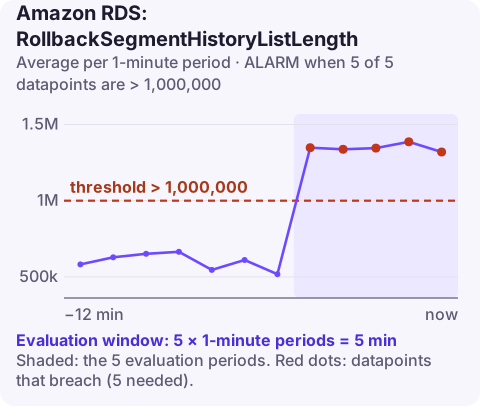
Alarm on AWS/RDS RollbackSegmentHistoryListLength per DBInstanceIdentifier with the Average over 60 seconds, firing when it is above 1,000,000 for 5 of 5 minutes. A long InnoDB history list means old row versions are piling up because purge cannot remove them, usually due to a long-open transaction, which slows queries and raises CPU.
What the history list is
InnoDB keeps old versions of changed rows (undo records) so that running transactions can still see a consistent snapshot. Once no transaction needs them, the purge process removes them. RollbackSegmentHistoryListLength is the number of these undo log entries waiting for purge, the same figure SHOW ENGINE INNODB STATUS calls "History list length".
The main reason it grows is a transaction that stays open: as long as a snapshot from an hour ago is alive, every change since then must be kept. Long reports run under REPEATABLE READ, a session that started a transaction and went idle, or a stuck application connection can all do this. Very high write rates can also outpace purge. In Aurora, read replicas share storage with the writer, so a long query on a reader can contribute too.
The cost: queries walk longer version chains, so reads get slower and CPU rises; and shutdowns or restarts take longer.
Recommended alarm settings
| Setting | Recommended value |
|---|---|
| Namespace | AWS/RDS |
| Metric | RollbackSegmentHistoryListLength |
| Dimensions | DBInstanceIdentifier |
| Statistic | Average |
| Threshold | 1000000.0 |
| Period | 60 seconds |
| Datapoints to alarm | 5 |
| Evaluation periods | 5 |
| Comparison operator | GreaterThanThreshold |
Tuning
One million gives time to investigate before performance suffers badly on most instances. If your system normally sits at a few thousand, a lower warning threshold (say 100,000) catches an open transaction much earlier. Heavy write workloads may hover higher; base any change on two weeks of history.
Pair it with a check on transaction age. The history list tells you that something is holding purge back; the oldest open transaction tells you what. Having both in the same notification shortens the investigation considerably.
Create the alarm
aws cloudwatch put-metric-alarm \
  --alarm-name aurora-orders-writer-history-list \
  --alarm-description "InnoDB history list length above 1 million on orders writer" \
  --namespace AWS/RDS \
  --metric-name RollbackSegmentHistoryListLength \
  --dimensions Name=DBInstanceIdentifier,Value=orders-cluster-instance-1 \
  --statistic Average \
  --period 60 \
  --evaluation-periods 5 \
  --datapoints-to-alarm 5 \
  --threshold 1000000 \
  --comparison-operator GreaterThanThreshold \
  --alarm-actions arn:aws:sns:eu-west-2:123456789012:oncall-alerts
When it fires
- Find old transactions on the writer and on every reader:
SELECT trx_id, trx_started, trx_mysql_thread_id, trx_query FROM information_schema.innodb_trx ORDER BY trx_started LIMIT 10; - End the culprit if it is safe (an abandoned session or a report that can be re-run). Large write transactions take time to roll back.
- Watch it fall: once the old snapshot is gone, purge catches up and the metric drops, sometimes over many minutes.
- Prevent it: keep transactions short, commit batch jobs in chunks, set timeouts for idle sessions, and run long analytical queries in a way that does not hold snapshots for hours.
Questions
Which CloudWatch alarms should I set for RDS?
Start with CPUUtilization, FreeStorageSpace, FreeableMemory, DatabaseConnections and read and write latency per instance, then add engine-specific ones such as ReplicaLag, DBLoad or the Aurora metrics on this site.
What is a normal InnoDB history list length?
It varies with workload, but healthy systems usually stay in the thousands or low tens of thousands. Millions indicate purge is blocked.
A long history list usually traces back to one forgotten transaction, which is quick to fix once you know. CloudConsole, a phone app for AWS, is built to show this alarm on your phone so you can start that check early.
Did it start after a deploy? What changed? on the app’s alarm screen lists the deploys and configuration changes from the hour before the alarm fired.
About the app → · Download on the App Store