 CloudConsole
CloudWatch alarm: SNS NumberOfNotificationsFilteredOut-InvalidAttributes
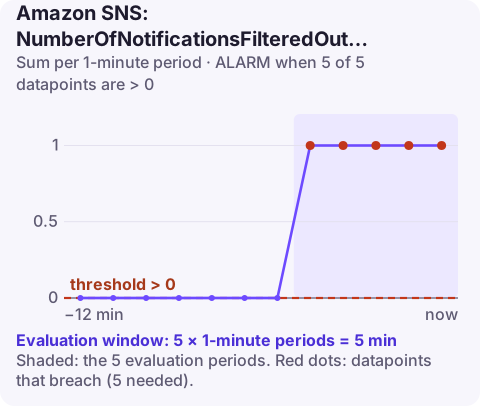
Alarm on AWS/SNS NumberOfNotificationsFilteredOut-InvalidAttributes per TopicName with the Sum over 60 seconds, firing when it is above 0 for 5 of 5 minutes. These are messages that a subscription's attribute-based filter policy could not evaluate because the message attributes themselves were malformed, which nearly always means a publisher bug.
Filtered out versus invalid
Subscription filter policies are meant to drop messages, so NumberOfNotificationsFilteredOut going up is usually fine. The -InvalidAttributes variant is different: SNS rejected the message for a subscription because its message attributes could not be evaluated, for example malformed attribute values or the wrong data type. The subscriber does not get the message, and nothing tells the publisher.
Common real causes: a publisher building the attribute map by hand and sending a number as a string type (or the reverse), a JSON-encoded array attribute that is not valid JSON, an SDK upgrade that changed how attributes are serialised, or a new publisher that never followed the attribute contract.
The metric only matters for topics with attribute-based filter policies on at least one subscription.
Recommended alarm settings
| Setting | Recommended value |
|---|---|
| Namespace | AWS/SNS |
| Metric | NumberOfNotificationsFilteredOut-InvalidAttributes |
| Dimensions | TopicName |
| Statistic | Sum |
| Threshold | 0.0 |
| Period | 60 seconds |
| Datapoints to alarm | 5 |
| Evaluation periods | 5 |
| Comparison operator | GreaterThanThreshold |
With 5 of 5 one-minute datapoints, the alarm needs invalid messages in every minute for five minutes. A publisher that only sends occasionally can break without ever tripping it; for low-volume topics use 1 of 1, since invalid attributes are never expected.
Tuning and related metrics
There is no normal level of invalid attributes, so tuning is about the window, not the threshold. On busy topics the 5-of-5 window is fine; on quiet ones, use 1 of 1 or a longer period such as five minutes, so a single bad publish still produces a datapoint above zero.
Graph the metric next to NumberOfNotificationsFilteredOut and NumberOfNotificationsDelivered. A rise in invalid attributes with a matching fall in deliveries confirms subscribers are missing messages; a rise with no change in deliveries suggests the affected subscription receives little traffic anyway.
Create the alarm
aws cloudwatch put-metric-alarm \
  --alarm-name sns-order-events-invalid-attributes \
  --alarm-description "Messages on order-events with invalid attributes for filtering" \
  --namespace AWS/SNS \
  --metric-name NumberOfNotificationsFilteredOut-InvalidAttributes \
  --dimensions Name=TopicName,Value=order-events \
  --statistic Sum \
  --period 60 \
  --evaluation-periods 5 \
  --datapoints-to-alarm 5 \
  --threshold 0 \
  --comparison-operator GreaterThanThreshold \
  --treat-missing-data notBreaching \
  --alarm-actions arn:aws:sns:eu-west-2:123456789012:oncall-alerts
When it fires
- Identify the publisher. If several services publish to the topic, check which deployed recently; CloudTrail does not log message content, so application logs are the best source.
- Capture an example: temporarily subscribe an SQS queue without a filter policy and inspect the
MessageAttributesof incoming messages. - Compare with the filter policies on the subscriptions:
aws sns get-subscription-attributes \ --subscription-arn arn:aws:sns:eu-west-2:123456789012:order-events:0123abcd-4567-89ef-0123-456789abcdef \ --query "Attributes.FilterPolicy" - Fix the publisher to send correctly typed attributes, and consider validating attributes in a shared client library.
Questions
What does a CloudWatch alarm SNS message look like?
The message body is JSON with fields such as AlarmName, AlarmDescription, NewStateValue, NewStateReason, OldStateValue, StateChangeTime, Region and a Trigger object describing the metric, statistic and threshold.
Is NumberOfNotificationsFilteredOut a problem?
Usually not; it counts messages that simply did not match a filter policy. The -InvalidAttributes and -InvalidMessageBody variants indicate malformed messages and are worth alarming on.
Invalid attributes mean a subscriber is quietly missing messages, which usually traces back to a recent publisher change. CloudConsole, a phone app for AWS, is built to show this alarm with its start time on your phone so you can match it to a deploy.
Did it start after a deploy? What changed? on the app’s alarm screen lists the deploys and configuration changes from the hour before the alarm fired.
About the app → · Download on the App Store