 CloudConsole
CloudWatch alarm: SNS NumberOfNotificationsFilteredOut-InvalidMessageBody
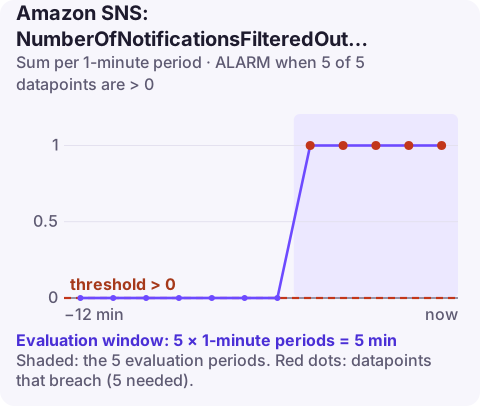
Alarm on AWS/SNS NumberOfNotificationsFilteredOut-InvalidMessageBody per TopicName, Sum over 60 seconds, above 0 for 5 consecutive minutes. It fires when subscriptions that filter on the message body receive messages whose body cannot be evaluated, typically because it is not valid JSON, so those subscribers silently miss them.
When this metric applies
SNS filter policies can look at message attributes or, when the subscription's FilterPolicyScope is MessageBody, at the JSON payload itself. Payload-based filtering only works if the body is a JSON object. A message whose body is plain text, truncated JSON, or JSON that is not an object cannot be matched, and SNS counts it here instead of delivering it.
So this metric is only ever non-zero for topics with at least one payload-filtering subscription. Typical causes: a publisher that sends a plain string (an error message, a CSV line) to a topic that otherwise carries JSON; double-encoded JSON, where the body is a JSON string containing JSON; a publisher wrapping the payload with extra text; or a message body exceeding what the publisher intended because of truncation in logging middleware.
Recommended alarm settings
| Setting | Recommended value |
|---|---|
| Namespace | AWS/SNS |
| Metric | NumberOfNotificationsFilteredOut-InvalidMessageBody |
| Dimensions | TopicName |
| Statistic | Sum |
| Threshold | 0.0 |
| Period | 60 seconds |
| Datapoints to alarm | 5 |
| Evaluation periods | 5 |
| Comparison operator | GreaterThanThreshold |
Invalid bodies are not expected in a healthy system, hence a threshold of 0. Note that five consecutive minutes are required; for topics that receive a few messages an hour, switch to 1 of 1 so a single bad message is caught.
Tuning and prevention
As with invalid attributes, the threshold stays at zero and the window is what you adjust. For topics that mix payload formats on purpose, the better fix is to split them into separate topics, or to switch the affected subscriptions to attribute-based filtering, rather than living with a permanently firing alarm.
A cheap prevention step is to validate the body as JSON in the publishing code or shared client library before calling Publish, and to fail loudly there. A publisher that rejects its own malformed output is far easier to debug than a subscriber that silently receives nothing.
Create the alarm
aws cloudwatch put-metric-alarm \
  --alarm-name sns-order-events-invalid-body \
  --alarm-description "Messages on order-events with bodies that payload filters cannot parse" \
  --namespace AWS/SNS \
  --metric-name NumberOfNotificationsFilteredOut-InvalidMessageBody \
  --dimensions Name=TopicName,Value=order-events \
  --statistic Sum \
  --period 60 \
  --evaluation-periods 5 \
  --datapoints-to-alarm 5 \
  --threshold 0 \
  --comparison-operator GreaterThanThreshold \
  --treat-missing-data notBreaching \
  --alarm-actions arn:aws:sns:eu-west-2:123456789012:oncall-alerts
When it fires
- Find which subscriptions filter on the body: check
FilterPolicyScopewithaws sns get-subscription-attributesfor each subscription on the topic. - Capture an offending message by subscribing a temporary SQS queue without a filter and inspecting bodies that are not JSON objects.
- Trace the publisher from the content and recent deploys; fix the serialisation (send an object, encode once).
- Decide about missed messages: they were not delivered to the filtering subscribers; if they matter, re-publish them once fixed.
Questions
How do I send a CloudWatch alarm to an SNS topic?
Add the topic ARN as an alarm action (--alarm-actions on put-metric-alarm, or Notification in the console). The topic's access policy must allow CloudWatch to publish, which the default policy does for alarms in the same account.
Can SNS filter on the message body?
Yes. Set the subscription's FilterPolicyScope to MessageBody and write the filter policy against the JSON payload. The body must be valid JSON for this to work.
Malformed messages are a quiet failure: no errors, just subscribers that stop seeing some events. CloudConsole, a phone app for AWS, is built to show alarms like this on your phone with enough context to know which topic to look at.
Did it start after a deploy? What changed? on the app’s alarm screen lists the deploys and configuration changes from the hour before the alarm fired.
About the app → · Download on the App Store