 CloudConsole
CloudWatch alarm: SNS SMSMonthToDateSpentUSD
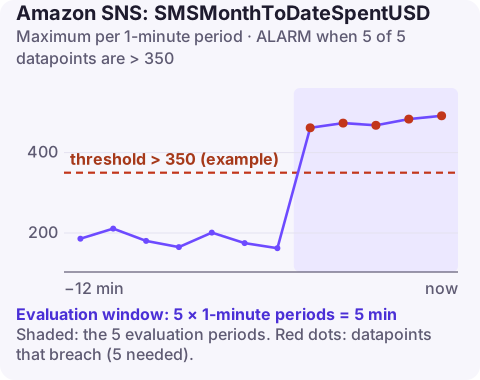
Alarm on AWS/SNS SMSMonthToDateSpentUSD using the Maximum over 60 seconds, firing when it is above your chosen threshold for 5 of 5 minutes. Pick a value comfortably below your account's monthly SMS spend limit, because once spending reaches that limit SNS stops sending text messages until the next month or a quota increase.
What the metric tracks
SMSMonthToDateSpentUSD is how much, in US dollars, your account has spent sending SMS through SNS since the start of the current month. It resets at the start of each month.
It matters because of the monthly spend limit. New accounts start with a very low SMS spending quota (1 USD by default), and even raised quotas are a hard ceiling: when the month-to-date spend reaches the limit, SNS stops delivering SMS. If you use SMS for one-time passcodes or alerts, that is an outage for logins or on-call notifications.
Spend jumps when message volume grows, when messages go to countries with higher prices, or when someone abuses a sign-up form to send passcodes to premium-rate numbers (SMS pumping).
Recommended alarm settings
| Setting | Recommended value |
|---|---|
| Namespace | AWS/SNS |
| Metric | SMSMonthToDateSpentUSD |
| Dimensions | TopicName |
| Statistic | Maximum |
| Threshold | Depends on your situation (a value below your spend limit) |
| Period | 60 seconds |
| Datapoints to alarm | 5 |
| Evaluation periods | 5 |
| Comparison operator | GreaterThanThreshold |
The dimension is reproduced as published. SMS spend is tracked for the account, so confirm which dimensions your account emits with aws cloudwatch list-metrics --namespace AWS/SNS --metric-name SMSMonthToDateSpentUSD; if the metric appears without dimensions, drop --dimensions from the command below.
Choosing the threshold
aws sns get-sms-attributes --attributes MonthlySpendLimitTake your monthly limit and decide how much warning you need to get an increase approved, which goes through AWS Support and is not instant. With a 500 USD limit and typical spend of 10 USD a day, a threshold of 350 gives about two weeks. Consider a second, earlier alarm that compares spend with the day of the month, so a sudden spike is caught even early in the month.
Create the alarm
aws cloudwatch put-metric-alarm \
  --alarm-name sns-sms-spend-near-limit \
  --alarm-description "SMS month-to-date spend above 350 USD of a 500 USD limit" \
  --namespace AWS/SNS \
  --metric-name SMSMonthToDateSpentUSD \
  --dimensions Name=TopicName,Value=otp-sms \
  --statistic Maximum \
  --period 60 \
  --evaluation-periods 5 \
  --datapoints-to-alarm 5 \
  --threshold 350 \
  --comparison-operator GreaterThanThreshold \
  --alarm-actions arn:aws:sns:eu-west-2:123456789012:oncall-alerts
When it fires
- Check whether the spend is legitimate. Look at delivery logs or usage reports for destination countries and volumes. A surge to unusual countries suggests SMS pumping; add rate limits and bot protection to whatever triggers SMS.
- Request a spend limit increase early if growth is genuine.
- Raise the account setting once the quota is approved, up to the approved amount, with
aws sns set-sms-attributes --attributes MonthlySpendLimit=1000. - Have a fallback for critical messages (email or authenticator apps) in case the limit is hit.
Questions
How do I send a CloudWatch alarm to an SNS topic?
Add the topic ARN as an alarm action (--alarm-actions on put-metric-alarm, or Notification in the console). The topic's access policy must allow CloudWatch to publish, which the default policy does for alarms in the same account.
What happens when the SNS SMS spend limit is reached?
SNS stops sending SMS messages for the rest of the month unless the limit is raised. Other SNS deliveries are unaffected.
An SMS spend alarm is something to act on within days, not minutes, but it should not be missed. CloudConsole, a phone app for AWS, is built to show alarms and cost signals on your phone.
Did it start after a deploy? What changed? on the app’s alarm screen lists the deploys and configuration changes from the hour before the alarm fired.
About the app → · Download on the App Store