 CloudConsole
CloudWatch alarm: SNS SMSSuccessRate
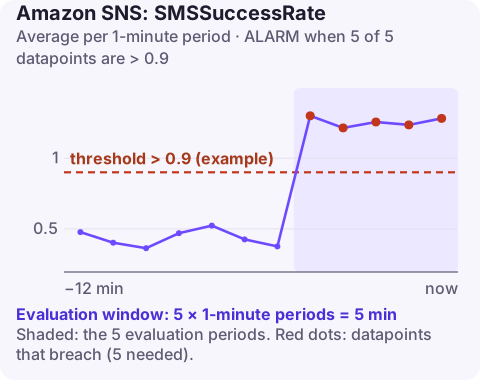
Alarm on AWS/SNS SMSSuccessRate with the Average over 60 seconds for 5 of 5 minutes, using a threshold that matches your tolerance for failed text messages. The metric is a delivery success ratio, so in practice you want the alarm to fire when it drops below your threshold, for example under 0.9.
What the metric measures
SMSSuccessRate is the share of SMS messages SNS sent that were successfully delivered, as a value between 0 and 1. A drop means texts are not arriving: one-time passcodes failing, alerts not reaching on-call staff, customer notifications lost.
Typical causes: carrier filtering in particular countries, sender ID or origination number requirements not met for a destination, invalid or landline numbers in your data, opt-outs, a burst of fraudulent sign-ups to unreachable numbers, and the monthly spend limit being reached (see SMSMonthToDateSpentUSD).
Final delivery status depends on carrier receipts, which can arrive some time after the send, so very recent minutes may not yet reflect every outcome. That is another reason to avoid an over-sensitive window.
Recommended alarm settings
| Setting | Recommended value |
|---|---|
| Namespace | AWS/SNS |
| Metric | SMSSuccessRate |
| Dimensions | TopicName |
| Statistic | Average |
| Threshold | Depends on your situation (your tolerance for failed SMS) |
| Period | 60 seconds |
| Datapoints to alarm | 5 |
| Evaluation periods | 5 |
| Comparison operator | GreaterThanThreshold (as published; see below) |
Operator gotcha. AWS's published entry lists GreaterThanThreshold. For a success rate, that would fire while things are going well. Since the goal is to detect failing deliveries, the command below uses LessThanThreshold; all other settings are as published. As with the spend metric, confirm the dimensions your account emits with list-metrics before relying on TopicName.
Choosing the threshold
Look at two to four weeks of the metric. Delivery rates vary by country and carrier, so a global average of 0.95 may be normal for you. Set the threshold a few points below your normal low, for example 0.9, and lower still if you send mainly to countries with lower delivery rates. If SMS volume is small, five one-minute datapoints may be sparse; a longer period gives a steadier average.
Create the alarm
aws cloudwatch put-metric-alarm \
  --alarm-name sns-sms-success-rate-low \
  --alarm-description "SMS delivery success rate below 90% for 5 minutes" \
  --namespace AWS/SNS \
  --metric-name SMSSuccessRate \
  --dimensions Name=TopicName,Value=otp-sms \
  --statistic Average \
  --period 60 \
  --evaluation-periods 5 \
  --datapoints-to-alarm 5 \
  --threshold 0.9 \
  --comparison-operator LessThanThreshold \
  --alarm-actions arn:aws:sns:eu-west-2:123456789012:oncall-alerts
When it fires
- Turn on SMS delivery status logging if it is not already on, so each delivery attempt writes a log with its provider response.
- Group failures by country and reason with Logs Insights; a single country failing points at carrier or registration requirements.
- Check spend: a reached spend limit stops all SMS.
- Check for abuse: a sudden rise in sends to unusual prefixes often comes with a low success rate.
Questions
What does a CloudWatch alarm SNS message look like?
The message body is JSON with fields such as AlarmName, AlarmDescription, NewStateValue, NewStateReason, OldStateValue, StateChangeTime, Region and a Trigger object describing the metric, statistic and threshold.
Why is my SNS SMS success rate low?
Common reasons are carrier filtering, missing sender registration for a country, invalid numbers, and reaching the monthly spend limit. Delivery status logs give the per-message reason.
If SMS is how your on-call team gets paged, a falling success rate deserves a second channel. CloudConsole, a phone app for AWS, is built to show CloudWatch alarms in an app, which is one more place to see them.
Did it start after a deploy? What changed? on the app’s alarm screen lists the deploys and configuration changes from the hour before the alarm fired.
About the app → · Download on the App Store