 CloudConsole
aws ec2 reboot-instances
aws ec2 reboot-instances --instance-ids i-0123456789abcdef0 queues an operating-system reboot. The instance stays on the same host and keeps its public IP, instance store data and billing period; if the OS will not shut down cleanly within a few minutes, EC2 forces a hard reboot.
What the command does
reboot-instances is the API equivalent of running sudo reboot, except it works when you cannot log in. EC2 signals the guest OS to restart; the instance never leaves the running state, so you will not see stopping or pending in describe-instances.
Because it stays on the same physical host, a reboot does not fix hardware or host problems. If the system status check is failing, you need a stop and start so the instance can move.
Syntax
aws ec2 reboot-instances --instance-ids i-0123456789abcdef0 [i-0fedcba9876543210 ...] [--dry-run]On success the command prints nothing at all. That catches people out: no output and exit code 0 means the reboot request was accepted.
Worked examples
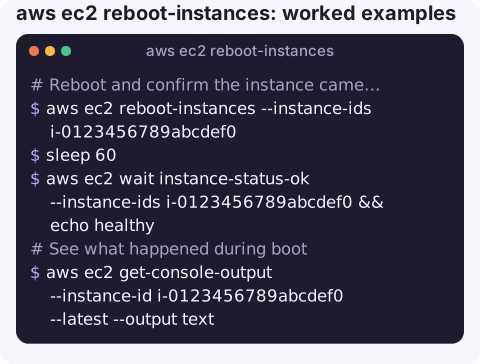
Reboot and confirm the instance came back healthy:
aws ec2 reboot-instances --instance-ids i-0123456789abcdef0
sleep 60
aws ec2 wait instance-status-ok --instance-ids i-0123456789abcdef0 && echo healthy
The pause matters: immediately after the request, status checks may still report the pre-reboot result, so the waiter can return before the reboot has even happened.
See what happened during boot if it does not come back:
aws ec2 get-console-output --instance-id i-0123456789abcdef0 --latest --output textReboot a group of instances by tag (one at a time keeps a service available):
for id in $(aws ec2 describe-instances \
    --filters "Name=tag:Role,Values=worker" "Name=instance-state-name,Values=running" \
    --query "Reservations[].Instances[].InstanceId" --output text); do
  aws ec2 reboot-instances --instance-ids "$id"
  sleep 60
  aws ec2 wait instance-status-ok --instance-ids "$id"
done
Confirm who rebooted an instance using CloudTrail:
aws cloudtrail lookup-events \
  --lookup-attributes AttributeKey=EventName,AttributeValue=RebootInstances \
  --query "Events[].[EventTime,Username]" --output table
Reboot vs stop/start
| reboot-instances | stop + start | |
|---|---|---|
| Physical host | Same | Usually different |
| Public IPv4 (non-Elastic) | Kept | Changes |
| Instance store data | Kept | Lost |
| Fixes failed system status check | No | Usually |
| Billing | Continues uninterrupted | Stops, then restarts with a new minimum period |
| Instance type change possible | No | Yes, while stopped |
Gotchas
- A hung kernel may ignore the signal. EC2 falls back to a hard reboot after a few minutes, so be patient before escalating to stop/start.
- Load balancer health checks will fail briefly. Expect targets to go unhealthy during the reboot; deregister first if you need zero errors.
- A failing instance status check (kernel panic, full disk, bad fstab) often comes straight back after a reboot. Read the console output before retrying.
- Termination and stop protection do not block reboots. They only guard against terminate and stop.
- Only API reboots are in CloudTrail. A reboot started from inside the operating system, such as
sudo rebootor an unattended-upgrades restart, never calls the EC2 API, so CloudTrail has no record of it. Check the OS journal or the console output for those.
Questions
How do I reboot an EC2 instance from the terminal?
Run aws ec2 reboot-instances --instance-ids i-0123456789abcdef0. If you are logged in to the instance itself, sudo reboot has the same effect.
Does rebooting an EC2 instance change its IP address?
No. A reboot keeps both the private and public IP addresses. Only a stop and start releases an auto-assigned public IP.
Why did reboot-instances print nothing?
That is normal. The API returns an empty response on success, so the CLI prints nothing; check status checks afterwards to confirm the instance recovered.
A reboot is often the first thing tried when an alarm fires at night. CloudConsole, a phone app for AWS, is built to show the failing status check and the instance's alarms on a phone so you can judge whether a reboot is the right move.
About the app → · Download on the App Store