 CloudConsole
EC2 instance status check failed
A failed instance status check means EC2 can reach the host but your operating system is not responding properly: usually a boot failure (bad /etc/fstab, kernel), exhausted memory, a full disk or broken network configuration. Read the console output first, try a reboot, and if the OS will not boot, fix the root volume from a rescue instance.
Instance check vs system check
EC2 runs automated status checks on every running instance. The system status check covers AWS's side: host hardware, power and network. The instance status check covers yours: it probes the instance's network interface and fails when the OS does not answer. The console shows "1/2 checks passed", and the metric StatusCheckFailed_Instance becomes 1.
Because the problem is inside the guest, AWS will not fix it for you, and a stop/start alone usually does not help unless the cause was transient memory pressure. Newer instances also show a separate check for attached EBS volumes; that one points at storage rather than the OS.
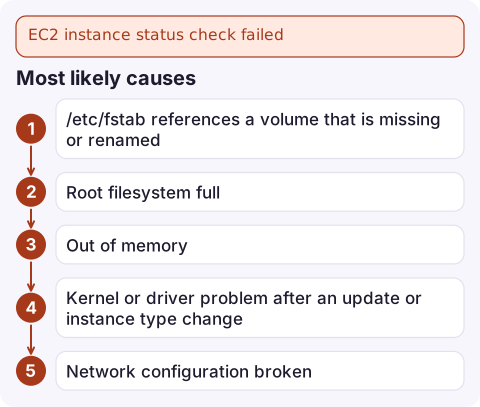
Most likely causes
| Cause | What you see in console output |
|---|---|
| /etc/fstab references a volume that is missing or renamed | Boot stops in emergency mode, "Dependency failed for /data", timed out waiting for device |
| Root filesystem full | Services fail to start, errors about no space left on device |
| Out of memory | Kernel "Out of memory: Killed process" messages, instance hangs under load |
| Kernel or driver problem after an update or instance type change | Kernel panic, unable to mount root, missing NVMe or ENA driver on a Nitro type |
| Network configuration broken | Static IP or wrong interface name in the OS network config; boot completes but no network |
| Firewall inside the OS dropping everything | Boot looks normal; probes still fail |
Diagnose
- Confirm which check is failing:
aws ec2 describe-instance-status --instance-ids i-0123456789abcdef0 \ --query 'InstanceStatuses[].{system:SystemStatus.Status,instance:InstanceStatus.Status,events:Events}' - Read the serial console log; it is captured even when you cannot log in:
aws ec2 get-console-output --instance-id i-0123456789abcdef0 \ --latest --output text | tail -100 - If the log is empty or unhelpful, take a screenshot of the console:
aws ec2 get-console-screenshot --instance-id i-0123456789abcdef0 \ --query ImageData --output text | base64 -d > screen.jpg - If the EC2 Serial Console is enabled for your account and the AMI has a password-enabled user, you can log in interactively and fix things in place.
Recover
Transient (memory, hung process): reboot. It keeps the host, IPs and instance store.
aws ec2 reboot-instances --instance-ids i-0123456789abcdef0Will not boot: repair the root volume from another instance.
- Snapshot the root volume first, so you can undo mistakes.
- Stop the instance, detach its root volume and attach it to a rescue instance in the same AZ as a secondary device.
- Mount it and fix the cause: add
nofailto optional entries inetc/fstab, delete large logs, or revert the default kernel in the bootloader configuration. - Unmount, detach, reattach to the original instance under its root device name, and start it.
Stopping loses instance store data and changes the public IPv4 address unless it is an Elastic IP; check before you stop.
Prevent a repeat
- Use
nofailon every non-root mount and mount by UUID, not device name, since device names change between instance types. - Alarm on disk and memory from the CloudWatch agent; the default EC2 metrics do not include either.
- Before changing instance type, confirm the AMI has ENA and NVMe drivers.
- Alarm on
StatusCheckFailed_Instancewith a short period so you hear about it before users do: see the status check alarm.
Questions
Will stopping and starting fix a failed instance status check?
Sometimes, if the cause was transient, but usually not. Stop/start moves the instance to new hardware, which fixes system checks; instance checks fail because of something in the OS that comes back with you.
Can I recover an instance without SSH access?
Yes. Use get-console-output and the console screenshot to diagnose, the EC2 Serial Console for interactive access if enabled, or detach the root volume and repair it from a rescue instance.
Does auto recovery work for instance status check failures?
No. EC2 automatic recovery only reacts to system status check failures, because those are caused by the underlying host.

A failed instance check usually arrives as an alarm at an awkward hour. CloudConsole, a phone app for AWS, is built to show the alarm, the instance's status checks and its recent state on your phone so you can decide whether it can wait until you reach a laptop.
Did it start after a deploy? What changed? on the app’s alarm screen lists the deploys and configuration changes from the hour before the alarm fired.
About the app → · Download on the App Store