 CloudConsole
aws ec2 terminate-instances
aws ec2 terminate-instances --instance-ids i-0123456789abcdef0 permanently deletes an instance; it cannot be started or restored afterwards. By default the root EBS volume is deleted with it, while extra volumes attached later survive, and the call fails if termination protection is turned on.
What the command does
This is the destructive one. The instance shuts down, moves to shutting-down and then terminated, and its ID stays visible in describe-instances for a short while before disappearing. There is no undo and no recycle bin for instances.
What survives depends on each volume's DeleteOnTermination flag: the root volume of a normal launch has it set to true, and volumes attached after launch default to false. Snapshots and AMIs are never deleted by terminating an instance.
Syntax
aws ec2 terminate-instances --instance-ids i-0123456789abcdef0 [...] \
  [--force] [--skip-os-shutdown] [--dry-run]
The response lists TerminatingInstances with each instance's previous and current state. Terminating an already-terminated instance succeeds quietly, which keeps clean-up scripts idempotent.
Worked examples
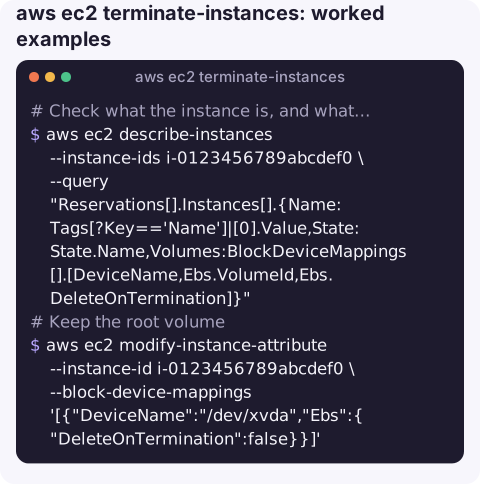
Check what the instance is, and what will be deleted, before you terminate:
aws ec2 describe-instances --instance-ids i-0123456789abcdef0 \
  --query "Reservations[].Instances[].{Name:Tags[?Key=='Name']|[0].Value,State:State.Name,Volumes:BlockDeviceMappings[].[DeviceName,Ebs.VolumeId,Ebs.DeleteOnTermination]}"
Keep the root volume by flipping its flag first (the device name must match the instance's root device):
aws ec2 modify-instance-attribute --instance-id i-0123456789abcdef0 \
  --block-device-mappings '[{"DeviceName":"/dev/xvda","Ebs":{"DeleteOnTermination":false}}]'
Terminate and wait:
aws ec2 terminate-instances --instance-ids i-0123456789abcdef0
aws ec2 wait instance-terminated --instance-ids i-0123456789abcdef0
Terminate an instance in an Auto Scaling group without getting a replacement:
aws autoscaling terminate-instance-in-auto-scaling-group \
  --instance-id i-0123456789abcdef0 --should-decrement-desired-capacity
Find out who terminated an instance (CloudTrail keeps 90 days of management events):
aws cloudtrail lookup-events \
  --lookup-attributes AttributeKey=ResourceName,AttributeValue=i-0123456789abcdef0 \
  --query "Events[?EventName=='TerminateInstances'].[EventTime,Username]" --output table
Protecting instances
| Setting | Effect on terminate-instances |
|---|---|
DisableApiTermination (termination protection) | Call fails with OperationNotPermitted. Does not stop an ASG scale-in or an OS-initiated shutdown with terminate behaviour. |
InstanceInitiatedShutdownBehavior=terminate | A shutdown inside the OS terminates the instance. Set it to stop for safety. |
| IAM condition on tags | Deny ec2:TerminateInstances where aws:ResourceTag/Environment is prod, so only a break-glass role can delete production. |
Enable protection with aws ec2 modify-instance-attribute --instance-id i-0123456789abcdef0 --disable-api-termination; see enabling termination protection.
Gotchas
- Do not pass IDs from an unchecked variable. A filter typo can return far more IDs than you expect. Echo the list and count it before terminating.
- Spot requests. Terminating an instance from a persistent Spot request can cause a new one to launch; cancel the request first.
- Elastic IPs remain allocated and keep billing after the instance is gone. Release them separately.
- "Recovering" a terminated instance means launching a new one from an AMI or from snapshots of the old volumes. If the root volume was deleted and no snapshot exists, the data is gone.
- Rehearse with
--dry-run. In a new script, run the call with--dry-runfirst: aDryRunOperationerror confirms you have permission, without deleting anything. Then remove the flag once the ID list has been reviewed.
Questions
Can I restore a terminated EC2 instance?
No. A terminated instance cannot be started again. You can only launch a new instance from an AMI, a snapshot, or a root volume that was kept because DeleteOnTermination was false.
How do I find who terminated an EC2 instance?
Search CloudTrail for the TerminateInstances event on that instance ID with aws cloudtrail lookup-events. The event shows the IAM identity, source IP and time.
Will an SSH session ending terminate my instance?
No. Closing SSH only ends your shell. To keep processes running after logout use a service manager, nohup, tmux or screen; the instance itself keeps running.
Terminations are permanent, so the worst time to run one is in a rush on a phone. CloudConsole, a phone app for AWS, is built with production guardrails and is meant to help you see an instance's context before anything irreversible happens.
About the app → · Download on the App Store