 CloudConsole
How to enable termination protection on EC2
In the EC2 console, select the instance and choose Actions, Instance settings, Change termination protection, then enable it. On the CLI, run aws ec2 modify-instance-attribute --instance-id i-0123456789abcdef0 --disable-api-termination. It blocks TerminateInstances calls from the console, CLI and API until someone turns it off, but it doesn't stop Auto Scaling, Spot interruptions or an OS shutdown configured to terminate.
Turn it on, check it, turn it off
# Enable
aws ec2 modify-instance-attribute --instance-id i-0123456789abcdef0 \
  --disable-api-termination

# Check (true = protected)
aws ec2 describe-instance-attribute --instance-id i-0123456789abcdef0 \
  --attribute disableApiTermination --query 'DisableApiTermination.Value'

# Disable (needed before you can terminate)
aws ec2 modify-instance-attribute --instance-id i-0123456789abcdef0 \
  --attribute disableApiTermination --value false

# Launch new instances already protected
aws ec2 run-instances --image-id ami-0abcdef1234567890 --instance-type t3.micro \
  --disable-api-termination
The CLI also accepts --no-disable-api-termination as the shorthand for switching it off. The double negative in the attribute name trips people up: disable API termination = true means protection is on.
Console steps
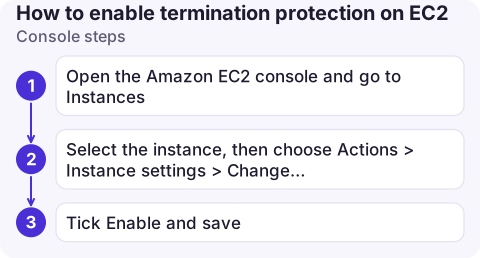
- Open the Amazon EC2 console and go to Instances.
- Select the instance, then choose Actions > Instance settings > Change termination protection.
- Tick Enable and save. When launching, the same setting is under the advanced details section.
Trying to terminate a protected instance fails with an OperationNotPermitted error that names termination protection.
What it does not protect against
| Scenario | Protected? | Use instead |
|---|---|---|
| Someone terminates it in the console or API | Yes | — |
| Auto Scaling scale-in or health replacement | No | Instance scale-in protection; Standby |
shutdown inside the OS with shutdown behaviour = terminate | No | Set shutdown behaviour to stop |
| Spot interruption | No | On-Demand capacity for critical work |
| Someone stopping it | No | Stop protection (--disable-api-stop) |
A user who can call ModifyInstanceAttribute | Only until they turn it off | IAM or SCP deny on termination for tagged instances |
Termination protection is a guard against accidents, not a security control. For important instances, also keep DeleteOnTermination false on data volumes and take regular snapshots.
Protect a whole environment
For more than a handful of instances, apply it by tag and back it with a policy, so protection doesn't depend on someone remembering a checkbox:
IDS=$(aws ec2 describe-instances \
  --filters Name=tag:env,Values=prod Name=instance-state-name,Values=running,stopped \
  --query 'Reservations[].Instances[].InstanceId' --output text)
for id in $IDS; do
  aws ec2 modify-instance-attribute --instance-id "$id" --disable-api-termination
done
Then add an IAM policy (or an SCP across the organisation) that denies ec2:TerminateInstances and ec2:ModifyInstanceAttribute on instances tagged env=prod for everyone except a break-glass role. Termination protection stops slips of the mouse; the deny stops a script or a colleague with broad permissions from undoing it casually.
Check before and after
- Run the check command above for every instance you consider critical; a quick
describe-instancesloop withdescribe-instance-attributemakes an inventory. - CloudFormation and Terraform: set the property (
DisableApiTermination/disable_api_termination) in the template, or the next deploy may revert a manual change. - Before decommissioning, remember to switch it off; scripts that terminate in bulk will fail on protected instances, which is the point, but can leave half-finished clean-ups.
Questions
How do I change termination protection with the AWS CLI?
Use aws ec2 modify-instance-attribute with --disable-api-termination to enable it, and --no-disable-api-termination (or --attribute disableApiTermination --value false) to disable it.
Does termination protection prevent Auto Scaling from terminating an instance?
No. Use instance scale-in protection on the Auto Scaling group for that, and remember health checks can still replace unhealthy instances.
Does termination protection stop the instance being stopped?
No. It only blocks termination. Stop protection is a separate attribute, set with --disable-api-stop.

Production guardrails matter most when you are acting quickly. CloudConsole, a phone app for AWS, is built with protections like these in mind, showing which resources are production before anything changes.
About the app → · Download on the App Store