 CloudConsole
aws ecs list-clusters
aws ecs list-clusters returns the ARNs of every ECS cluster in the current region. Pass them to aws ecs describe-clusters for running task, pending task and active service counts, and loop over regions to find clusters you have forgotten about.
What the command does
The command takes no filters; it lists all clusters in the region as ARNs:
{
  "clusterArns": [
    "arn:aws:ecs:eu-west-2:123456789012:cluster/prod",
    "arn:aws:ecs:eu-west-2:123456789012:cluster/staging"
  ]
}
The CLI follows pagination for you. For anything beyond names, use describe-clusters.
Syntax
aws ecs list-clusters [--max-items 50] [--region eu-west-2]
aws ecs describe-clusters --clusters prod staging [--include STATISTICS TAGS]
Worked examples
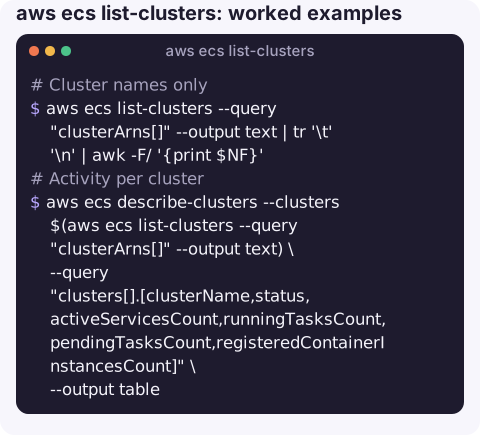
Cluster names only:
aws ecs list-clusters --query "clusterArns[]" --output text | tr '\t' '\n' | awk -F/ '{print $NF}'Activity per cluster:
aws ecs describe-clusters --clusters $(aws ecs list-clusters --query "clusterArns[]" --output text) \
  --query "clusters[].[clusterName,status,activeServicesCount,runningTasksCount,pendingTasksCount,registeredContainerInstancesCount]" \
  --output table
describe-clusters accepts up to 100 clusters per call, which covers most accounts in one go.
Clusters in every region, including forgotten experiments:
for r in $(aws ec2 describe-regions --query "Regions[].RegionName" --output text); do
  for c in $(aws ecs list-clusters --region "$r" --query "clusterArns[]" --output text); do
    echo "$r ${c##*/}"
  done
done
Empty clusters that can probably be deleted:
aws ecs describe-clusters --clusters $(aws ecs list-clusters --query "clusterArns[]" --output text) \
  --query "clusters[?activeServicesCount==\`0\` && runningTasksCount==\`0\`].clusterName" --output text
Capacity providers and Container Insights settings:
aws ecs describe-clusters --clusters prod \
  --query "clusters[0].{providers:capacityProviders,settings:settings}" --output json
Finding where the cost is
ECS itself has no charge for clusters; what you pay for is the Fargate tasks or EC2 instances underneath. To see which cluster is worth looking at first, combine the counts above with the capacity behind each cluster:
for c in $(aws ecs list-clusters --query "clusterArns[]" --output text); do
  aws ecs describe-clusters --clusters "$c" --include STATISTICS \
    --query "clusters[0].[clusterName,runningTasksCount,registeredContainerInstancesCount]" --output text
done
A cluster with container instances registered but few running tasks is paying for idle EC2 capacity; check its capacity provider settings or Auto Scaling group minimum. A cluster running many Fargate tasks is better analysed in Cost Explorer grouped by the ECS cluster or service tags, if you propagate tags to tasks.
describe-clusters fields
| Field | Meaning |
|---|---|
status | ACTIVE, PROVISIONING, DEPROVISIONING, FAILED or INACTIVE. |
runningTasksCount / pendingTasksCount | Tasks across all services and standalone tasks. |
activeServicesCount | Services in ACTIVE state. |
registeredContainerInstancesCount | EC2 instances registered; zero for Fargate-only clusters. |
settings | Whether Container Insights is enabled. |
Gotchas
- The
defaultcluster. ECS creates a cluster calleddefaultin some situations, and commands without--clusteruse it. Seeing it here does not mean anything runs in it. - Deleted clusters can linger as
INACTIVEfor a while indescribe-clusters; they cost nothing. - Empty command substitution. If the region has no clusters,
describe-clusters --clusterswith no names fails; guard loops accordingly. - EC2 capacity is billed separately. A cluster with zero tasks can still have EC2 container instances or capacity provider Auto Scaling groups running.
Questions
How do I list all ECS clusters with the CLI?
aws ecs list-clusters lists clusters in the current region; loop over regions from aws ec2 describe-regions for all of them.
How do I describe an ECS cluster?
aws ecs describe-clusters --clusters my-cluster returns status and counts of services, running and pending tasks, and container instances.
How do I list ECS services in a cluster?
aws ecs list-services --cluster my-cluster returns service ARNs; describe-services gives their details.
A quick view of what is running where is useful when an alarm comes in from an unfamiliar cluster. CloudConsole, a phone app for AWS, is built to show clusters, services and their alarms on a phone.
About the app → · Download on the App Store