 CloudConsole
aws lambda invoke
aws lambda invoke --function-name my-function --cli-binary-format raw-in-base64-out --payload '{"key":"value"}' response.json runs a function and writes its return value to response.json. In AWS CLI v2 you need --cli-binary-format raw-in-base64-out (or a fileb:// payload) for plain JSON, and a function error still exits 0, so check FunctionError in the output.
What the command does
invoke calls the function exactly as an SDK client would. By default the call is synchronous (RequestResponse): the CLI waits for the function to finish, writes the returned payload to the file you name last, and prints invocation metadata to the terminal. The outfile is a required positional argument, not an option.
Syntax
aws lambda invoke \
  --function-name my-function \
  [--qualifier live|7] \
  [--invocation-type RequestResponse|Event|DryRun] \
  [--log-type Tail] \
  [--cli-binary-format raw-in-base64-out] \
  [--payload '{"orderId": 42}' | --payload fileb://event.json] \
  response.json
Terminal output for a function that threw an exception:
{
    "StatusCode": 200,
    "FunctionError": "Unhandled",
    "ExecutedVersion": "$LATEST"
}
StatusCode 200 only means Lambda ran the function. The error details are in response.json.
Worked examples
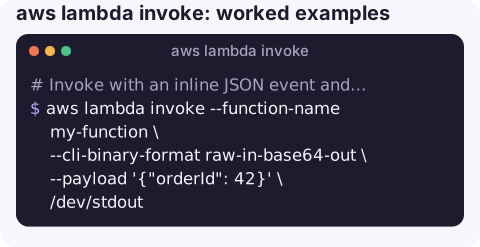
Invoke with an inline JSON event and print the result:
aws lambda invoke --function-name my-function \
  --cli-binary-format raw-in-base64-out \
  --payload '{"orderId": 42}' \
  /dev/stdout
To avoid typing the flag every time, set it once: aws configure set cli_binary_format raw-in-base64-out.
Use a test event from a file; fileb:// sends the bytes as-is, so no format flag is needed:
aws lambda invoke --function-name my-function --payload fileb://events/s3-put.json out.jsonSee the function's logs for this call (the last 4 KB, base64-encoded):
aws lambda invoke --function-name my-function --payload fileb://event.json \
  --log-type Tail --query LogResult --output text out.json | base64 -d
Fire and forget (asynchronous; returns 202 straight away, retries and destinations apply):
aws lambda invoke --function-name my-function --invocation-type Event \
  --payload fileb://event.json /dev/null
Invoke a specific alias or version:
aws lambda invoke --function-name my-function --qualifier live \
  --payload fileb://event.json out.json
Fail a CI step when the function errors:
ERR=$(aws lambda invoke --function-name smoke-test --payload fileb://event.json \
  --query FunctionError --output text out.json)
[ "$ERR" = "None" ] || { cat out.json; exit 1; }
Invocation types
| Type | Status code | Behaviour |
|---|---|---|
RequestResponse (default) | 200 | Waits for the result; no automatic retries. |
Event | 202 | Queued; Lambda retries on error and can send failures to a destination or DLQ. |
DryRun | 204 | Checks parameters and permissions without running the function. |
Gotchas
Invalid base64means CLI v2 tried to base64-decode your JSON. Add--cli-binary-format raw-in-base64-outor usefileb://; see Invalid base64 on lambda invoke.- The CLI may time out before the function does. The default read timeout is 60 seconds; for long functions add
--cli-read-timeout 900, or the CLI retries and you get duplicate invocations. - Payload size limits apply: around 6 MB for synchronous requests and responses at the time of writing, and a lower limit for async events. Larger data belongs in S3.
- Permissions. The caller needs
lambda:InvokeFunction; for a qualified ARN the permission must cover that alias or version.
Questions
Why does aws lambda invoke say Invalid base64?
AWS CLI v2 treats --payload as base64 by default. Pass --cli-binary-format raw-in-base64-out with inline JSON, or provide the payload with fileb://.
What is the outfile in aws lambda invoke?
It is the file the function's response payload is written to, and it is required. Use /dev/stdout to print it, or /dev/null to discard it.
Can a CloudWatch alarm invoke a Lambda function?
Yes. Alarm actions can target a Lambda function directly, or you can route the alarm through SNS or EventBridge to the function.
Re-running a function to see whether a fix worked is common during an incident. CloudConsole, a phone app for AWS, is built to show Lambda errors, durations and the log lines behind them on a phone.
About the app → · Download on the App Store