 CloudConsole
aws lambda update-alias
aws lambda update-alias --function-name my-function --name live --function-version 8 moves the alias to version 8; anything invoking the alias ARN switches immediately. Add --routing-config to send a percentage of traffic to a second version for a canary, and run the same command with the previous number to roll back.
What the command does
An alias is a named pointer to a function version. Triggers, API Gateway integrations and other services that reference my-function:live follow the alias, so moving it is how you release and roll back without reconfiguring callers. The change applies to new invocations straight away; in-flight invocations finish on the version they started with.
Syntax
aws lambda update-alias --function-name my-function --name live \
  [--function-version 8] \
  [--routing-config '{"AdditionalVersionWeights": {"9": 0.1}}'] \
  [--description "..."] [--revision-id ...]
The alias must already exist; create it with aws lambda create-alias.
Worked examples
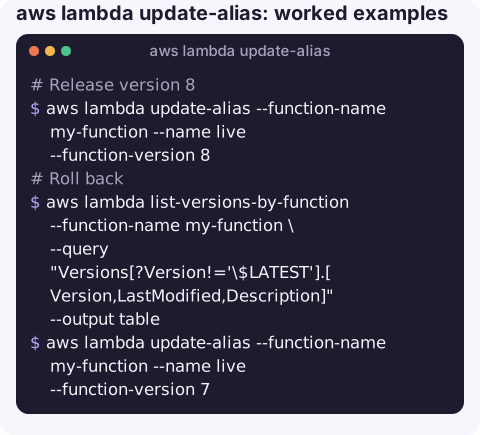
Release version 8:
aws lambda update-alias --function-name my-function --name live --function-version 8Roll back: find the previous version and point the alias back. The backslash before $LATEST stops the shell expanding it as a variable:
aws lambda list-versions-by-function --function-name my-function \
  --query "Versions[?Version!='\$LATEST'].[Version,LastModified,Description]" --output table
aws lambda update-alias --function-name my-function --name live --function-version 7Canary: keep version 8 as primary and send 10% of invocations to version 9:
aws lambda update-alias --function-name my-function --name live \
  --function-version 8 \
  --routing-config '{"AdditionalVersionWeights": {"9": 0.1}}'
Watch errors for both versions; the ExecutedVersion field and the version-specific metrics show which version handled each request.
Complete the rollout: make 9 primary and clear the weights:
aws lambda update-alias --function-name my-function --name live \
--function-version 9 --routing-config '{"AdditionalVersionWeights": {}}'Confirm:
aws lambda get-alias --function-name my-function --name live \
  --query "[FunctionVersion,RoutingConfig]" --output json
Options
| Option | Notes |
|---|---|
--function-version | The primary version. A number, or $LATEST (not allowed when weighted routing is used). |
--routing-config | One extra version and its weight, between 0 and 1. The primary gets the remainder. |
--revision-id | Fails the update if the alias changed since you read it; useful in pipelines. |
Gotchas
- Routing config persists. Changing only
--function-versionkeeps the existing weights. Clear them explicitly when the canary is done. - Provisioned concurrency is configured on the alias or version. Moving an alias to a version without warm capacity can cause cold starts.
- Permissions follow the alias. A resource-policy statement added with
--qualifier livestays valid when the alias moves. - Event source mappings attached to the alias ARN start using the new version for new batches; one attached to the unqualified ARN is not affected at all.
- Use CodeDeploy for automated canaries with alarms and automatic rollback; manual weights are fine for quick checks.
- Function URLs on an alias follow it. A function URL created with the alias as its qualifier serves whichever version the alias points to, so moving the alias also changes what the URL returns.
- Record what you changed. Note the previous version before moving the alias; rolling back is only instant if you know which number was good.
Questions
How do I roll back a Lambda function?
Point its alias back at the previous version with update-alias --function-version. This is instant and does not redeploy code.
How do I split traffic between two Lambda versions?
Use --routing-config '{"AdditionalVersionWeights": {"9": 0.1}}' with update-alias to send 10% of traffic to version 9.
Can an alias point to $LATEST?
Yes, but then it moves with every deploy, and weighted routing is not available. Aliases are most useful when they point at published versions.
Rolling an alias back is one of the fastest fixes for a bad Lambda release. CloudConsole, a phone app for AWS, is built to show the error alarm and recent versions on a phone, with production guardrails before any change.
About the app → · Download on the App Store