 CloudConsole
aws rds restore-db-instance-from-db-snapshot
aws rds restore-db-instance-from-db-snapshot creates a brand-new DB instance from a snapshot; it never overwrites the existing database. Give it a new --db-instance-identifier and the --db-snapshot-identifier, and pass the subnet group, security groups and parameter group explicitly, because the restored instance does not inherit all of them from the original.
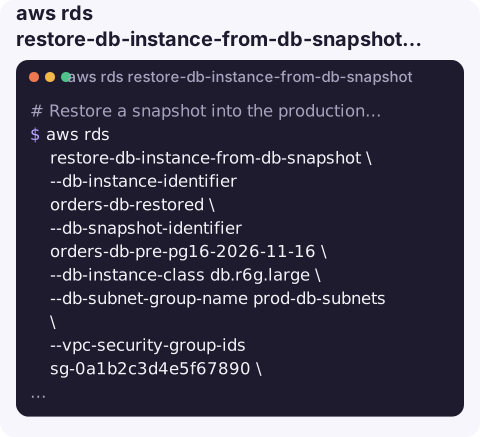
What the command does
RDS builds a fresh instance with its own endpoint and loads the snapshot's storage into it. The instance becomes available before every block has been pulled in, so the first reads of cold data can be slow until the volume has been fully hydrated.
Because the result is a new instance, "restoring production" is really two steps: restore alongside the old one, then point the application at the new endpoint, or rename the instances so the new one takes over the old name.
Syntax
aws rds restore-db-instance-from-db-snapshot \
  --db-instance-identifier <new-name> \
  --db-snapshot-identifier <snapshot-name-or-arn> \
  [--db-instance-class db.r6g.large] \
  [--db-subnet-group-name <group>] \
  [--vpc-security-group-ids sg-...] \
  [--db-parameter-group-name <group>] \
  [--multi-az] [--no-publicly-accessible] [--deletion-protection]
Worked examples
Restore a snapshot into the production network, matching the original's settings:
aws rds restore-db-instance-from-db-snapshot \
  --db-instance-identifier orders-db-restored \
  --db-snapshot-identifier orders-db-pre-pg16-2026-11-16 \
  --db-instance-class db.r6g.large \
  --db-subnet-group-name prod-db-subnets \
  --vpc-security-group-ids sg-0a1b2c3d4e5f67890 \
  --db-parameter-group-name orders-pg16 \
  --multi-az --no-publicly-accessible
aws rds wait db-instance-available --db-instance-identifier orders-db-restored
Find the most recent automated snapshot to restore from:
aws rds describe-db-snapshots --db-instance-identifier orders-db \
  --snapshot-type automated \
  --query "sort_by(DBSnapshots,&SnapshotCreateTime)[-1].DBSnapshotIdentifier" \
  --output text
Swap names so clients keep the same endpoint. Rename the old instance out of the way first, then give the restored one the original name:
aws rds modify-db-instance --db-instance-identifier orders-db \
  --new-db-instance-identifier orders-db-old --apply-immediately
aws rds modify-db-instance --db-instance-identifier orders-db-restored \
  --new-db-instance-identifier orders-db --apply-immediately
Each rename briefly interrupts connections and DNS takes a short while to follow, so expect a few minutes of disruption.
Options people forget
| Option | Why it matters |
|---|---|
--db-subnet-group-name | Without it the instance goes into the default VPC, if you have one, and your application may not be able to reach it. |
--vpc-security-group-ids | Otherwise the VPC's default security group is attached, which rarely allows your app servers in. |
--db-parameter-group-name | If omitted, the engine's default parameter group is used and custom tuning is lost. |
--db-instance-class | Defaults to the class recorded in the snapshot. Change it here to restore a smaller copy for investigation. |
--deletion-protection | Turn it on explicitly if this copy becomes production. |
--db-snapshot-identifier | Use the full ARN when the snapshot was shared from another account. |
Check the restored copy before you switch
- Confirm the instance is
availableand note its new endpoint with describe-db-instances. - Connect from an application host, not your laptop, so the security group and subnet routing are tested as well as the data.
- Spot-check the newest rows you expect to exist. A snapshot is a moment in time, so anything written after it is missing.
- Re-enable what a restore does not copy across for you: deletion protection, alarms that reference the instance identifier, and any IAM database authentication or log exports you rely on.
Gotchas
- Name collisions fail. You cannot restore to an identifier that already exists; that is why the rename dance above is needed.
- Engine version is fixed by the snapshot. You restore to the snapshot's version and upgrade afterwards with modify-db-instance.
- Data after the snapshot is not there. For a restore to a specific minute use restore-db-instance-to-point-in-time instead.
- Aurora uses a different command. Cluster snapshots are restored with
aws rds restore-db-cluster-from-snapshot, and you add instances to the cluster afterwards. - Billing starts at once. Delete investigation copies when you are done.
Questions
Can I restore an RDS snapshot over the existing database?
No. A restore always creates a new instance. Restore alongside, verify it, then switch the application or rename the instances.
How do I restore an RDS instance to a point in time instead of a snapshot?
Use aws rds restore-db-instance-to-point-in-time with --restore-time or --use-latest-restorable-time. It replays transaction logs on top of the automated backups.
How long does an RDS restore from snapshot take?
Commonly from several minutes to well over an hour depending on size. Performance can stay below normal for a while afterwards because data blocks load lazily on first access.
Restores usually happen mid-incident, with someone asking when the database will be back. CloudConsole is built to show RDS instance status and alarms on a phone so you can follow the restore without a laptop.
About the app → · Download on the App Store