 CloudConsole
aws s3 presign
aws s3 presign s3://my-bucket/report.pdf --expires-in 3600 prints a URL that lets anyone holding it download that one object for an hour, without AWS credentials. The URL carries your signature and permissions, so it fails if you lack access to the object or if your own credentials expire first.
What the command does
It signs a GET request for the object locally, with your current credentials, and prints the resulting URL. No API call is made, so the CLI does not check that the object exists or that you are allowed to read it; you find out when someone opens the link. The default lifetime is 3,600 seconds and the maximum is 604,800 (seven days).
The CLI command only creates download links. For upload links (pre-signed PUT or POST), use an SDK.
Syntax
aws s3 presign s3://<bucket>/<key> [--expires-in <seconds>] [--region <bucket-region>]Worked examples
Share a file for 24 hours:
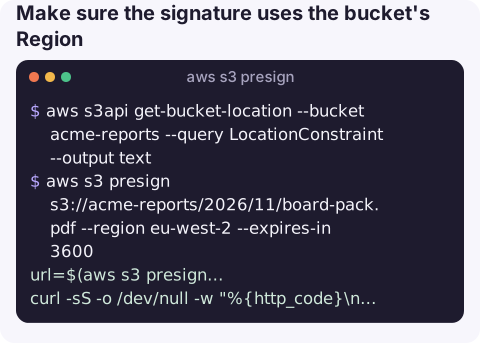
aws s3 presign s3://acme-reports/2026/11/board-pack.pdf --expires-in 86400Make sure the signature uses the bucket's Region:
aws s3api get-bucket-location --bucket acme-reports --query LocationConstraint --output text
aws s3 presign s3://acme-reports/2026/11/board-pack.pdf --region eu-west-2 --expires-in 3600
Test the link before sending it:
url=$(aws s3 presign s3://acme-reports/2026/11/board-pack.pdf --expires-in 600)
curl -sS -o /dev/null -w "%{http_code}\n" "$url"
200 means it works. A 403 response body contains an S3 error code that tells you why.
Use a long-lived identity for multi-day links. A URL signed with temporary credentials stops working when those credentials expire:
aws s3 presign s3://acme-reports/2026/11/board-pack.pdf --expires-in 604800 --profile report-signerWhy a pre-signed URL returns Access Denied
| Response | Cause and fix |
|---|---|
AccessDenied | The signer lacks s3:GetObject on that key, or a bucket policy denies it (for example a VPC endpoint or IP condition the downloader does not meet). See S3 AccessDenied. |
AccessDenied on a KMS-encrypted object | The signer also needs kms:Decrypt on the key. |
ExpiredToken or Request has expired | The URL's lifetime passed, or the session credentials it was signed with expired earlier; see Request has expired. |
AuthorizationQueryParametersError / redirect | Signed for the wrong Region. Pass --region with the bucket's Region. |
NoSuchKey | Typo in the key; presign does not check. See NoSuchKey. |
| Browser shows a CORS error | The bucket has no CORS rule allowing the requesting origin. Downloads by plain link do not need CORS; JavaScript fetch does. |
Gotchas
- SSO and role sessions cap the lifetime. If you sign with credentials from aws sso login or an assumed role, the URL dies when that session does, whatever
--expires-insays. - Anyone with the link can use it. Links get forwarded and logged. Use short expiries for sensitive files.
- You cannot revoke a single URL before it expires, other than by removing the signer's permissions, deleting the object, or adding a bucket policy deny.
- Special characters in keys are encoded in the URL; copy it whole, including everything after the
?.
Questions
How long can an S3 pre-signed URL last?
Up to seven days (604,800 seconds) when signed with long-term IAM user credentials. With temporary credentials it expires when those credentials do, which may be much sooner.
Can I create a pre-signed upload URL with the CLI?
Not with aws s3 presign, which only signs downloads. Use an SDK method such as generate_presigned_url for put_object or generate_presigned_post.
Why does my presigned URL work for me but not for others?
Look for bucket policy conditions such as aws:SourceIp or aws:SourceVpce, which apply to whoever uses the URL. Also check that you did not test it from a session with extra network access.
Someone asking for a file while you are away from your desk is a common reason to want S3 on a phone. CloudConsole is built to show S3 resources and their alarms, with guardrails for anything shared externally.
About the app → · Download on the App Store