 CloudConsole
aws sso login
aws sso login --profile my-profile signs you in to IAM Identity Center through your browser and caches a token that the CLI uses to get short-lived credentials for every profile sharing that SSO session. On a machine without a browser, add --no-browser or --use-device-code and complete the sign-in on another device.
What the command does
It starts an OAuth flow against Identity Center, stores the resulting access token under ~/.aws/sso/cache/, and returns. Later commands use that token to fetch temporary role credentials for the account and role in your profile. The token lasts as long as the Identity Center session duration set by your administrator (commonly 8 hours), after which you log in again.
The profile must already exist; create it with aws configure sso.
Syntax
aws sso login [--profile <profile> | --sso-session <session>] \
  [--no-browser] [--use-device-code]
Worked examples
Normal login:
aws sso login --profile prod-readonly
aws sts get-caller-identity --profile prod-readonly
Log in once for all profiles in a session:
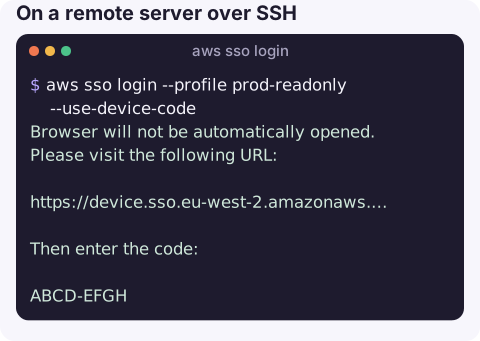
aws sso login --sso-session acmeOn a remote server over SSH, with no browser. The CLI prints a URL (and, with device code, a short code) to open on your laptop or phone:
aws sso login --profile prod-readonly --use-device-codeBrowser will not be automatically opened.
Please visit the following URL:
https://device.sso.eu-west-2.amazonaws.com/
Then enter the code:
ABCD-EFGHWithout opening a browser on this machine but keeping the default flow:
aws sso login --profile prod-readonly --no-browserRecent CLI versions use an authorisation-code flow that redirects back to a local port on the machine running the CLI. That works when the browser is on the same machine; over SSH, the device code flow is the reliable choice.
Checking you are signed in
Before debugging a permissions problem, confirm which identity the CLI is actually using. The ARN shows the account and the permission set's role:
aws sts get-caller-identity --profile prod-readonly --query Arn --output textarn:aws:sts::123456789012:assumed-role/AWSReservedSSO_ReadOnly_0123456789abcdef/[email protected]If this fails with a token error, log in again; if it shows a different account or role than you expected, you are using the wrong profile. See checking who is logged in.
Errors
| Message | Fix |
|---|---|
The SSO session associated with this profile has expired or is otherwise invalid | Run aws sso login again; see token expired. |
Error loading SSO Token | The cache is missing or corrupt, or the profile points to a session you never logged in to; see this error. |
The config profile (x) could not be found | Profile name typo; list them with list-profiles. |
| Browser shows an error after sign-in | Wrong start URL or SSO Region in the sso-session section. |
Gotchas
- One login per session, not per profile. Profiles that share an
sso_sessionare all covered; profiles with different sessions need separate logins. - The login URL is your start URL. "What is my SSO login URL?" is answered by
sso_start_urlin the[sso-session]block of~/.aws/config. - Scripts cannot do this unattended. A human has to approve each login. For automation, use roles, not SSO.
- Other tools such as Terraform or Docker credential helpers use the same cache if their SDK supports SSO; otherwise bridge with export-credentials.
Questions
How do I use aws sso login without a browser?
Run aws sso login --use-device-code (or --no-browser). Open the printed URL on any device, sign in, and enter the code if asked; the CLI finishes once you approve.
How long does an aws sso login session last?
As long as the session duration configured in IAM Identity Center, often 8 hours by default and adjustable by administrators. Role credentials fetched with it are shorter-lived and refreshed automatically.
Do I need to log in for every profile?
No. Log in once per sso-session; every profile that references it shares the token.
Re-authenticating before you can even look at a problem costs minutes during an incident. CloudConsole is built to show alarms, logs and resources on a phone, so the first look is quicker.
About the app → · Download on the App Store