 CloudConsole
CloudFront cache policy and TTL settings
A CloudFront cache policy sets Minimum, Default and Maximum TTL and what goes into the cache key. If the origin sends Cache-Control max-age or s-maxage, CloudFront caches for that value clamped between the minimum and maximum TTL; if it sends neither, CloudFront uses the default TTL. The managed CachingOptimized policy uses 1 second, 86,400 seconds (24 hours) and 31,536,000 seconds (365 days). Setting a minimum TTL above 0 makes CloudFront cache even responses marked no-cache, no-store or private.
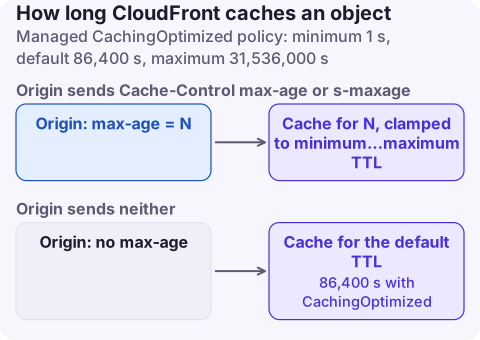
How the three TTLs combine with origin headers
| Origin sends | Minimum TTL = 0 | Minimum TTL > 0 |
|---|---|---|
Cache-Control: max-age=N (or s-maxage, or Expires) | Cache for N, capped at Maximum TTL | Cache for N, but never less than Minimum or more than Maximum |
| No caching headers | Cache for Default TTL | Cache for the greater of Minimum and Default |
no-cache, no-store or private | Respected: not cached | Cached for Minimum TTL anyway |
s-maxage applies to CloudFront (and other shared caches) and takes precedence over max-age for CloudFront, which lets you cache longer at the edge than in browsers. If both max-age and Expires are present, CloudFront uses max-age. Distributions that don't use a cache policy (legacy cache settings) default to a 24-hour TTL.
Managed policies worth knowing
| Policy | Min / Default / Max TTL | Cache key | Use for |
|---|---|---|---|
CachingOptimized (658327ea-f89d-4fab-a63d-7e88639e58f6) | 1 s / 86,400 s / 31,536,000 s | No query strings, cookies or headers (normalised Accept-Encoding) | Static assets, S3 origins |
CachingDisabled (4135ea2d-6df8-44a3-9df3-4b5a84be39ad) | 0 / 0 / 0 | None | APIs, personalised pages |
UseOriginCacheControlHeaders (83da9c7e-98b4-4e11-a168-04f0df8e2c65) | 0 / 0 / 31,536,000 s | Host, Origin and method-override headers | Origins that set their own Cache-Control |
Recommended settings
| Content | Policy / TTLs | Origin headers |
|---|---|---|
Fingerprinted assets (app.3f9a1c.js) | CachingOptimized | Cache-Control: public, max-age=31536000, immutable |
| HTML pages | Custom policy: Min 0, Default 0 to 60, Max 86,400 | max-age=0, s-maxage=60 or short values |
| JSON API responses | CachingDisabled (with an origin request policy to forward what the API needs) | no-store where appropriate |
| Images and downloads that rarely change | CachingOptimized | max-age=86400 or longer |
| Origin controls caching per path | UseOriginCacheControlHeaders | Origin decides |
Keep the cache key small: every query string, header or cookie you add multiplies the number of cached copies and lowers the hit ratio. Use an origin request policy to forward values the origin needs without making them part of the key.
Create and attach a custom policy
aws cloudfront create-cache-policy --cache-policy-config '{
  "Name": "html-short",
  "MinTTL": 0, "DefaultTTL": 60, "MaxTTL": 86400,
  "ParametersInCacheKeyAndForwardedToOrigin": {
    "EnableAcceptEncodingGzip": true, "EnableAcceptEncodingBrotli": true,
    "HeadersConfig": {"HeaderBehavior": "none"},
    "CookiesConfig": {"CookieBehavior": "none"},
    "QueryStringsConfig": {"QueryStringBehavior": "none"}
  }
}'
Then set the policy ID as CachePolicyId on the cache behaviour (console: distribution, Behaviors, Edit, Cache policy). CloudFormation: AWS::CloudFront::CachePolicy with CachePolicyConfig (MinTTL, DefaultTTL, MaxTTL, ParametersInCacheKeyAndForwardedToOrigin), referenced by CachePolicyId in the distribution's cache behaviour. Terraform: aws_cloudfront_cache_policy with min_ttl, default_ttl, max_ttl and parameters_in_cache_key_and_forwarded_to_origin.
Symptoms of wrong TTLs
- Users see old content after a deploy: long TTL on un-fingerprinted files; shorten it or invalidate, and fingerprint asset names so you rarely need to.
- Private data served to the wrong user: a minimum TTL above 0 overriding
private, or a cache key that omits the user's auth context. Use CachingDisabled for personalised responses. - Low cache hit ratio, origin overloaded: cache key includes all query strings, cookies or headers; or default TTL 0 with an origin that sends no headers.
Questions
What is the default TTL in CloudFront?
It depends on the cache policy. CachingOptimized uses a default TTL of 86,400 seconds (24 hours); distributions using legacy cache settings also default to 24 hours.
Does CloudFront respect Cache-Control no-cache?
Yes when the cache policy's minimum TTL is 0. If the minimum TTL is above 0, CloudFront caches the response for the minimum TTL anyway.
What is the maximum TTL in CloudFront?
The managed policies use 31,536,000 seconds (365 days) as the maximum TTL.
Caching mistakes usually show up as users seeing stale pages after a release, or an origin buckling under traffic. CloudConsole, a phone app for AWS, is being built to show CloudFront error and origin latency alarms on your phone.
About the app → · Download on the App Store