 CloudConsole
Route 53 TTL settings
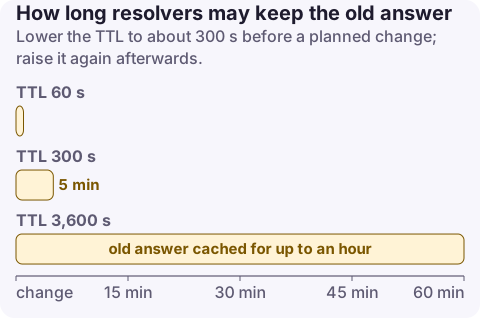
A record's TTL tells recursive resolvers how many seconds to cache the answer. Longer TTLs (hours to two days) mean fewer queries, lower cost and lower latency; shorter ones (60 to 300 seconds) let changes and failover take effect quickly. Lower the TTL to about 300 seconds before a planned change and raise it afterwards. Alias records pointing at AWS resources have no TTL you can set: Route 53 uses the target resource's TTL. Negative answers are cached according to the SOA record.
Recommended TTLs
| Record | TTL | Why |
|---|---|---|
| Stable records (MX, TXT verification, CNAMEs that rarely change) | 3,600 to 86,400 s | Fewer queries, cheaper, faster for users |
| Application endpoints that may move | 300 s | Good balance for most records |
| Records used with failover, weighted or latency routing | 60 s | Health-check-driven changes take effect quickly |
| Before a migration or IP change | Drop to 60 to 300 s at least one old-TTL in advance | Old long caches must expire first |
| NS records for the zone | 172,800 s (Route 53 default) | Changing them is rare; registry delegation has its own TTL |
Route 53 documentation's own example: if you're changing a record that's in use, set a short value such as 300 seconds first and increase it once you've confirmed the new settings work.
Alias records
Alias records (to CloudFront, load balancers, API Gateway, S3 websites, another record in the zone) don't take a TTL:
- Pointing at an AWS resource, Route 53 uses that resource's default TTL. For Elastic Load Balancing the value is short (around 60 seconds), so load balancer IP changes propagate quickly.
- Pointing at another record in the same hosted zone, Route 53 uses that record's TTL.
Aliases are also free to query for AWS resource targets and work at the zone apex, which a CNAME can't.
Negative caching (SOA)
When a name doesn't exist, resolvers cache the NXDOMAIN for the lesser of the SOA record's TTL (900 seconds by default in Route 53) and the SOA minimum field (86,400 seconds in AWS's example). If you create a record right after clients looked it up and failed, they may keep failing for up to 15 minutes. Avoid querying names before you create them, or lower the SOA TTL if this matters to you.
Change a TTL
aws route53 change-resource-record-sets --hosted-zone-id Z0123456789ABCDEFGHIJ --change-batch '{
  "Changes": [{"Action": "UPSERT", "ResourceRecordSet": {
    "Name": "api.example.com", "Type": "A", "TTL": 300,
    "ResourceRecords": [{"Value": "203.0.113.10"}]}}]}'

aws route53 list-resource-record-sets --hosted-zone-id Z0123456789ABCDEFGHIJ \
  --query "ResourceRecordSets[?Name=='api.example.com.'].[Type,TTL]"

# See the TTL resolvers hand out (it counts down in caches)
dig +noall +answer api.example.com
CloudFormation: TTL on AWS::Route53::RecordSet (omit it for alias records). Terraform: ttl on aws_route53_record (not allowed together with an alias block).
Mistakes to avoid
- Lowering the TTL at the same moment as the change: caches still hold the old answer for the old TTL. Lower it, wait out the old value, then change.
- Very low TTLs everywhere: 10 to 30 seconds multiplies query volume and cost, and some resolvers apply their own minimum anyway.
- Expecting instant failover: with a 300-second TTL, some clients use the failed endpoint for up to five minutes after Route 53 changes its answer. Pair health checks with TTLs of about 60 seconds.
- Forgetting client-side caching: JVMs, browsers and some SDKs cache DNS beyond the TTL; the JVM's
networkaddress.cache.ttlis a common culprit.
Questions
What is the default TTL in Route 53?
The console suggests 300 seconds for new records. Route 53's own NS records use 172,800 seconds and the SOA record 900 seconds. Alias records use the target's TTL.
What TTL should I use for Route 53 failover records?
About 60 seconds, so resolvers pick up the change soon after a health check fails over.
Can I set a TTL on a Route 53 alias record?
No. Alias records to AWS resources use the resource's TTL, and aliases to another record use that record's TTL.
DNS changes are the classic "it works for me" incident because caches expire at different times. CloudConsole, a phone app for AWS, is being built to show health check and endpoint alarms on your phone while a change propagates.
About the app → · Download on the App Store