 CloudConsole
What is BoxUsage on my AWS bill?
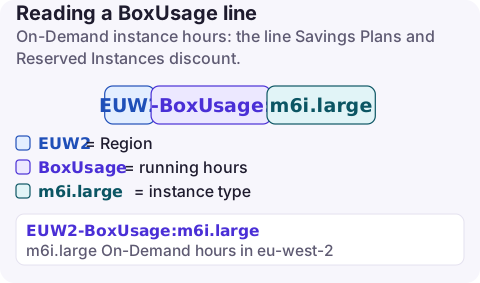
BoxUsage is the usage type for EC2 On-Demand instance running time, written as Region-BoxUsage:instance-type, for example EUW2-BoxUsage:m6i.large, and measured in hours. It is the line Savings Plans and Reserved Instances discount, and it is usually the largest EC2 line on a bill.
BoxUsage and its siblings
| Usage type | What runs |
|---|---|
BoxUsage:t3.large | On-Demand instance hours (Linux, Windows and other OSes; the OS is in the Operation column) |
BoxUsage:c7g.metal | Bare metal On-Demand instance hours |
SpotUsage:m5.xlarge | Spot Instance hours |
HostBoxUsage: / HostUsage: | Instances on Dedicated Hosts / the hosts themselves |
DedicatedUsage: | Dedicated Instances |
Reservation: / UnusedBox: | Capacity Reservation time used / reserved but unused |
EBSOptimized: | EBS optimisation hours on instance types that charge for it |
The Operation tells you the platform: RunInstances is Linux/UNIX and RunInstances:0002 is Windows. Burstable T instances in unlimited mode can add a separate CPU credits line when they run above baseline for long periods.
How the hours turn into cost
- On-Demand Linux instances bill per second with a one-minute minimum; the usage still reports in hours.
- If a Savings Plan or Reserved Instance covers the hour, the usage type is still
BoxUsage, but the line item type changes (SavingsPlanCoveredUsageorDiscountedUsage) and the effective cost moves to the commitment. Use the amortized cost view in Cost Explorer to see this clearly. - Stopped instances do not accrue
BoxUsage, but their EBS volumes keep billing under EC2 - Other.
To separate On-Demand from Spot, Dedicated and committed hours, use the EC2: Running Hours usage type group and group by the Purchase option dimension in Cost Explorer. That shows how much of your instance spend is still at On-Demand rates, which is the part a commitment or Spot could reduce.
Find the instances behind it
# Instance-hour spend (On-Demand, Spot, Dedicated) by type and Region
aws ce get-cost-and-usage --region us-east-1 \
  --time-period Start=2026-11-01,End=2026-11-17 \
  --granularity MONTHLY --metrics UnblendedCost UsageQuantity \
  --filter '{"Dimensions":{"Key":"USAGE_TYPE_GROUP","Values":["EC2: Running Hours"]}}' \
  --group-by Type=DIMENSION,Key=INSTANCE_TYPE Type=DIMENSION,Key=REGION

# Running instances of the expensive type, with their Name tag
aws ec2 describe-instances --region eu-west-2 \
  --filters Name=instance-type,Values=m6i.4xlarge Name=instance-state-name,Values=running \
  --query 'Reservations[].Instances[].[InstanceId,LaunchTime,Tags[?Key==`Name`]|[0].Value]' \
  --output table
Large GPU or memory instance types in a Region you do not use are a red flag for compromised credentials; see the incident checklist.
Reduce it, safest first
- Stop or schedule non-production instances outside working hours.
- Rightsize using CPU and memory history; AWS Compute Optimizer gives per-instance recommendations.
- Move to current generations or Graviton (the
gtypes) where your software supports Arm. - Use Spot for interruptible batch and CI work.
- Commit to a Savings Plan for the steady baseline you are confident will remain; see Savings Plans vs RIs.
What not to do: buy a commitment before rightsizing. You lock in the waste for one or three years.
Questions
What does BoxUsage mean in AWS?
It is the usage type for Amazon EC2 On-Demand instance running time, suffixed with the instance type.
Is BoxUsage only for EC2?
The BoxUsage usage types documented in the EC2 billing codes are EC2 instance hours; other services use their own names, such as InstanceUsage for RDS.
Why do I still see BoxUsage after buying a Savings Plan?
The usage type does not change. The covered hours are marked as Savings Plan covered usage and priced through the plan.
An instance left running after a test is the classic BoxUsage surprise. CloudConsole, a phone app for AWS, shows spend by service and usage type, with BoxUsage and its siblings explained, so an unexpected instance type stands out on your phone.
About the app → · Download on the App Store