 CloudConsole
Why is my CloudWatch Logs bill so high?
CloudWatch Logs charges mainly for ingestion (per GB written), then for storage (per GB-month, compressed) and for Logs Insights queries (per GB scanned). Ingestion is almost always the biggest part, so a high bill usually means one or two chatty log groups: debug logging left on, full request bodies, or VPC flow logs and other vended logs sent to CloudWatch.
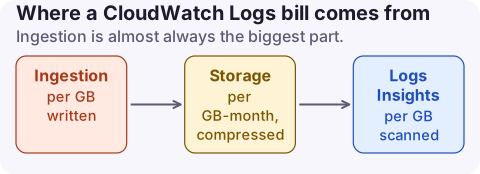
How the charge is calculated
| Meter | Usage type | Driver |
|---|---|---|
| Ingestion, Standard class | DataProcessing-Bytes | GB written by your applications |
| Ingestion, Essentials class | DataProcessingIA-Bytes | Same, at a lower rate |
| Vended logs (VPC, Route 53 and others) | VendedLog-Bytes | Volume-tiered delivery |
| Storage | TimedStorage-ByteHrs | Compressed GB kept, set by retention |
| Logs Insights | DataScanned-Bytes | GB scanned by queries |
| Live Tail | Logs-LiveTail | Session minutes |
The pricing page examples for US East (N. Virginia) use $0.25 per GB ingested in the Infrequent Access (now Essentials) class and $0.03 per GB-month for storage, at the time of writing. The free tier includes 5 GB of log data. See CloudWatch usage types for the full decoder.
Find the log groups driving it
# Log groups by stored bytes, with retention (null = never expire)
aws logs describe-log-groups \
  --query 'reverse(sort_by(logGroups,&storedBytes))[:15].[logGroupName,storedBytes,retentionInDays,logGroupClass]' \
  --output table

# Ingestion for one group over the last 7 days (bytes per day)
aws cloudwatch get-metric-statistics --namespace AWS/Logs \
  --metric-name IncomingBytes \
  --dimensions Name=LogGroupName,Value=/aws/lambda/my-function \
  --start-time 2026-11-10T00:00:00Z --end-time 2026-11-17T00:00:00Z \
  --period 86400 --statistics Sum
Stored bytes rank storage; IncomingBytes ranks ingestion, which is what usually matters. In Cost Explorer you can also filter Service = CloudWatch and use the Resource dimension (last 14 days, resource-level data must be enabled).
Reduce it, biggest saving first
- Log less: drop debug and per-request info logs in production, stop logging full payloads, and sample high-volume success paths. For Lambda functions using the JSON log format, set the application log level in the function's logging configuration.
- Set retention on every log group. Groups default to never expire. See setting log retention.
- Use the Essentials log class for logs you keep for audit or rare investigation. It has a lower ingestion price, supports most Logs Insights commands, and is chosen when you create the group; it cannot be changed later.
- Send VPC flow logs and other bulk logs to S3 rather than CloudWatch when you only query them occasionally (flow logs cost).
- Scope Logs Insights queries to the log groups and time range you need; queries bill by data scanned.
aws logs put-retention-policy --log-group-name /aws/lambda/my-function --retention-in-days 30

# New audit-only log group in the Essentials (Infrequent Access) class
aws logs create-log-group --log-group-name /app/audit --log-group-class INFREQUENT_ACCESS
What not to do
- Do not delete log groups that functions or services still write to; most recreate the group on the next write, without your retention setting.
- Do not set retention shorter than your compliance or incident-review needs; export to S3 first if you need longer history cheaply.
- Do not assume retention fixes the bill. It caps storage, but ingestion is usually the larger cost.
Questions
How much does CloudWatch Logs cost per GB?
It depends on Region and log class. The pricing page examples for N. Virginia use $0.25 per GB ingested in the Essentials (Infrequent Access) class and $0.03 per GB-month for storage.
Does setting log retention reduce cost?
It reduces storage cost going forward. Ingestion, usually the larger part, is unchanged.
Is the Infrequent Access log class cheaper?
Yes for ingestion. Now called Essentials, it has a lower per-GB ingestion price with fewer features; storage and Logs Insights prices are the same as Standard.
Log ingestion jumps the day someone ships debug logging to production. CloudConsole, a phone app for AWS, shows CloudWatch spend by usage type, with DataProcessing-Bytes explained, so you see the jump the same day.
About the app → · Download on the App Store