 CloudConsole
gp2 vs gp3 cost
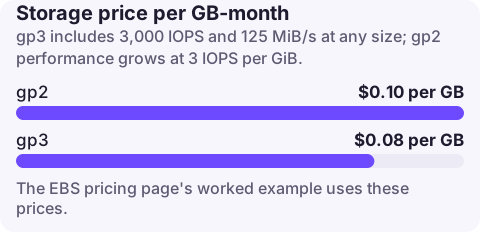
gp3 is priced up to 20% lower per GiB than gp2 and includes a baseline of 3,000 IOPS and 125 MiB/s regardless of size, while gp2 performance grows with size at 3 IOPS per GiB. For most volumes switching is a straight saving with equal or better performance; large gp2 volumes need extra gp3 IOPS or throughput provisioned to match, which eats into the saving.
How each type is billed
| gp2 | gp3 | |
|---|---|---|
| Storage | Per GB-month (EBS:VolumeUsage.gp2) | Per GB-month, up to 20% lower (EBS:VolumeUsage.gp3) |
| IOPS | Included: 3 per GiB, minimum 100, maximum 16,000; volumes under 1 TiB burst to 3,000 on credits | 3,000 included; extra billed per IOPS-month (EBS:VolumeP-IOPS.gp3), up to 80,000 |
| Throughput | Included, scales with size | 125 MiB/s included; extra billed per MiB/s-month (EBS:VolumeP-Throughput.gp3), up to 2,000 |
The EBS pricing page's worked example uses $0.08 per GB-month for gp3 and $0.10 for gp2 "in a region that charges" those rates; check your Region.
When switching saves money, and when it needs care
- Volumes up to 1,000 GiB: gp2 baseline is at most 3,000 IOPS, which gp3 includes. Switch with no extra provisioning and pay less for storage.
- Larger gp2 volumes have higher baselines (a 2,000 GiB gp2 volume has 6,000 IOPS). If the workload uses them, provision the matching gp3 IOPS. Compare the extra IOPS charge with the storage saving.
- Throughput-heavy volumes (databases doing large scans, Kafka) may have been getting more than 125 MiB/s on a large gp2 volume. Check
VolumeReadBytesandVolumeWriteBytesbefore switching and provision throughput if needed. - Small boot volumes that rely on gp2 burst do better on gp3, which sustains 3,000 IOPS without credits.
Migrate in place
Elastic Volumes changes the type without detaching or stopping the instance. There is no charge for the modification itself; the new rate applies once it starts.
# Find gp2 volumes in a Region, largest first
aws ec2 describe-volumes --region eu-west-2 \
  --filters Name=volume-type,Values=gp2 \
  --query 'reverse(sort_by(Volumes,&Size))[].[VolumeId,Size,Iops,State]' --output table

# Convert one to gp3 at baseline performance
aws ec2 modify-volume --volume-id vol-0123456789abcdef0 --volume-type gp3

# Or match a larger gp2 volume's performance
aws ec2 modify-volume --volume-id vol-0123456789abcdef0 \
  --volume-type gp3 --iops 6000 --throughput 250

# Watch progress (modifying -> optimizing -> completed)
aws ec2 describe-volumes-modifications --volume-ids vol-0123456789abcdef0
A volume can be modified up to four times in a rolling 24-hour period, and large volumes can take hours to finish optimising. Performance during the optimising state is between the old and new specifications.
Before and after
- Change the default for new volumes too: launch templates, Terraform modules, EKS storage classes and AMI block device mappings often still say gp2.
- RDS has its own gp2 and gp3 storage types with different baselines; check the RDS documentation rather than reusing the EBS numbers.
- After a week, compare
EBS:VolumeUsage.gp2and.gp3in Cost Explorer to confirm the shift.
Questions
Is gp3 always cheaper than gp2?
Per GiB of storage, yes, up to 20% lower. Total cost can be higher only if you provision far more IOPS or throughput than the gp2 volume delivered.
Can I switch gp2 to gp3 without downtime?
Yes. Elastic Volumes modifies the volume type while it stays attached and in use.
What IOPS does gp3 give by default?
A baseline of 3,000 IOPS and 125 MiB/s, included in the storage price, for any volume size.
A gp2 to gp3 migration is the kind of saving that is easy to forget to verify. CloudConsole, a phone app for AWS, shows spend by usage type, with VolumeUsage.gp2 and .gp3 explained, so you can watch one line fall and the other rise.
About the app → · Download on the App Store